Solved

CRM marketing campaign integration mailchimp

  • January 13, 2026
  • 3 replies
  • 44 views

paul harland
Superhero (Employee)
Forum|alt.badge.img+24

In 25r1 we now have a delivered mailchimp integration from Marketing Campaigns.  

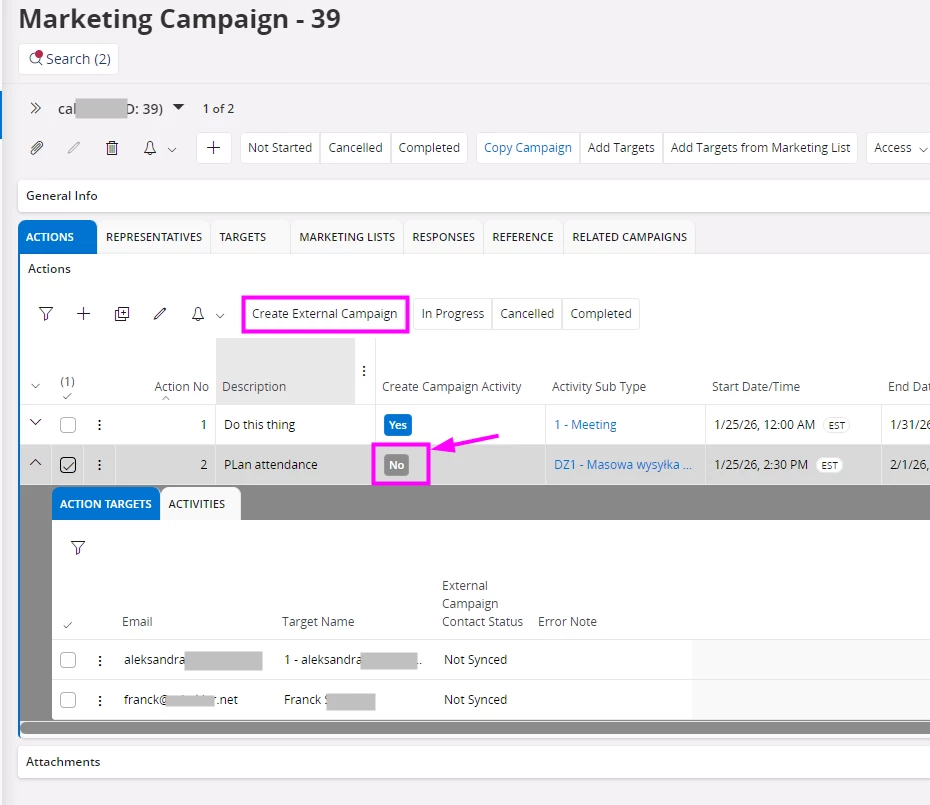
I can’t quite see how to turn it on.  There is a system/template BPA called CrmMailchimpIntegration.  And there is a button on the Marketing Campaign Action to create an external campaign (but the button is inactive).  I believe that the BPA needs to be deployed to activate the button, but the BPA cannot be deployed because it’s a template.  If you copy the BPA to another ID, you can deploy it, but then the button would not know to call that BPA ID?

What am i missing…?

Best answer by Annjse

Hi ​@paul harland ,

This is not a complete integration to mailchimp, but we provide a workflow template for handling campaigns in Mailchimp. We also created end points/APIs that can be used to create e.g. activities or opportunities from a campaign in an external campaign tool. 

The template is an example workflow for Mailchimp and you need to clone it and configure your own version. Please refer to the technical documentation https://docs.ifs.com/techdocs/25r1/040_tailoring/500_business_process_automation/090_industry_specific_configurations/090_marketing_campaign/?h=marketing#create_campaign_in_mailchimp
When the workflow is deployed and you have added targets to your marketing campaign, the command button should be enabled so that you can create a campaign in Mailchimp.

Best Regards,
Anna

3 replies

Annjse
Hero (Employee)
Forum|alt.badge.img+11
  • Hero (Employee)
  • Answer
  • January 14, 2026

Hi ​@paul harland ,

This is not a complete integration to mailchimp, but we provide a workflow template for handling campaigns in Mailchimp. We also created end points/APIs that can be used to create e.g. activities or opportunities from a campaign in an external campaign tool. 

The template is an example workflow for Mailchimp and you need to clone it and configure your own version. Please refer to the technical documentation https://docs.ifs.com/techdocs/25r1/040_tailoring/500_business_process_automation/090_industry_specific_configurations/090_marketing_campaign/?h=marketing#create_campaign_in_mailchimp
When the workflow is deployed and you have added targets to your marketing campaign, the command button should be enabled so that you can create a campaign in Mailchimp.

Best Regards,
Anna


paul harland
Superhero (Employee)
Forum|alt.badge.img+24

Hey Anna!  Good to hear from you.

Thank you, this makes sense.  User needs to configure a projection reaction to connect the button click to their BPA.


paul harland
Superhero (Employee)
Forum|alt.badge.img+24

If anyone is stuck and reading this, the following might help

If you cannot see the “Create External Campaign” button, you need to set your Action to Create Campaign Activity = No.