Solved

Qty changes when we GRN

  • Aug 11, 2021 10:54 AM UTC
  • 7 replies
  • 407 views

Forum|alt.badge.img+5

Hi Guys,


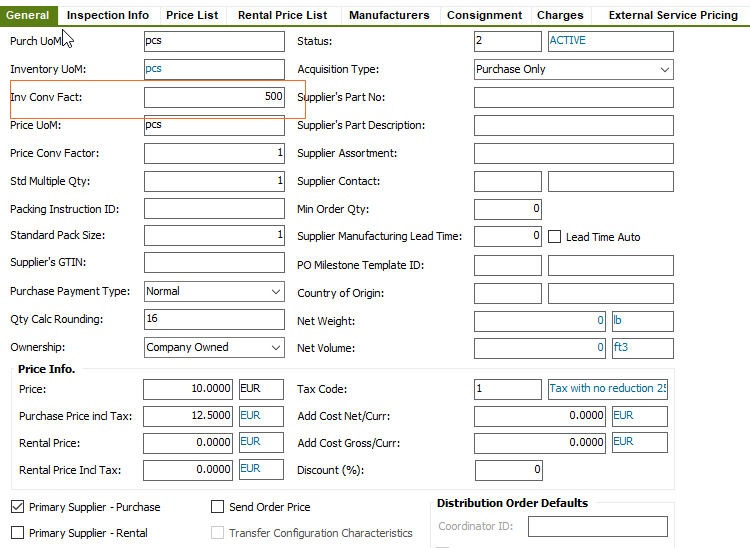
Quantity changes when we GRN a PO. Purchase order is raised with qty 1 but when we GRN it, even with qty 1, it changes to 500 post it in GL. It happens with only 1 line item at the PO rest is fine and this has happened number of times this year.


We can reverse it with a JNL but how should this be fixed permanently?


Kind regards,


Sohail

Best answer by ShawnBerk

Look at the PO line for Inv Conv Fact column for that line on the PO. 

If the Supplier for Purchase Part doesn’t have the setting, it is still possible to change the PO itself manually.  This would drive the inventory quantity from the PO receipt.


View original
This topic has been closed for replies.

7 replies

Rasika Lakmal
Superhero (Customer)
Forum|alt.badge.img+18
  • Superhero (Customer)
  • Aug 11, 2021 11:14 AM UTC

Have you used inventory conversion for the part? you can check it in Supplier for Purchase Part window.


Forum|alt.badge.img+5
  • Author
  • Sidekick (Customer)
  • Aug 11, 2021 3:05 PM UTC

Thanks but cant seem to find this screen you have shared. Please give me bit more detail on the path. I did find “supplier for purchase part” and there in general tab Conv Factor is 1.


Kind regards,


Sohail


Rasika Lakmal
Superhero (Customer)
Forum|alt.badge.img+18
  • Superhero (Customer)
  • Aug 11, 2021 3:09 PM UTC

@Sohail If the conversion factor is 1, this would be due to another reason. Can you recreate the issue on demand in your Test environment?


Forum|alt.badge.img+5
  • Author
  • Sidekick (Customer)
  • Aug 11, 2021 3:36 PM UTC

@Rasika Lakmal TBH I am not that expert in IFS so not sure if I can create that in IFS test. I thought this might be some thing to with background sequences rather than the human error.


Rasika Lakmal
Superhero (Customer)
Forum|alt.badge.img+18
  • Superhero (Customer)
  • Aug 11, 2021 3:45 PM UTC

@Sohail As far as I know, this kind of application behavior can be come across when you define conversion factor in supplier for purchase part window or user may receive the quantity incorrectly. However if this is a recurring issue, it’s better if you can create an IFS support case to further investigate the issue. 


Forum|alt.badge.img+28
  • Superhero (Customer)
  • Answer
  • Aug 11, 2021 3:46 PM UTC

Look at the PO line for Inv Conv Fact column for that line on the PO. 

If the Supplier for Purchase Part doesn’t have the setting, it is still possible to change the PO itself manually.  This would drive the inventory quantity from the PO receipt.


Forum|alt.badge.img+5
  • Author
  • Sidekick (Customer)
  • Aug 16, 2021 10:04 AM UTC

@ShawnBerk thanks - it worked.


Kind regards,


Sohail