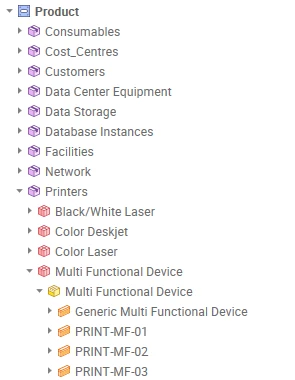
Is it possible to show the name and/or shortCode (name) of Items in the Product Tree Data Explorer in assystWeb? Currently, it seems that only the shortCode is displayed at the Item level in the hierarchy, while the parent levels show only the name.
To illustrate
There does not seem to be much detail about this in the wiki, and I haven’t been able to find any system parameter or user preference that can be toggled to change this behaviour. Does anyone have additional information on this? For reference: https://wiki.axiossystems.com/assyst24R2Wiki/index.php/Data_Explorers
Is this something that is currently possible, or would it need to be raised as an idea? We are using assyst 24R2.
Best answer by Caroline Schaffner
Hello Richard,
For now it is not currently possible to change the Explorer menu display by Name or ShortCode or both, even in the latest assyst version 25 R2 SU3/
Please log your idea using the link below to access our structured submission form that will help you provide the necessary details for fair and efficient evaluation by the product team.
This will also allow the customer community to view the suggestion and comment or vote on it.
For now it is not currently possible to change the Explorer menu display by Name or ShortCode or both, even in the latest assyst version 25 R2 SU3/
Please log your idea using the link below to access our structured submission form that will help you provide the necessary details for fair and efficient evaluation by the product team.
This will also allow the customer community to view the suggestion and comment or vote on it.