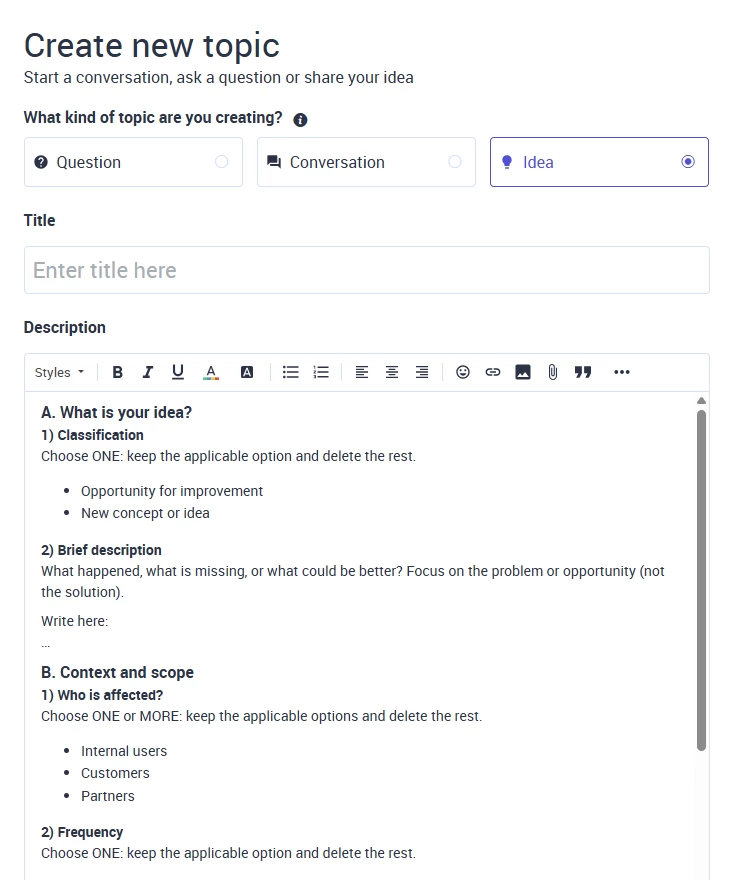



We are improving the IDEA submission experience in the IFS Community to ensure ideas are clear, complete, and easier to assess by our Product Management teams.
As the first step in this journey, we are introducing a structured IDEA submission form. The form is designed to guide you in providing the right level of detail and context, helping ensure your idea can be evaluated fairly and efficiently. When selecting IDEA as the post type, a new structured submission form will appear in the editor.
Important:
IDEAS that are incomplete or not properly filled in will not be considered for review.
In the coming weeks, we will also:
- Introduce refreshed IDEA statuses that better reflect progress and intent
- Share clearer expectations around assessment timelines
- Conduct a thorough review of the existing IDEA backlog
These changes aim to improve transparency, consistency, and the overall value of the IDEA process.
Why the IDEA Submission Form Matters
The structured form helps ensure that each IDEA:
- Clearly describes the problem or opportunity
- Provides the necessary business and usage context
- Highlights value and impact
- Is routed to the correct review team
Well‑structured submissions reduce the need for follow‑up questions and allow ideas to be assessed more quickly and consistently.
How to Use the Form (High‑Level Overview)
The IDEA form is divided into logical sections, each serving a specific purpose:
-
Describe the idea clearly
Focus on the problem or opportunity. Avoid jumping straight to a solution. -
Provide context
Indicate who is affected and how frequently the issue occurs. -
Explain the value
Describe the business outcome, impact scale, and whether a workaround exists today. -
Add evidence
Include screenshots, documents, or examples that help explain the situation. -
Add routing details
Select the most relevant product area, reference any related support cases, and indicate whether you are open to validation or early testing.
Completing all sections gives your IDEA the best chance of being understood and assessed correctly.
How to Complete the Form
The IDEA form uses guided prompts to help you provide clear and consistent input:
- Where you see “Choose ONE” or “Choose ONE or MORE”, keep the applicable option(s) and remove the rest.
- Where you see “Write here: …”, replace the placeholder text with your own input.
Following these prompts ensures your IDEA is complete and ready for review.
Selecting the Relevant Product Area
Selecting the right product area is essential. It ensures your IDEA is reviewed by the appropriate Product Management team and avoids re‑routing.
You will be asked to select one primary product area, grouped into the sections below. Choose the section that best represents where your IDEA has the strongest relevance.
Capabilities
Use this section for IDEAS related to core functional or platform capabilities of IFS solutions, such as business processes, functional modules, cross‑functional workflows, analytics, automation, AI, or platform services.
Industry‑specific Areas
Use this section when your IDEA is specific to a particular industry solution or vertical offering, where requirements differ from general IFS capabilities.
Access & User Types
Use this section for IDEAS related to user access models, licensing, user roles, or access‑specific behavior.
Integrations & Extensions
Use this section for IDEAS related to integrations, interfaces, add‑ons, partner solutions, or extensions that complement core IFS capabilities.
If you are unsure which section to choose, select the one that most closely matches your IDEA. The review team can adjust it if needed.
What Happens After You Submit
Once submitted:
- Your IDEA is reviewed against consistent assessment criteria
- It progresses through the refreshed IDEA status model (coming soon)
- IDEAS with clear context, value, and supporting evidence are prioritized
We appreciate the time and effort you take to submit thoughtful, well‑structured IDEAS. Your input plays an important role in shaping the future of IFS products.
💡Submit IDEA💡