



Question

Calendar Generation Error for just one single day

  • September 25, 2026
  • 4 replies
  • 39 views

lopespetro
Hero (Customer)
Forum|alt.badge.img+13

Hi All.

Does anyone know something about it?


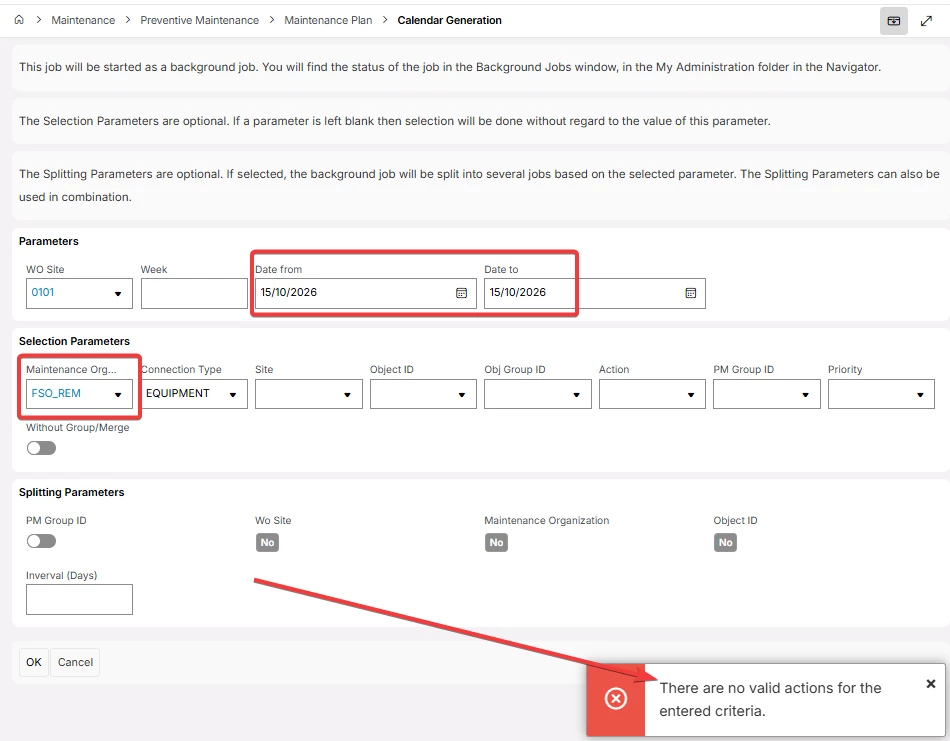
Calendar Generation Error for just one single day - There are no valid actions for the entered criteria.
It only works if a set two different days in the date range.
But We have scenarios that needs to be genereted for just one day
Please see prints in attach
Product Version: 26.1.3
Business Impact: Calendar generation work orders
High affect since a work order can not be generated
For just one single day in a date from and date to filter
Maintenance > Preventive Maintenance > Maintenance Plan > Calendar Generation


4 replies

  • Superhero (Employee)
  • September 25, 2026

What if you try 15/10/2026-16/10/2026? It might be that it’s looking at 15/10/2026 00:00:00 for both and thus not finding anything, but moving the end date one day, should include your actions.


lopespetro
Hero (Customer)
Forum|alt.badge.img+13
  • Author
  • Hero (Customer)
  • September 25, 2026

What if you try 15/10/2026-16/10/2026? It might be that it’s looking at 15/10/2026 00:00:00 for both and thus not finding anything, but moving the end date one day, should include your actions.

Hi ​@anmise , I’ve tried this scenario, but the system generated for both days, 15 and 16. 

I need for just one day.

Tks


lopespetro
Hero (Customer)
Forum|alt.badge.img+13
  • Author
  • Hero (Customer)
  • September 28, 2026

What if you try 15/10/2026-16/10/2026? It might be that it’s looking at 15/10/2026 00:00:00 for both and thus not finding anything, but moving the end date one day, should include your actions.

Hi ​@anmise , I’ve tried this scenario, but the system generated for both days, 15 and 16. 

I need for just one day.

Tks

Hi ​@anmise , I have reaised a case and this is the IFS feedback:

The case will be passed to the relevant capability area to be addressed within the target handling times specific to the case priority as per KB0045498.

Our primary objective is to expedite the resolution process or alternatively offer an appropriate action plan to mitigate the situation at hand.

Should our analysis confirm a software defect at the core level, the necessary fix will be planned to include in a forthcoming product release.


lopespetro
Hero (Customer)
Forum|alt.badge.img+13
  • Author
  • Hero (Customer)
  • October 2, 2026

What if you try 15/10/2026-16/10/2026? It might be that it’s looking at 15/10/2026 00:00:00 for both and thus not finding anything, but moving the end date one day, should include your actions.

Hi ​@anmise , I’ve tried this scenario, but the system generated for both days, 15 and 16. 

I need for just one day.

Tks

Hi ​@anmise , I have reaised a case and this is the IFS feedback:

The case will be passed to the relevant capability area to be addressed within the target handling times specific to the case priority as per KB0045498.

Our primary objective is to expedite the resolution process or alternatively offer an appropriate action plan to mitigate the situation at hand.

Should our analysis confirm a software defect at the core level, the necessary fix will be planned to include in a forthcoming product release.

Hi ​@anmise , follow update.

Case: CS056644


Hi Samuel,

I have successfully reproduced the reported issue in our core environment.

As the next step, I will discuss the findings with the relevant internal team to further investigate the behavior and determine the appropriate resolution.

We apologize for the inconvenience this issue may have caused and appreciate your patience while we work on this. We are happy to continue assisting you and will provide you with an update once we have further findings from the internal team.

Action Plan
1. Current Situation:
- The issue occurs when generating a preventive maintenance calendar for a single-day date range.
- The reported behavior has been successfully reproduced in the IFS core environment.

2. Next Action For IFS:
- Discuss the reproduced behavior with the relevant internal team for further investigation and determine whether a core-level correction is required.

3. Timeline for the Next IFS Action:
- Internal investigation is the next step and will be initiated based on the reproduced findings.

4. Next Action for Customer:
- No action is required from the customer at this stage.

5. Next Update from IFS:
- IFS will provide an update once feedback or further findings are received from the internal team.
