


Solved

save views

  • Dec 24, 2021 7:55 AM UTC
  • 1 reply
  • 151 views

Forum|alt.badge.img+9

Can we save the way columns are sorted in the views ?

Saving the required columns in the required order is OK

Saving the search criterias with and without pre-selected values is OK

But the way the columns are sorted is not saved. Each time you select another view, always te first column is sorted ascending. You have to redefine the required sorting order in the different columns again manually.

Best answer by Phil Seifert

Yes this is possible but apparently not working in v15.3 HF1

I tested this with the following results:

v15.3 HF1 - did not work

v15.3 HF3 - worked

v15.4 - worked


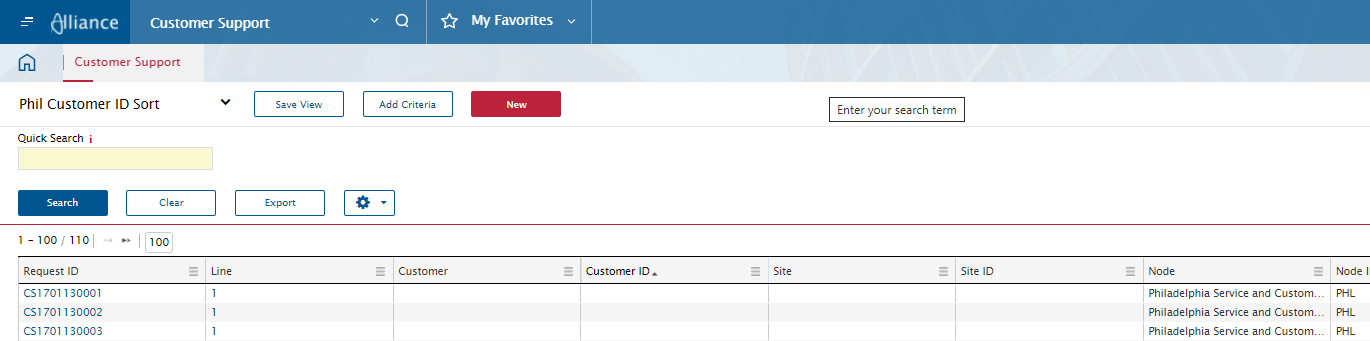
For the v15.3 HF3 test, this is my result when I did this sorting by the Customer ID column.  I went from an unsorted Empty view to the saved view::


View original

1 reply

Phil Seifert
Ultimate Hero (Employee)
Forum|alt.badge.img+24
  • Ultimate Hero (Employee)
  • Answer
  • Dec 24, 2021 8:12 AM UTC

Yes this is possible but apparently not working in v15.3 HF1

I tested this with the following results:

v15.3 HF1 - did not work

v15.3 HF3 - worked

v15.4 - worked


For the v15.3 HF3 test, this is my result when I did this sorting by the Customer ID column.  I went from an unsorted Empty view to the saved view::

