

How can i install a printer in Astea V10?

Solved
Printer installation Astea V10
Best answer by Phil Seifert
Hi Anthony,
The printer driver must be installed on each of the Alliance APP and UTIL servers while logged in as the application pool user for your Alliance app pool. Screen shot below for example reference highlights which application pool and identity is the application pool user.
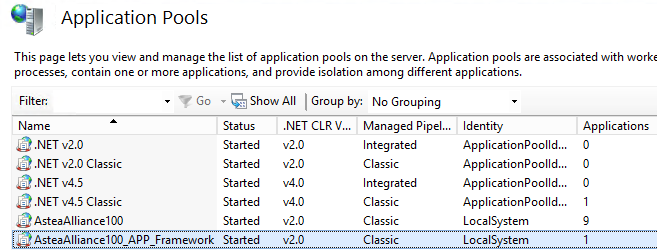
The network security permissions need to also be configured to allow the app pool user to access the printer across the network share.
Once the driver is installed (test it from the OS and not Alliance) and is working while logged in as the application pool user, then you can add it to the Alliance application using the Printers module.
Hope this helps.
Kind regards,
Phil



Enter your E-mail address. We'll send you an e-mail with instructions to reset your password.