


Question

Partner Portal : error message on CS creation

  • May 23, 2025
  • 1 reply
  • 25 views

Forum|alt.badge.img+7
  • Sidekick (Partner)

Hi, our customer (15/4 SU3) uses the Parner Portal for Customer Support creation.

Sometimes his customer get an error message when he creates a ticket
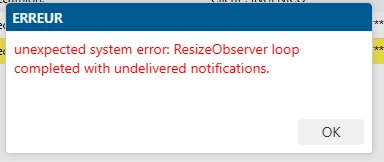
 

But after this message, the CS is well created. Do you know why this message is sent ? 

Thanks by advance

1 reply

Phil Seifert
Ultimate Hero (Employee)
Forum|alt.badge.img+24
  • Ultimate Hero (Employee)
  • May 23, 2025

Hi Philippe,

This is a duplicate of an already asked question from Laurence:

Portal random error : ResizeObserverloop | IFS Community


The advice given was to log a support case to have this reviewed by IFS Support.


What I can find on this error is the following:


The error message "ResizeObserver loop completed with undelivered notifications" typically occurs when the ResizeObserver callback is not called for an element that has been resized. This can lead to performance issues and visual bugs in your application.

Here's a bit more detail on what might be happening:

  • ResizeObserver is a JavaScript API that allows you to observe changes to the size of an element.
  • When the size of an observed element changes, the ResizeObserver callback is supposed to be called.
  • If the callback is not called, it means there are undelivered notifications about the size change, which can cause the loop to complete without processing all changes


This issue can be caused by several factors, such as:

  1. Infinite Loops: If your code creates a loop where resizing an element triggers another resize, it can lead to an infinite loop.
  2. Browser Extensions: Sometimes, browser extensions can interfere with the layout and cause this error.
  3. Incorrect Implementation: Not following the ResizeObserver specification correctly can also lead to this issue 

    .

To fix this, you can:

  • Ensure your ResizeObserver implementation follows the correct specifications.
  • Check if any browser extensions are causing the issue by testing in incognito mode.
  • Simplify your layout changes to avoid creating infinite loops .


I certainly would at least try incognito mode/disable all browser extensions as the others involve changing code as the first check but this should be generally be worked through IFS Support for diagnosing/troubleshooting based on this information.

