When I select “open UI editor” in Astea v15.3 I don’t get the correct screen. Seems like the graphics are corrupted and can’t use the Customizer (see example attached)

When I select “open UI editor” in Astea v15.3 I don’t get the correct screen. Seems like the graphics are corrupted and can’t use the Customizer (see example attached)
Best answer by Phil Seifert
Hi Piet,
Try to remove all the IE cached files, not just by using the Astea Browser clear cache option.
Go to Internet Explorer – Internet Options – General Tab – Browsing History Delete – View Files
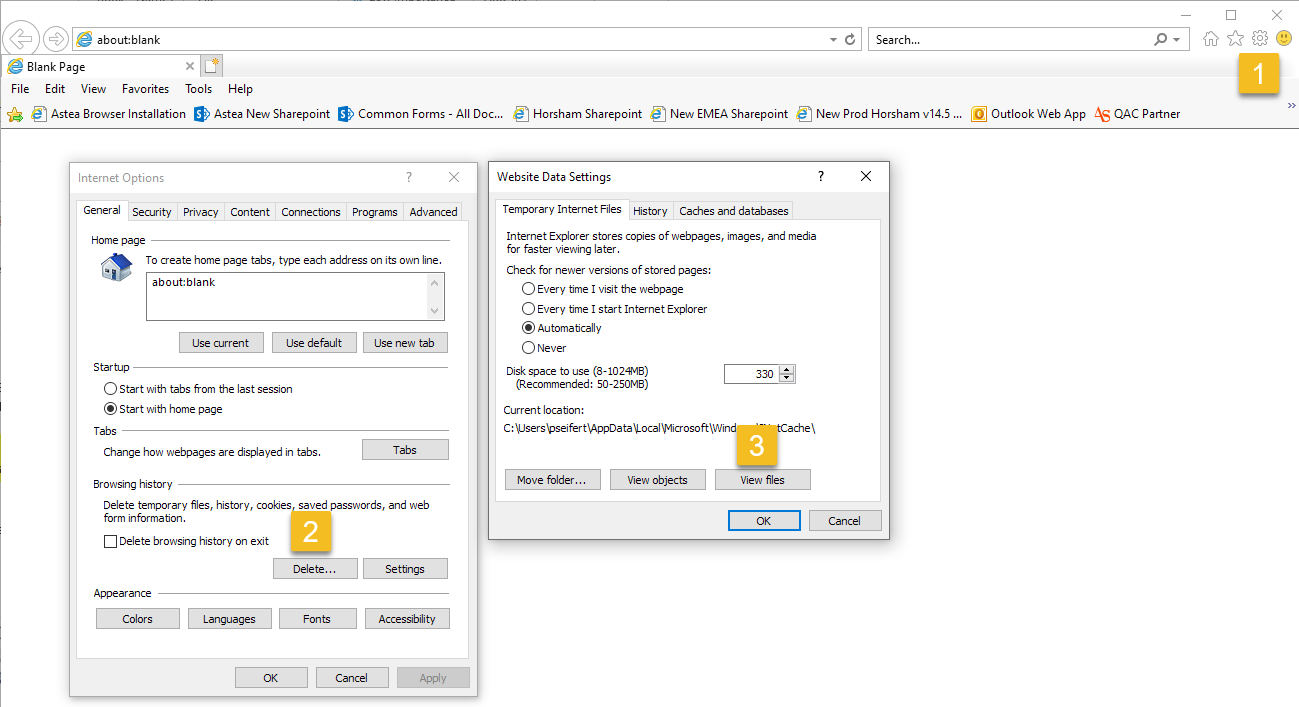
After this, please go to C:\Users\<username>\AppData\Local\Temp and delete as much as possible (some might be locked – skip them)
This should force the download of the CSS file that appears to be corrupted on your client.
Kind regards,
Phil
Enter your E-mail address. We'll send you an e-mail with instructions to reset your password.