

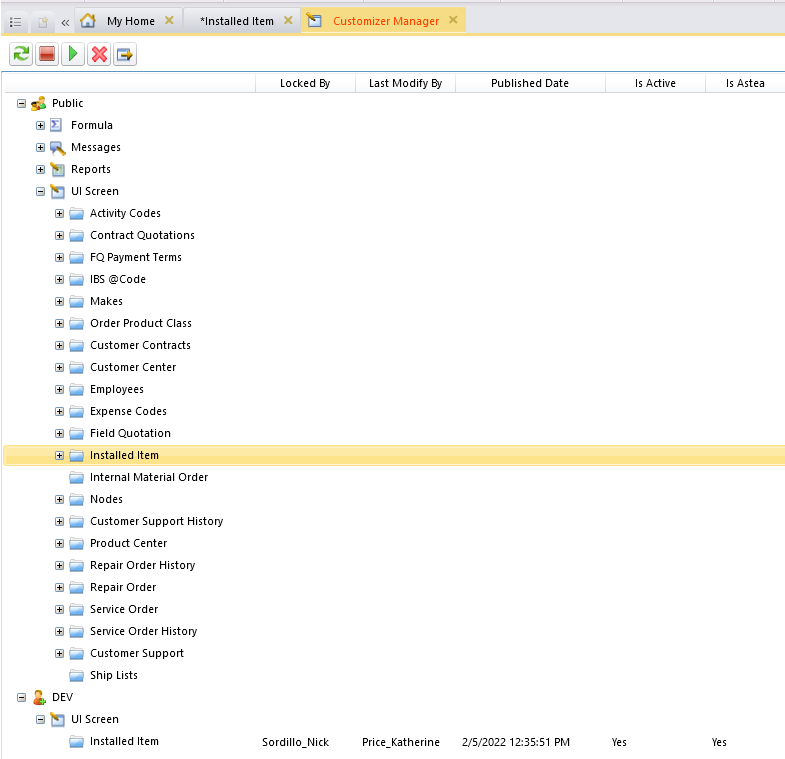
We had 2 users that were accidentally making changes to the same screen (installed items). We are now stuck where neither user can publish or delete their customization. As we have 3 other pilot environments without this issue, is there a way to copy over existing files that are customizer related and replace the problematic ones?

Solved
Customizer Issue in one of our Pilot Environments
Best answer by Phil Seifert
It really does not matter which branch, Public or Dev as when it is deleted, it will delete all branches. However, this was not successful for you so then I would advise the following:
- Export all customizations from your profile. These will be only your Public customizations including what you have published for installed item as Public and not include QA or Dev branches.
- Goto your AsteaShare\FilestoragePath for the profile involved and copy the highlighted folders below somewhere for backup. This would serve as a backup in case the below caused a problem for you. (Shouldn’t as I did this myself as a test case)
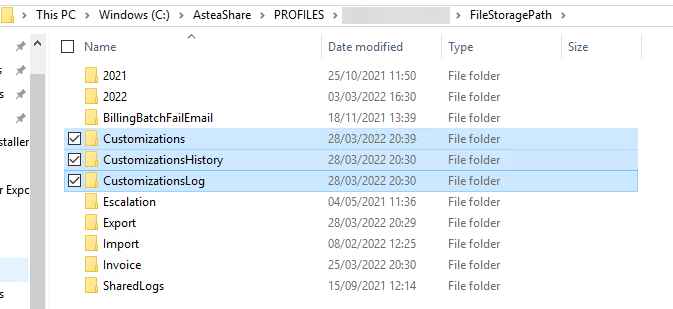
- Delete the contents of the Customizations folder (you probably can’t delete this folder itself or at least I could not)
- Delete the CustomizationsHistory and CustomizationsLog folders
- IISRESET - the Customizations folder will have the config folder restored automatically but no contents.
- Log into the Alliance Browser as a customizer and open the Customizer menu.
- Import the customizations you exported in the first step.
- Recommend also to run the Customizer - Conflict Resolver just in case.
Now you should have all your Public customizations back but no Dev branch which is what you wanted as your screen only shows the one module in the DEV branch anyway for the UI Screen.
After the import, your application will be forced to restart and this should resolve your issue. You can create a new customization from that point but of course don’t let the two users edit the same module without publishing it to Public again…



Enter your E-mail address. We'll send you an e-mail with instructions to reset your password.