Question

Choose Open date for Service Order when created by PM Batch Scheduler

  • June 22, 2023
  • 6 replies
  • 112 views

Forum|alt.badge.img+10

Hi,

We use in some cases, the PM batch scheduler, and this one uses PM dates on Installed Items.

The fact is that sometimes this PM date is not exact, and can be some days before.

But once the PM batch scheduler creates the service order, the open date is set based on the PM date. 

Is there any way we can choose another date for open date ? Customer would like to set it PM date - 3 month.

Any parameter ? Any idea ? 

Thank you

BR

Laurence 


ALLIANCE V15.1

6 replies

Chris_Perkins
Hero (Customer)
Forum|alt.badge.img+12
  • Hero (Customer)
  • June 22, 2023

Hi Laurence,

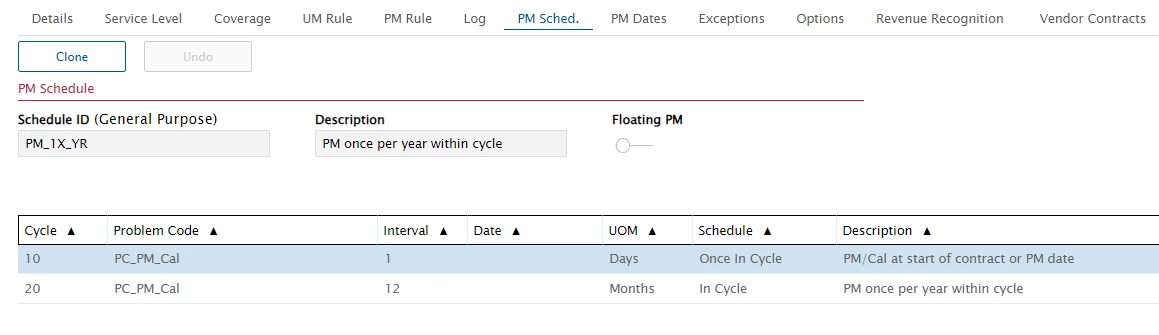
We like to have our PM Dates set to the first day of the contract period, so we use “Once in Cycle” and set that to 1 day.  I guess you can use the same but set it to whatever months to get the dates you want.


ktolkacevic
Hero (Customer)
Forum|alt.badge.img+9
  • Hero (Customer)
  • June 22, 2023

You can use Process flows to changed the open/contract dates. 

We use the PM batch scheduler with floating PM dates. When the order is generated the open date is the date the PM is due. I use two process flows to set the open date to current date and set the contract date to the PM due date.

I’ve attached the two process flows, if you want to import and see how I set them up. I have older workflow version as well.


Forum|alt.badge.img+10
  • Author
  • Sidekick (Partner)
  • June 22, 2023

Hi Guys,

Thank you both very much. I’ll test both options and I’m sure that at least one of those will match my need !

BR

Laurence


Phil Seifert
Ultimate Hero (Employee)
Forum|alt.badge.img+24
  • Ultimate Hero (Employee)
  • June 22, 2023

I believe the best solution will likely be the process flow method.  Normally a PM always gets the open date based on the PM Schedule.

For example, you may run a PM Batch Schedule in June but only for the PM Schedule Dates in October, the resulting service orders will take on the date of the PM Schedule dates in October.

There are no parameters to say automatically add x number of days to the open date in the application itself that I am aware.

Do also consider that the further out you make the open date, the more opportunity of changes to the contracts (say the line needs to be cancelled) you can’t because there is an existing open PM service order.

Also, I believe the open dates will also take into account things like coverage and holidays.  Meaning if on the weekend, it might shift to the following Monday, etc.

Just my thoughts.


athobie
Sidekick (Partner)
Forum|alt.badge.img+11
  • Sidekick (Partner)
  • June 30, 2023

Hi @ktolkacevic 
I try to import the ZIP, but if I’m not mistaken (not sure) I have only 1 process flow (PM_set_contractual_date) ?
Would you mind make a zip for the other one ?

Thanks and Regards

anthony


athobie
Sidekick (Partner)
Forum|alt.badge.img+11
  • Sidekick (Partner)
  • June 30, 2023

Hi @ktolkacevic 

It’s OK I found the 2 PF 👍

Regards

anthony