Question

Astea Mobile on Android 16

  • January 9, 2026
  • 21 replies
  • 184 views

Forum|alt.badge.img+6

Hi All,

Last year there was mention that Android 16 was NOT certified to run Astea Mobile.

Is there any update as to when it will be certified to run on Android 16??

We have contractors buying new phones and then finding that they cannot use Astea Mobile on it, as it comes up with a message saying that the app was designed  for an older version of android.


Cheers

mark.

21 replies

Forum|alt.badge.img+6
  • Author
  • Sidekick
  • January 9, 2026

It seems not to be an issue specifically with Android 16, but with that in conjunction with either the age of the phone, or possibly the version of Google Play.

I have a Samsung s23 Ultra, running Android 16 and Google Play system update: 1 July 2025, and I have no issues with Astea Mobile on this phone. (on this phone it says that 1st July 2025 is the up to date version of google play on this device).

My colleague has a Samsung A16 (so a newer phone than the s23), running Android 16 and Google Play system update: 1 September 2025, and he is unable to find the Astea Mobile app on the playstore and gets that message saying it was made for an older version of Android.
He has cleared/deleted cache and data of the google play app, but it still doesn’t work for him.


Reid Gilbert
Superhero (Employee)
Forum|alt.badge.img+15
  • Superhero (Employee)
  • January 9, 2026

Hi Mark,
The Android 16 Operating System was certified last month, details on that can be found on this thread:


The issue with the app not appearing in the Play Store is not directly related to the certification, the R&D team is currently working on this issue (in addition to upgrading our own code there are several plugins that need to be upgraded or rewritten as well).  The tentative ETA for completion is March (end of Q1).  Impacted users can side-load the APK file as a workaround in the meantime, the steps for that are as follows:
 

You can side-load the app in the following manner (if you don’t have any MDM software installed/configured on the device):

To do this, open up the Google Chrome app on the mobile device and browse to the following URL:

https://qac.astea.com/AsteaMobileEdge/install.html

Click on the "Android Client" link on that screen.

You may get a "File might be harmful.  Do you want to download AsteaMobile.apk anyway?" message.

If so, click on "Download anyway".

Wait a couple of seconds for the download to complete.


If you get a Chrome popup window that says "For your security, your phone currently isn't allowed to install unknown apps from this source.  You can change this in Settings." Click on the Settings button and enable the "Allow from this source" toggle temporarily.


When you see the screen that says "Astea Mobile - Do you want to install this app?" click on Install.

Wait for the installation to complete, then launch the app and you'll be taken to the Enter Server Address screen as normal.

Thanks,

Reid


Forum|alt.badge.img+2

Hi Mark,
The Android 16 Operating System was certified last month, details on that can be found on this thread:


The issue with the app not appearing in the Play Store is not directly related to the certification, the R&D team is currently working on this issue (in addition to upgrading our own code there are several plugins that need to be upgraded or rewritten as well).  The tentative ETA for completion is March (end of Q1).  Impacted users can side-load the APK file as a workaround in the meantime, the steps for that are as follows:
 

You can side-load the app in the following manner (if you don’t have any MDM software installed/configured on the device):

To do this, open up the Google Chrome app on the mobile device and browse to the following URL:

https://qac.astea.com/AsteaMobileEdge/install.html

Click on the "Android Client" link on that screen.

You may get a "File might be harmful.  Do you want to download AsteaMobile.apk anyway?" message.

If so, click on "Download anyway".

Wait a couple of seconds for the download to complete.


If you get a Chrome popup window that says "For your security, your phone currently isn't allowed to install unknown apps from this source.  You can change this in Settings." Click on the Settings button and enable the "Allow from this source" toggle temporarily.


When you see the screen that says "Astea Mobile - Do you want to install this app?" click on Install.

Wait for the installation to complete, then launch the app and you'll be taken to the Enter Server Address screen as normal.

Thanks,

Reid

Hi Reid,


we noticed an Update of the Astea Mobile App in Android Play Store @ 20.02.2026

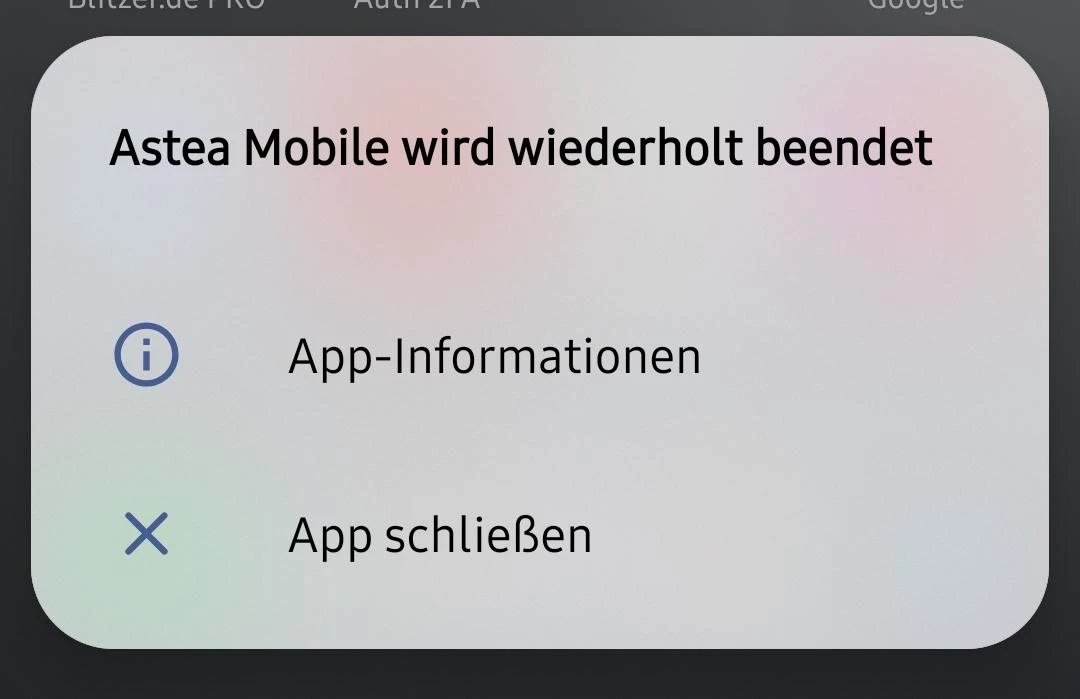
All Engineers using Samsung S25 are having issues after their Mobiles loaded this update. The App is crashing constantly.

We are only able to use the App with our local APK and automatic Updates switched off.

1) Is this a know issue?
2) Is this the Update “end of Q1” Update you mentioned?
3) Will there be a Fix?

Please just get in direct Contact with me, if you need more info for analysing this behavior.

Thanks,

Michael


Reid Gilbert
Superhero (Employee)
Forum|alt.badge.img+15
  • Superhero (Employee)
  • February 25, 2026

Hi Michael,
The V3.3.10 version of the Native App was just released.  What mobile build # are you experiencing this issue on? (this is displayed at the bottom of the login page)  What are the techs doing just prior to this message getting displayed on the screen?  Are they in a particular area of the application when they get this error message?  Maps module, Work List module, launching the Camera, etc.?  Do you have steps to replicate or does it happen at random intervals?
Thanks,
Reid


Forum|alt.badge.img+2

Hi,

it’s crashing right away after you clicked the icon. You will not make it to the login Screen.

Thanks,

Michael


Reid Gilbert
Superhero (Employee)
Forum|alt.badge.img+15
  • Superhero (Employee)
  • February 25, 2026

Hi Michael,
I just tested on a Samsung Galaxy S21 on V3.3.10 of the Native App and it takes me to the login screen and I’m able to get into the application.
On a Google Pixel 7A on V3.3.10 I was able to replicate the crash, but if I tap the Astea Mobile icon again to launch it I am able to login successfully (do you get the same results on your end?)  Or do those trigger the crash as well?
I'll log a support ticket for this shortly, thanks.
Reid


Reid Gilbert
Superhero (Employee)
Forum|alt.badge.img+15
  • Superhero (Employee)
  • March 2, 2026

The R&D team investigated the application crash issue on launch on V3.3.10 of the Android Native App and found that it is an issue with one of the third-party component applications that we use.  We have logged a support case with them to get the issue resolved, in the meantime users can click the Astea Mobile icon a second time and the app will launch successfully (or the previous V3.3.9 version of the Android Native App can be downloaded from here if needed):

https://qac.astea.com/asteamobileedge/install.html

Thanks,
Reid


Forum|alt.badge.img+8
  • Sidekick (Customer)
  • March 4, 2026

@Reid Gilbert 

Our techs are able to install the app using a double try or the side load option when using Android OS16, but are still experiencing the application crashing throughout the day so they are continually having to reinstall the app. Is this a product of 3P component application or something different? Suggestions to work around until resolved?


Reid Gilbert
Superhero (Employee)
Forum|alt.badge.img+15
  • Superhero (Employee)
  • March 4, 2026

Hi Leann,
They’re getting the application crash issue on the side-loaded V3.3.9 previous version of the Native App?  Or is this issue just happening on V3.3.10?  If they’re on the V3.3.10 version there’s an issue with one of the plugins we use from a third party provider, we already have a support case opened with them to get the issue fixed.  In my testing I didn’t need to uninstall/reinstall the app after the crash was encountered, I just had to click on the app again and it launched successfully the second time.  So those are the only workarounds available at this time.  I will update this thread once we have a fix from the third party provider (then we will provide an ETA on when the next release will be available in the Play Store).
Thanks,
Reid


Forum|alt.badge.img+8
  • Sidekick (Customer)
  • March 4, 2026

Yes, it is still crashing after the side load. I don’t know the version number, if the original side load instructions are for V3.3.9, that’s what they are using. 


Reid Gilbert
Superhero (Employee)
Forum|alt.badge.img+15
  • Superhero (Employee)
  • March 4, 2026

Hi Leann,
Can you have one of the impacted technicians go to Settings...Apps...Astea Mobile...and then scroll all the way down to the bottom of that screen?  There should be an entry at the bottom there that displays the version number…See if that shows as 3.3.9 or 3.3.10.  If it shows as 3.3.9 and you’re still experiencing the application crash issue then we’ll need to log a support ticket for this and dig into it further…
Thanks,
Reid


Forum|alt.badge.img+8
  • Sidekick (Customer)
  • March 4, 2026

Yes, thank you, I will confirm.


Reid Gilbert
Superhero (Employee)
Forum|alt.badge.img+15
  • Superhero (Employee)
  • March 4, 2026

(And I checked with the R&D team about the QAC environment...that is currently down for Maintenance and should be available in a couple of hours once that is complete).

Thanks,
Reid


Reid Gilbert
Superhero (Employee)
Forum|alt.badge.img+15
  • Superhero (Employee)
  • March 4, 2026

Quick update: Maintenance is now complete on the QAC environment


Reid Gilbert
Superhero (Employee)
Forum|alt.badge.img+15
  • Superhero (Employee)
  • March 10, 2026

The application crash issue on launch on V3.3.10 of the Android Native App is an issue with one of the third-party component applications that we use. We have logged a support case with them to get the issue resolved, once that is complete I will provide an ETA on when the new release will be available in the Play Store…
Thanks,
Reid


Forum|alt.badge.img+11
  • Hero (Partner)
  • March 26, 2026

Hi Reid, do you have some feedback on this issue, we have some reports from 2 customers having this issue now. Do you know what cause the crash because it’s not on all mobile device, until now it’s working for the majority of them on our side.

Thanks for your feedback

Rgds

Christophe


Reid Gilbert
Superhero (Employee)
Forum|alt.badge.img+15
  • Superhero (Employee)
  • March 26, 2026

Hi Christophe,
The issue is still under investigation by the third party at this time...once we receive a fix from them I’ll let everyone know (and then R&D will provide us with a tentative release date for the next version of the native app that contains the fix).  In the meantime our recommendation is to have the impacted technicians use the V3.3.9 version of the Native App.
Thanks,
Reid


Forum|alt.badge.img+11
  • Hero (Partner)
  • March 27, 2026

Hi Reid, this is doable for one of our customer but the other is using a MDM and for security purpose only authorise to install application for the playstore so we can’t install the 3.3.9. Could tell me what is the root cause as we don’t have the issue on all phones having android 16. We have a pixel on Android 16 which is working ok. Is there some MOE to turn on/off which could help ?

Thanks

Christophe


Reid Gilbert
Superhero (Employee)
Forum|alt.badge.img+15
  • Superhero (Employee)
  • March 27, 2026

Hi Christophe,
What type of MDM software is your customer using?  Can you send me the details on that?  (Most MDM’s have the ability to deploy a particular version of a APK file, so they should be able to download the previous V3.3.9 version from the QAC environment URL and then push that out to the mobile devices from there.  Only users with access to the MDM Admin account should be able to configure that so that may alleviate the concerns with their security team).  The root cause is unknown since it’s an error inside of one of the third party plugins, you can try disabling all GPS and location tracking related MOEs and see if that helps in the meantime:
-10030 set to 0
-10131 set to 5
-10255 set to unchecked
Thanks,
Reid


Forum|alt.badge.img+8
  • Sidekick (Customer)
  • April 1, 2026

Has anyone found a workaround for having to keep the automatic updates off until this is resolved? 


Reid Gilbert
Superhero (Employee)
Forum|alt.badge.img+15
  • Superhero (Employee)
  • April 1, 2026

Hi Leann,
Are you using any MDM software on the mobile devices?  You should have the ability in there to prevent users from updating to the latest version.  If you’re not using MDM software then you can have the users set this directly on the device in the following manner:
 

Disable Automatic Updates for Individual Apps

  1. Open Google Play Store.

  2. Tap the profile icon (top right).

  3. Select Manage apps & device.

  4. Tap Manage.

  5. Find the app you want to control.

  6. Tap the app’s Details page.

  7. Tap More (three-dot menu).

  8. Uncheck Enable auto update

    Thanks,
    Reid