

Question

Astea browser citrix with SSO - V15.4SU11

  • December 12, 2025
  • 3 replies
  • 41 views

Forum|alt.badge.img+11

Hello when we have installed the astea browser for virtualized platform (we want to use it with citrix). We want to set the SSO profile but each time we enter the profile name in the configuration editor and click ok when we re open it its blanked. we don’t find in which file we need to add our profile an example below of the configuration editor with anonyise data
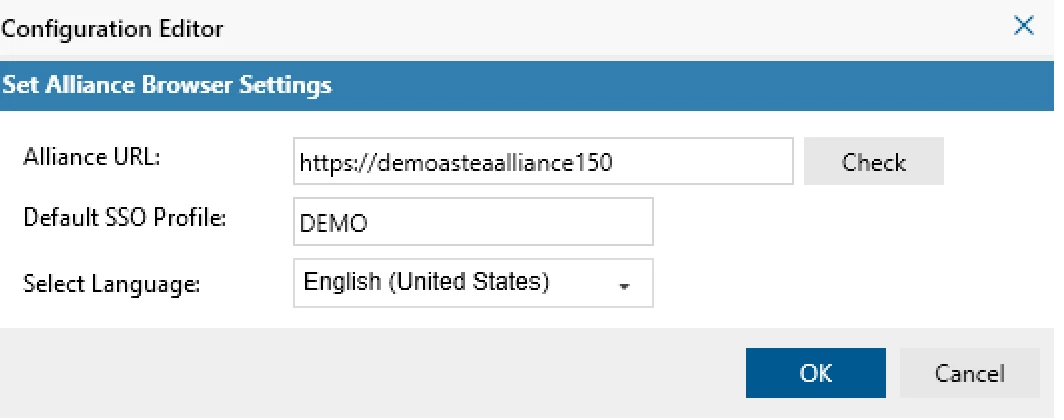
when we click ok and re open it the default sso profile si blank.

thanks for your fedeback

christophe

3 replies

Phil Seifert
Ultimate Hero (Employee)
Forum|alt.badge.img+24
  • Ultimate Hero (Employee)
  • December 18, 2025

Hi Christophe,

Another customer also faced this and it was suggested from R&D the following when this question was asked:

Before you publish the package to Citrix, you have to set the default profile and then create the package. after you will create the package you will not be able to change the default profile.

I hope this helps.


Forum|alt.badge.img+11
  • Author
  • Hero (Partner)
  • December 18, 2025

Hi PHil thanks for your feedback. DO you have a spécifi documentation for citrix installation / deployment ? the customer is using the Alliance Browser 15.4.x provided within the Alliance installation package and duirng the installation tells the instalshield that the installaiton is for virtualized plateform . Thanks for your feedback

Christophe


Phil Seifert
Ultimate Hero (Employee)
Forum|alt.badge.img+24
  • Ultimate Hero (Employee)
  • December 19, 2025

Hi Christophe,

Is your customer also interacting with IFS Support for the same question by any chance?

I have attached the document which is for Virtual Platforms such as Citrix.

