Question

IFS Report Migration Tool XSD Error

  • September 9, 2025
  • 4 replies
  • 49 views

Forum|alt.badge.img+1

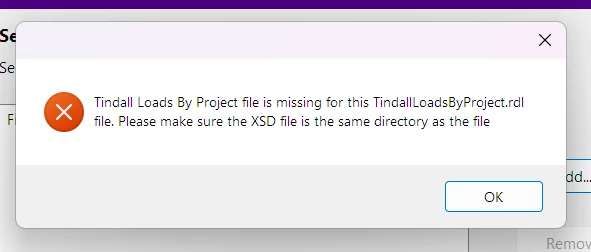
I am trying to use the IFS Report Migration Tool to convert an rdl layout to an rep layout. I get an error that states a file is missing and to please add the .XSD file to the same directory. The XSD file is in the same directory and I still get this error. I have tried both individual file conversion and the folder conversion.

The file names are exactly how they were exported:
SomeReport.rdl
SomeReportRep.XSD
Is there an additional naming convention that needs to be applied to the XSD file?


4 replies

Forum|alt.badge.img+1
  • Do Gooder (Customer)
  • November 25, 2025

Hi,

I am getting exactly the same issue.

Did you find a solution for this?


Forum|alt.badge.img+7
  • Hero (Partner)
  • January 20, 2026

Hi,

We have the same issue and haven't found a solution yet. I'm curious of you already found a way to make this working?


Forum|alt.badge.img+8
  • Sidekick (Customer)
  • February 2, 2026

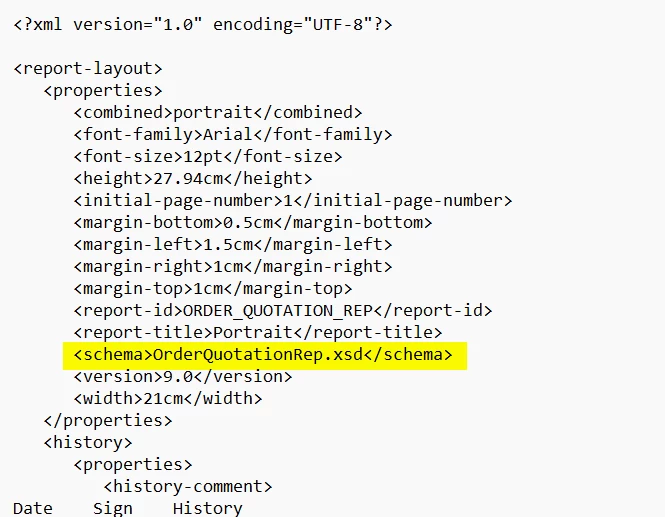
I was facing the same issue, and then did an xml file comparision between the default (standard) IFS rdl format vs the “evolved” rdl that we are trying to convert to a rep file. 

Try these steps:

  1. Open the rdl file with notepad
  2. Look for the “schema” tag at the top of the file. The xsd file name should be entered specifically like below. Ensure that your xsd filename matches this. Note the file extention “xsd” is entered in lowercase on the rdl file.
  3. Save the file and try the migration tool again. I was able to generate the rep file without an issue after.


Forum|alt.badge.img+7
  • Hero (Partner)
  • February 2, 2026

Hi ​@athasanka,

Thanks for your reply. I followed your steps and this is working now!