


Solved

Did 25R2 deployment overwrite MAIL_SENDER1 configuration parameters?

  • July 14, 2026
  • 6 replies
  • 108 views

maheshmuz
Hero (Partner)
Forum|alt.badge.img+11

We recently deployed the IFS Cloud 25R2 upgrade to our environment. Post-deployment, we noticed that our default mail sender settings in IFS Connect (MAIL_SENDER1) appear to have changed or reset.

I want to understand the standard behavior of the 25R2 installer regarding IFS Connect sender templates:

Does the 25R2 deployment automatically restore MAIL_SENDER1 back to its default core values?

What is the best practice to ensure our custom mail sender parameters are not affected during major release deployments?

Any insights from anyone who has experienced this during their 25R2 upgrade would be greatly appreciated.
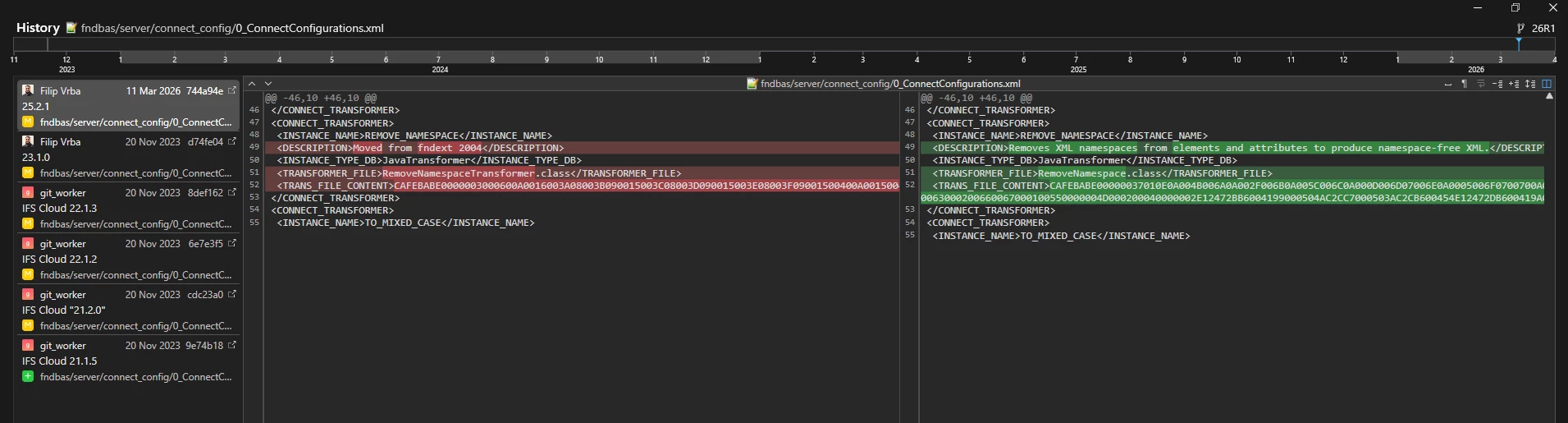
Best answer by InfFilipV

Hi,
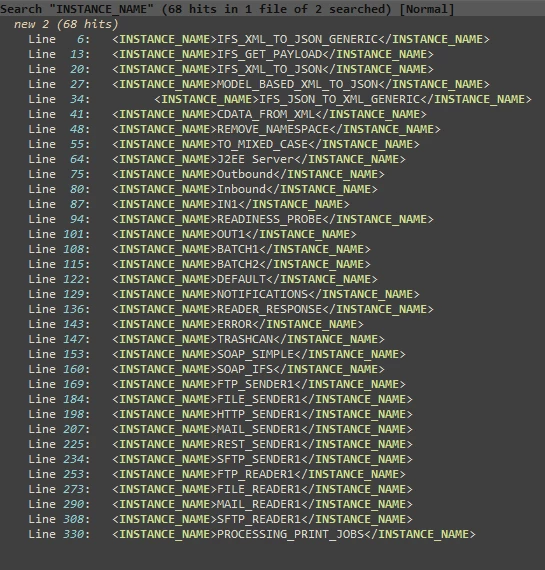
in 25r2 Transformer “Rename Namespace” was changed, unfortunatelly all core connect_configs are in single file "fndbas\server\connect_config\0_ConnectConfigurations.xml"
As result all these objects are rewritten during RU 25R2.


6 replies

ashen_malaka_ranasinghe
Superhero (Employee)
Forum|alt.badge.img+14

Hi ​@maheshmuz,

From my understanding, MAIL_SENDER1 is an IFS Connect configuration object rather than application metadata that is normally recreated during every release deployment. Therefore, under normal circumstances, I would not expect a 25R2 upgrade to intentionally reset a customer-configured MAIL_SENDER1 instance back to the original core values. However, the actual outcome can depend on how the environment was upgraded, whether configuration data was restored from backups, whether environment recreation was involved, and whether any post-upgrade activities were performed on the IFS Connect configuration. I have not found any release documentation stating that 25R2 explicitly resets MAIL_SENDER1 to its default configuration during deployment.

If the sender configuration changed after the upgrade, I would suggest investigating whether the MAIL_SENDER1 parameters were maintained as environment-specific configuration or if they were overwritten during a configuration import, environment refresh, delivery deployment, or other post-upgrade activities. In several IFS Connect implementations, customer-specific sender definitions and authentication settings are considered operational configuration and should ideally remain unchanged unless a deployment activity explicitly updates them. The fact that the change was observed immediately after the upgrade does not necessarily prove that the 25R2 installer itself performed the reset.


maheshmuz
Hero (Partner)
Forum|alt.badge.img+11
  • Author
  • Hero (Partner)
  • July 15, 2026

Hi ​@ashen_malaka_ranasinghe ,

Thank you for your response.

Sorry, I should have mentioned that this was not an upgrade but an update that we applied to the environment. Previously, the environment was running 25R1, and we applied the 25R2 update.

The issue occurred after applying the 25R2 update. We did not experience this problem with the previous updates that were installed in the environment. This appears to have started only after the 25R2 update installation.


InfFilipV
Hero (Partner)
Forum|alt.badge.img+14
  • Hero (Partner)
  • Answer
  • September 8, 2026

Hi,
in 25r2 Transformer “Rename Namespace” was changed, unfortunatelly all core connect_configs are in single file "fndbas\server\connect_config\0_ConnectConfigurations.xml"
As result all these objects are rewritten during RU 25R2.


maheshmuz
Hero (Partner)
Forum|alt.badge.img+11
  • Author
  • Hero (Partner)
  • September 8, 2026

Hi ​@InfFilipV , Thank you for the response. What would be the recommended method to follow for mitigating this issue? Is creating a new ifs connect without using the default ifs connect the only available way to mitigate this issue?


InfFilipV
Hero (Partner)
Forum|alt.badge.img+14
  • Hero (Partner)
  • September 8, 2026

Hi,
yes, not using auto created instances is only future proof option.


This file was untouched for 3 years… 
If it was split in multiple files, it would not happen… (but now it is hard to solve - if IFS splitted it now, it would trigger another reimport….)

When you recognise in logs (during delivery build) that this file "fndbas\server\connect_config\0_ConnectConfigurations.xml" is present in delivery, you can backup current configuration - but you must notice it first…
Backuping these before every delivery installation is also just complicated easy to forgot workaround...


Forum|alt.badge.img

I too encountered this issue where the MAIL_SENDER1 values were reset to their default. To resolve it across Service Update installations, I created a new Mail Sender record with the values I needed to be preserved, and made it our default sender. It’s not ideal, but it worked.