Solved

26R1 Release Update Failed

  • September 14, 2026
  • 4 replies
  • 71 views

asanka1055
Hero (Partner)
Forum|alt.badge.img+9

Hi All,

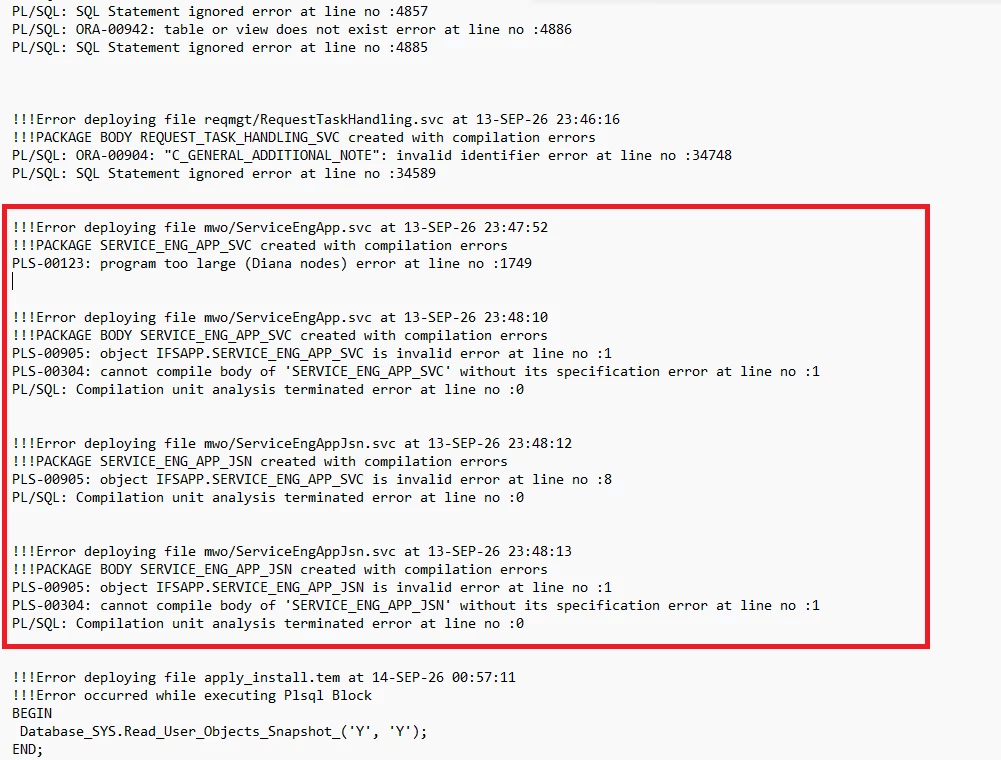
I am in the middle of Release Update 26R1 SU3 and we’re updating from 25R1 SU13. I am getting some instalation erros related to the ServiceEngApp. We have some customizations there, but it’s the same eventhough I removed all the customization changes in relevant files.

I am getting the same errors for the newly customized ServiceEngApp files as well. I just attached the error screen shot below. Please share if you have any idea on this?

Error:


Thanks & Regards,
Asanka.


Best answer by asanka1055

The best approach to avoid the "PLS-00123: program too large (Diana nodes)" error, which is caused by an Oracle PL/SQL package size limitation, is to move customizations into separate projections wherever possible. In your environment, we suspect that the ServiceEngApp projection generates a very large Oracle package during compilation. Oracle enforces a hard limit on package size, and when this limit is exceeded, compilation fails with the reported error.

R&D has already implemented package size optimizations as part of the 26R1 redesign and has reduced the core ServiceEngApp footprint as much as possible within the current architecture. However, because some existing customizations are directly tied to core pages and projections, they continue to contribute significantly to the generated package size. R&D has confirmed that no further meaningful reduction can be made to the core package without a larger architectural redesign. Such improvements are currently being considered as a long-term product initiative rather than a short-term solution.

To create additional headroom and improve the likelihood of successfully completing the 26R1 RU upgrade, we kindly request that you review your customizations and identify opportunities to:

- Remove any ServiceEngApp customizations, projections, or fragments that are no longer actively used.
- Minimize or consolidate non-essential projections and fragments currently associated with core pages.
- Move custom functionality into separate projections where technically feasible, rather than extending the core ServiceEngApp projection.

Any reduction in the customization footprint may help decrease the overall package size and allow the upgrade to proceed while longer-term architectural improvements are being evaluated by R&D.


4 replies

asanka1055
Hero (Partner)
Forum|alt.badge.img+9
  • Author
  • Hero (Partner)
  • September 16, 2026

IFS has confirmed this is a know limitation with 26R1 and they are working on a workaround. Will update this when I get more details.


ChanakaEA
Do Gooder (Partner)
Forum|alt.badge.img+4
  • Do Gooder (Partner)
  • September 18, 2026

IFS has confirmed this is a know limitation with 26R1 and they are working on a workaround. Will update this when I get more details.

Hi Asanka,
Do you have any more information about those limitations confirmed by IFS? 
Thank you.

Best regards,

Voshitha


asanka1055
Hero (Partner)
Forum|alt.badge.img+9
  • Author
  • Hero (Partner)
  • Answer
  • September 18, 2026

The best approach to avoid the "PLS-00123: program too large (Diana nodes)" error, which is caused by an Oracle PL/SQL package size limitation, is to move customizations into separate projections wherever possible. In your environment, we suspect that the ServiceEngApp projection generates a very large Oracle package during compilation. Oracle enforces a hard limit on package size, and when this limit is exceeded, compilation fails with the reported error.

R&D has already implemented package size optimizations as part of the 26R1 redesign and has reduced the core ServiceEngApp footprint as much as possible within the current architecture. However, because some existing customizations are directly tied to core pages and projections, they continue to contribute significantly to the generated package size. R&D has confirmed that no further meaningful reduction can be made to the core package without a larger architectural redesign. Such improvements are currently being considered as a long-term product initiative rather than a short-term solution.

To create additional headroom and improve the likelihood of successfully completing the 26R1 RU upgrade, we kindly request that you review your customizations and identify opportunities to:

- Remove any ServiceEngApp customizations, projections, or fragments that are no longer actively used.
- Minimize or consolidate non-essential projections and fragments currently associated with core pages.
- Move custom functionality into separate projections where technically feasible, rather than extending the core ServiceEngApp projection.

Any reduction in the customization footprint may help decrease the overall package size and allow the upgrade to proceed while longer-term architectural improvements are being evaluated by R&D.



asanka1055
Hero (Partner)
Forum|alt.badge.img+9
  • Author
  • Hero (Partner)
  • September 18, 2026

IFS has confirmed this is a know limitation with 26R1 and they are working on a workaround. Will update this when I get more details.

Hi Asanka,
Do you have any more information about those limitations confirmed by IFS? 
Thank you.

Best regards,

Voshitha

Hi Voshitha,

In above, I have added the answer for this issue. We had to  split ServiceEngApp and remove cust changes outside of it to new client/projection and include it in app model. You can find more details about Split Projections in this IFS Documentation as well.
https://docs.ifs.com/techdocs/26r1/060_development/022_user_interface/035_native/010_application_development/020_split_projection/

Thanks & Regards,
Asanka.