


Solved

Partner portal date format

  • September 9, 2021
  • 2 replies
  • 94 views

Forum|alt.badge.img+5

Hi,

I’m wanting to configure the date format to match NZ standard DD/MM/YYYY and have selected under the vendor centre and vendor contact regional settings = NZ but it still doesn’t seem to be following to activity settings. Any idea where this can be configured from? will it need to be at the server end perhaps? 
Best answer by Susie Yao

Hi,

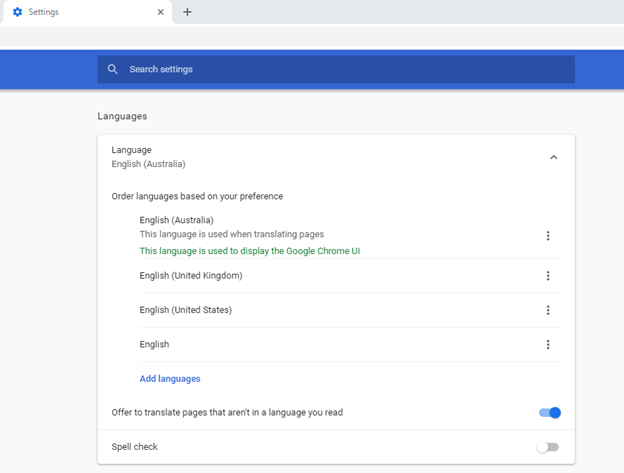
What browser are you using?  Please take a look at the Setting page of your browser.  For example, if you are using Chrome, you can change the date format by setting preferred language as below.

Regards,

Susie

2 replies

Forum|alt.badge.img+10
  • Hero (Employee)
  • Answer
  • September 9, 2021

Hi,

What browser are you using?  Please take a look at the Setting page of your browser.  For example, if you are using Chrome, you can change the date format by setting preferred language as below.

Regards,

Susie


Forum|alt.badge.img+5
  • Author
  • Sidekick (Customer)
  • September 10, 2021

Thanks Susie! I would never have thought my browser would be set to United States

