



Solved

not allowed to change status when the work Assignment is downloaded to a mobile device

  • February 1, 2022
  • 2 replies
  • 273 views

lopespetro
Hero (Customer)
Forum|alt.badge.img+13

Hi all.

I’m in a situation that there is a failed transaction that has been deleted and the user can do nothing with the work task assignment that remains in work started.

The mobile user already initialized the app but the work task does not appear anymore and no one can change the assignment status even in IEE or in Aurena.


How may I resolve this situation?


Trying to change the status in IEE or Aurena with the same user got the message:


“not allowed to change status when the work Assignment is downloaded to a mobile device”


Apps 10 UPD8

Mobile is mWorkOrder 4.8

Tks for attention.


Best answer by Bandula

Hi @lopespetro 

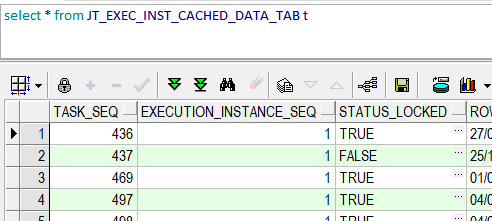
When we transfer a work assignment to mobile, we get entry in table JT_EXEC_INST_CACHED_DATA_TAB to prevent state changes happening directly from EE.

In you case data seems ‘corrupted’. So you can simply remove relevant task/Ei record from this table


This topic has been closed for replies.

2 replies

Bandula
Hero (Employee)
Forum|alt.badge.img+12
  • Hero (Employee)
  • Answer
  • February 1, 2022

Hi @lopespetro 

When we transfer a work assignment to mobile, we get entry in table JT_EXEC_INST_CACHED_DATA_TAB to prevent state changes happening directly from EE.

In you case data seems ‘corrupted’. So you can simply remove relevant task/Ei record from this table


lopespetro
Hero (Customer)
Forum|alt.badge.img+13
  • Author
  • Hero (Customer)
  • February 1, 2022

Hi @lopespetro 

When we transfer a work assignment to mobile, we get entry in table JT_EXEC_INST_CACHED_DATA_TAB to prevent state changes happening directly from EE.

In you case data seems ‘corrupted’. So you can simply remove relevant task/Ei record from this table


Hi @Bandula , Tks for the info.

I’ll do that.

Br.

Lopes

