

Question

Print Manager status - ' Remote Working' in IFS cloud 22R2.

  • December 4, 2023
  • 4 replies
  • 151 views

Dilshan Aththanayake
Sidekick (Employee)
Forum|alt.badge.img+5

Hello Experts!

  • Regarding a Print Agent setup in IFS cloud 22R2 , Print Manager status is in ‘ Remote Working’ instead of ‘ Complete’ 
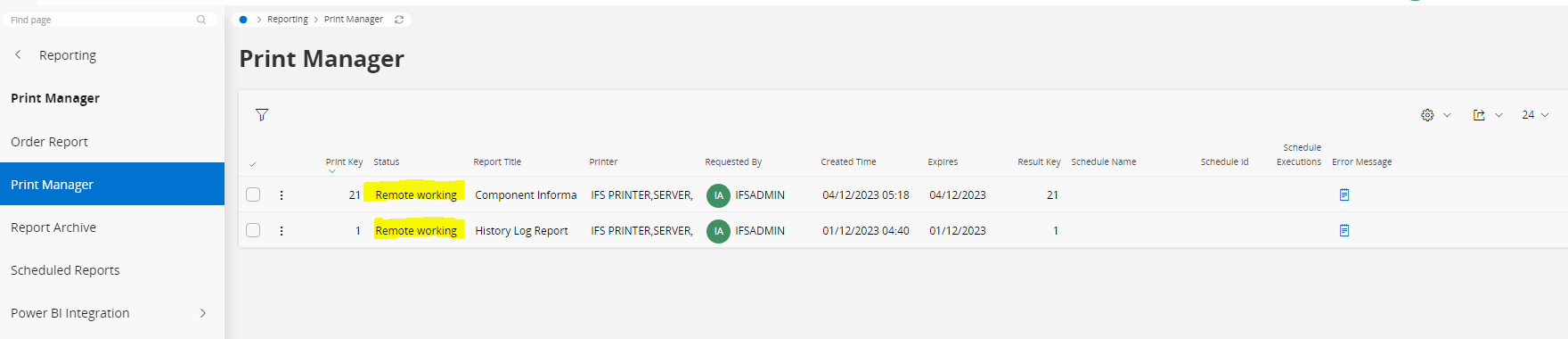
  • When checking the Print Manager manager, it is Up & running as below.
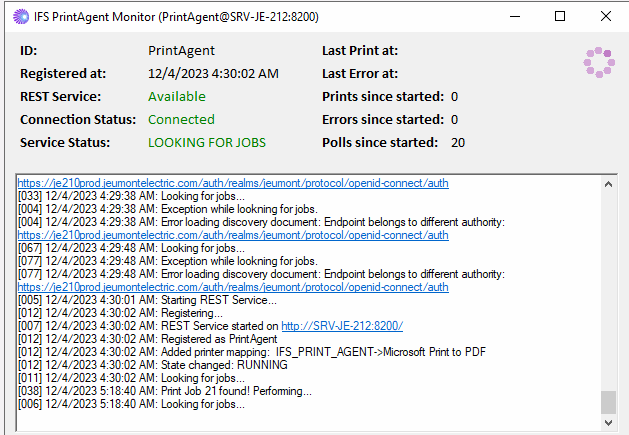
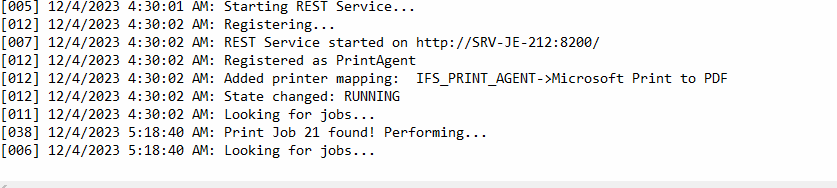
  • print agent log
  • Please advice on how to fix this.


BR!

/Dilshan

4 replies

Forum|alt.badge.img+9
  • Sidekick (Employee)
  • December 4, 2023

Have you tried with a real printer?
Have you sometimes got it working with the PDF-printer?

Since the default PDF printers usually have an user interface (you have to select where to print it) it sounds to me as it would not work with software automation such as this.
Install a real printer and see how it goes with that.


Dilshan Aththanayake
Sidekick (Employee)
Forum|alt.badge.img+5

Hi @SamiL ;


Thanks for the feedback!


  • Didn’t try with a real printer yet & will try that too.
  • with the PDF-printer : still didn’t get any response as ‘completed’ status , but ‘ in ‘ remote working’ status.
  • print agent doesn’t show status as ‘completed’  ,  instead it shows as ‘looking for jobs’

Forum|alt.badge.img+11
  • Hero (Customer)
  • December 4, 2023

Hi @Dilshan Aththanayake ,

Had the same problem here and everything was back to normal once I installed the latest version of the print agent.

Thanks,

Gianni Neves


Dilshan Aththanayake
Sidekick (Employee)
Forum|alt.badge.img+5

Hi @gianni.neves ;

  • Thanks for the feedback!
  • ‘’The Latest version of print agent’’ means,  you got it from 23R2 environment?