When a new Customer Support order is created, an email immediately gets sent to the Service Agent assigned.
I’m trying to figure out, where this is triggered and email configured.
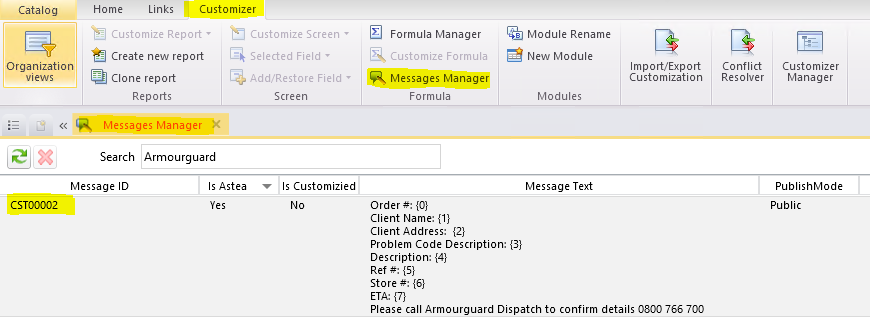
What I have found, is that the body of the email exists in an item in the “Messages Manager” under the Customizer tab.
What I haven’t been able to figure out is where the configuration is that instructs an email to be sent on new Customer Support order creation, and that it should contain the text that i’m seeing in the Meesage ID: CST00002? Can anyone point me in the right direction?
Cheers Mark.
Best answer by Pranavan Paranthaman
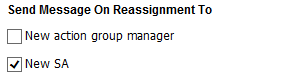
In “Workflow (Cust. Support)” the ‘Send Message On Reassignment To’ ‘New SA’ is checked, so maybe that is triggering the message?
Yes Mark, this option is what is triggering the message, and looks like there has been a customization to the standard message (default email message body is hardcoded into the system and not exposed)
If you wish to change the static text in the email body you can do so via the customizer by editing the Message ID: CST00002 message text field. But If you require to add or remove field from the email body, I would advise to raise a ticket and reach out to your regional support team.
Do you see any relevant custom fields in Prompts (Cust. Support) or Workflow( Cust. Support) modules?
Hi Pranavan,
I don’t see anything that looks like a custom field. But in both those modules, i do see a couple of items checked that may be a part of the setup to send such an email??
In “Workflow (Cust. Support)” the ‘Send Message On Reassignment To’ ‘New SA’ is checked, so maybe that is triggering the message? But if that’s the case, where is it specified what message to send, and as an email, not a popup message.
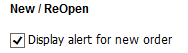
And in “Prompts (Cust. Support)” the ‘New/ReOpen’ ‘Display Alert for new order’ is checked, so likewise, maybe that’s what triggers the message?? But again, where does it specify what alert is displayed?
In “Workflow (Cust. Support)” the ‘Send Message On Reassignment To’ ‘New SA’ is checked, so maybe that is triggering the message?
Yes Mark, this option is what is triggering the message, and looks like there has been a customization to the standard message (default email message body is hardcoded into the system and not exposed)
If you wish to change the static text in the email body you can do so via the customizer by editing the Message ID: CST00002 message text field. But If you require to add or remove field from the email body, I would advise to raise a ticket and reach out to your regional support team.
In “Workflow (Cust. Support)” the ‘Send Message On Reassignment To’ ‘New SA’ is checked, so maybe that is triggering the message?
Yes Mark, this option is what is triggering the message, and looks like there has been a customization to the standard message (default email message body is hardcoded into the system and not exposed)
If you wish to change the static text in the email body you can do so via the customizer by editing the Message ID: CST00002 message text field. But If you require to add or remove field from the email body, I would advise to raise a ticket and reach out to your regional support team.
Aha. Ok, cool, thanks Pranavan. Appreciate your help. I’m not sure why a previous employee would have set it up this way. Would seem easier to me, just to create an Alarm on Document Creation of a Customer Support order. Anyway, thanks again.