Question

Reversal of supplier payment

  • January 29, 2025
  • 2 replies
  • 79 views

Forum|alt.badge.img+1

We get a  few of supplier payments back as they get rejected from the receiver bank. At that time the payment order is posted in the supplier as paid.


What is the correct way to reverser the payment and thereby open up the invoice for payment after adjusting the payment address?

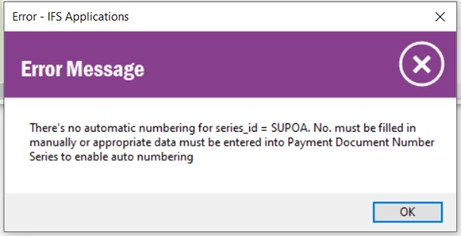
I tried Rollback Partial Payment, but get an error message regarding number series that our support function do not know how to solve

 

2 replies

Forum|alt.badge.img+8

Hi,

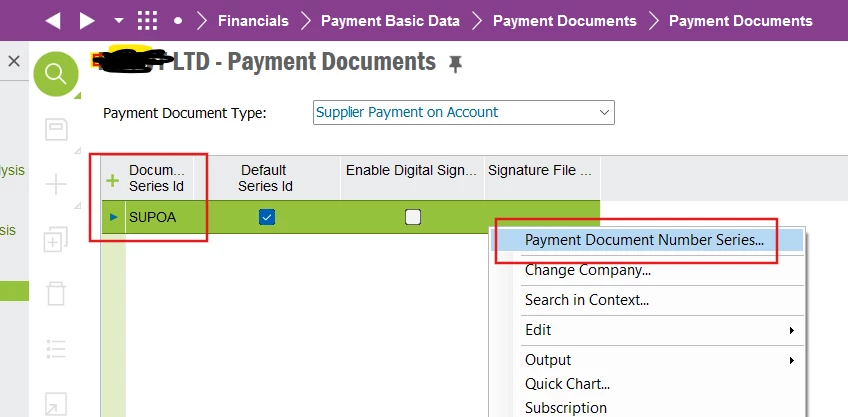
Navigate to Payment Documents & go to payment doc type ‘Supplier Payment on Account’. RMB - Payment Document Number Series.


Forum|alt.badge.img+4
  • Do Gooder (Partner)
  • January 29, 2025

Hi, 


You’re on the right track rolling back the payment. When you do that, you will end up with an unmatched supplier payment on account which is created automatically. You will therefore need a number series to populate the number on the supplier payment on account (SUPOA).

To populate the number series go to PAYMENT DOCUMENTS.

Search for Supplier Payment on Account.


You should see document series = SUPOA

If you don’t, you can create the record yourself with the + button and entering SUPOA.


Right click on that and enter a number series with valid from dates and you should be good to proceed.


I don’t have access to an Apps10 environment so that may not be 100% accurate but I hope you get enough info to proceed.


Good luck,

Steve