


Question

Several lines on Transport task => new transport task

  • September 5, 2025
  • 4 replies
  • 74 views

Forum|alt.badge.img+1
  • Do Gooder (Partner)

Hi, all of you experts,

I’m using IFS Cloud and I have a question related to multiple lines to be moved with transport task. 

When using move inventory with transport task from Inventory part in stock I would like to have a new transport task created for the picked lines.

In my case the selected lines will be added to an already existing transport task which is not yet executed. Do I miss any setup?
Best regards,

Marita 

4 replies

Piyal Perera
Hero (Employee)
Forum|alt.badge.img+10
  • Hero (Employee)
  • September 6, 2025

Hi ​@Marh,

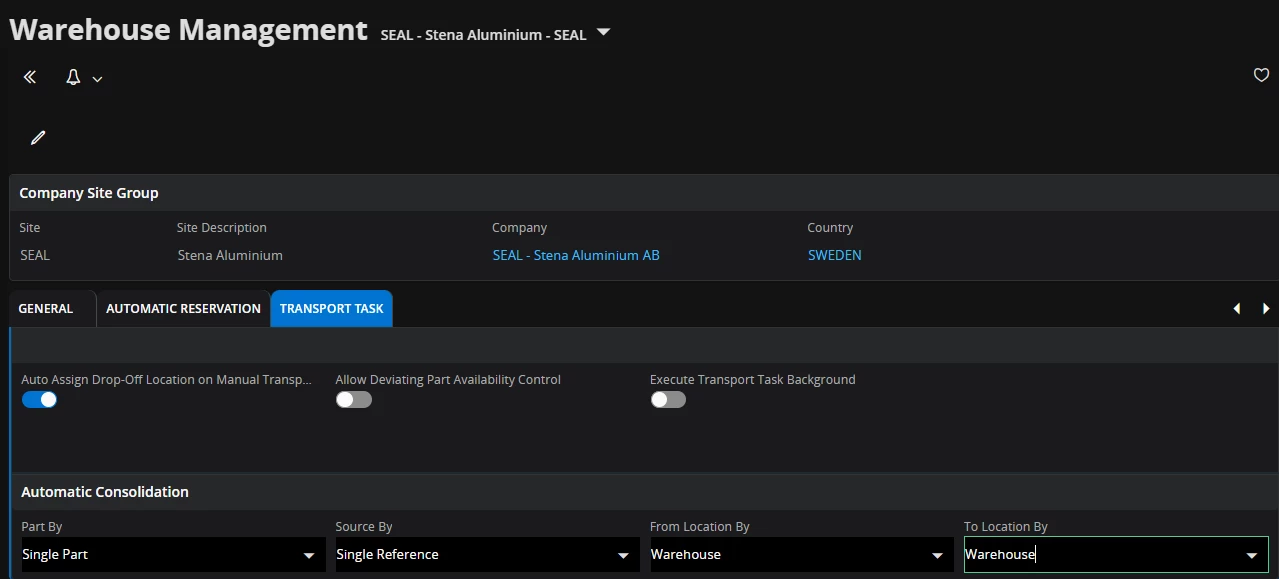
   I think your concern about Transport Task automatic consolidation functionality. Actually, for this functionality different options are available. Part by/ Source by/ From Location by/ To location by.

Optionally, it could be Ownership/Owner/Project ID, activity sequence/Lot batch no/Max number of lines Ownership/Owner/Project ID, activity sequence/Lot batch no/Max number of line.

But, there are no options related to status (e.g. picked) when we do consolidation.

regards,

Piyal


Forum|alt.badge.img+11

Hi,

I think the Fixed check box in the transport task can be used to block the transport task from getting more lines added. However there is no way of getting this check box ticked automatically as far as I know? Not sure if this could be defaulted by an event or something similar? If all transport tasks are having this check box ticked I assume that you will always create a completely new transport task for your new selection?

Best Regards

Fredrik 


Forum|alt.badge.img+1
  • Author
  • Do Gooder (Partner)
  • September 8, 2025

Thanks, Fredrik

I will try this out and see if the outcome will suit my purpose

Best regards,

Marita


Forum|alt.badge.img+2
  • Do Gooder (Partner)
  • February 2, 2026

Hi Marita,

regarding “In my case the selected lines will be added to an already existing transport task which is not yet executed.”


If you print the “already existing TT” it will not allow you to automatically consolidate further lines to the TT, which makes sense as the warehouse worker is phisically working on the picking steps and would not be aware of added lines.

So once you want to disable consolidation, just print the TT.

Hopfefully this additional info can help you.


BR FleNikolS





