


A. What is your idea?
1) Classification
Opportunity for improvement
2) Brief description
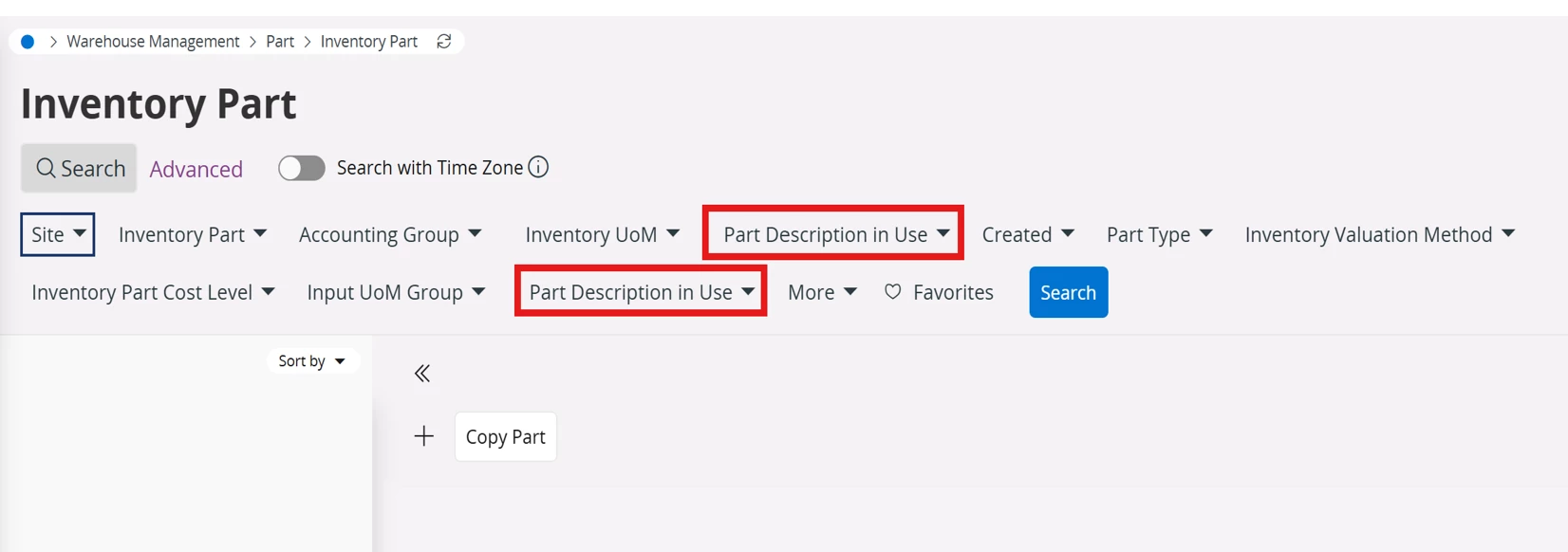
Search panel displays two filters with the same label, “Part Description in Use” in Inventory Part page.
From the user’s perspective, these appear to be duplicate PartDescriptionInUse filters, with no way to distinguish which underlying attribute each filter represents.
B. Context and scope
1) Who is affected?
Customers
2) Frequency
Daily
C. Value and impact
1) What is the business outcome?
Improves productivity or efficiency
Enhances user experience
2) Impact scale
Enterprise-wide
3) Workaround
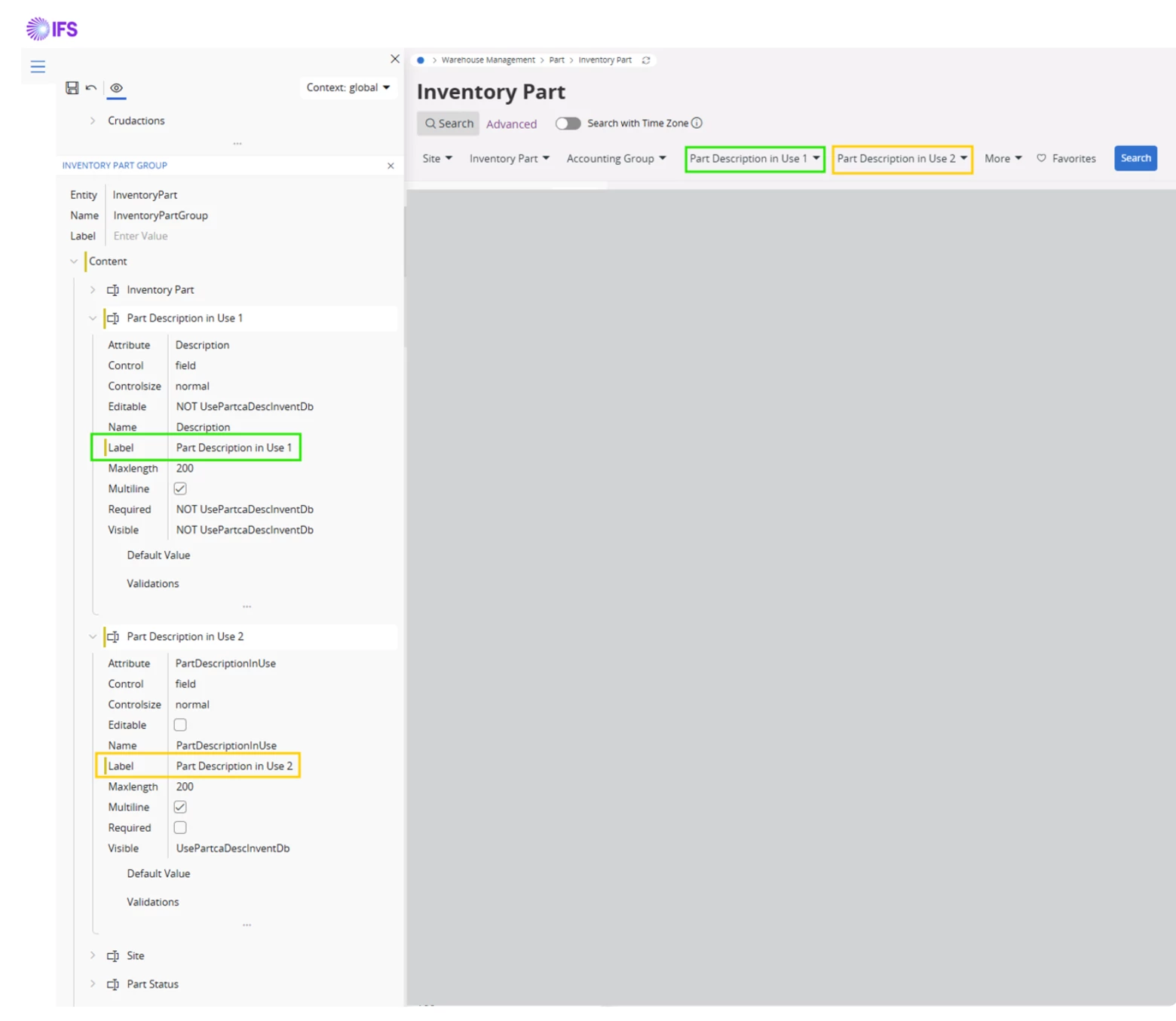
Because both Search chips use the same caption, the user cannot tell them apart on the Search bar itself. A configuration-only check can be used to map each chip to its attribute:
- Open Inventory Part → Page Designer → Inventory Part Group.
- Temporarily change the Label of the field whose Attribute is Description (for example to Part Description in Use 1).
- Temporarily change the Label of the field whose Attribute is PartDescriptionInUse (for example to Part Description in Use 2).
- Save / apply the Page Designer change and reopen Search (You may not be able to save this without the app owner, but you can still check it without them).
The Search bar then shows two differently named filters, matching those labels. In the example we used:
- Part Description in Use 1 → bound to Description (stored inventory part description)
- Part Description in Use 2 → bound to PartDescriptionInUse (description actually in use, including Part Catalog / language description when that site option is enabled)
This only helps identify the fields. It is not a permanent solution: it is a local Page Designer change, it should be reverted after the check, and end users should not be expected to keep these temporary names.
D. Evidence and examples
- The Search panel is not generating two PartDescriptionInUse filters. It is generating two different attributes, both using the same visible label:
| Search filter as shown to the user | Bound attribute | What it actually searches |
| Part Description in Use (first field in Page Designer / Inventory Part Group) | Description | Stored inventory part description (inventory_part_tab.description) |
| Part Description in Use (second field in Page Designer / Inventory Part Group) | PartDescriptionInUse | Description actually in use (Part Catalog / language description when the site option is ON; otherwise the same value as Description) |
- So, this is the first of the two cases they described: one filter is bound to Description and the other to PartDescriptionInUse. It is not a duplicate filter-generation bug.
- The Description filter is labelled Part Description in Use on purpose. That is the same label used on the Inventory Part page, so that the end user always sees one consistent name regardless of the site option. Search inherits that label. From a user point of view this is misleading in Search, because unlike the page itself, Search shows both filters at once.
How the user can tell them apart
There is no different caption in the Search panel today. The reliable way to identify them is Page Designer:
- Open Inventory Part → Page Designer → Inventory Part Group.
- Select each Part Description in Use field.
- Check the Attribute property:
- Description = stored inventory part description
- PartDescriptionInUse = description actually in use (catalog / language-aware)
The Search filters correspond to those two attributes. They appear as duplicates only because both attributes share the label Part Description in Use.
E. Additional details
1) Enter support ticket ID reference (If applicable)
CS0545508
2) Would you like to participate in validation or early testing?
Yes
Customer Request:
- To change the system to reflect what the search actually does so it is clearer i.e. to make one search 'part description in use' to 'Stored Inventory Part Description' and the other one 'Part Catalogue Part Description'. This way, the searches are more relatable and mean something to the users.