


Hi,
When creating a Sales Quotation and adding Quotation Addresses, the behavior initially works as expected:
- The address from Quotation Addresses is automatically propagated to all quotation lines.
- At the same time, Delivery Information (including Freight Map / Freight Zone and freight price list–related details) is updated correctly on both:
- the quotation header
- and the quotation lines.
If I later change the address and ZIP code in Quotation Addresses:
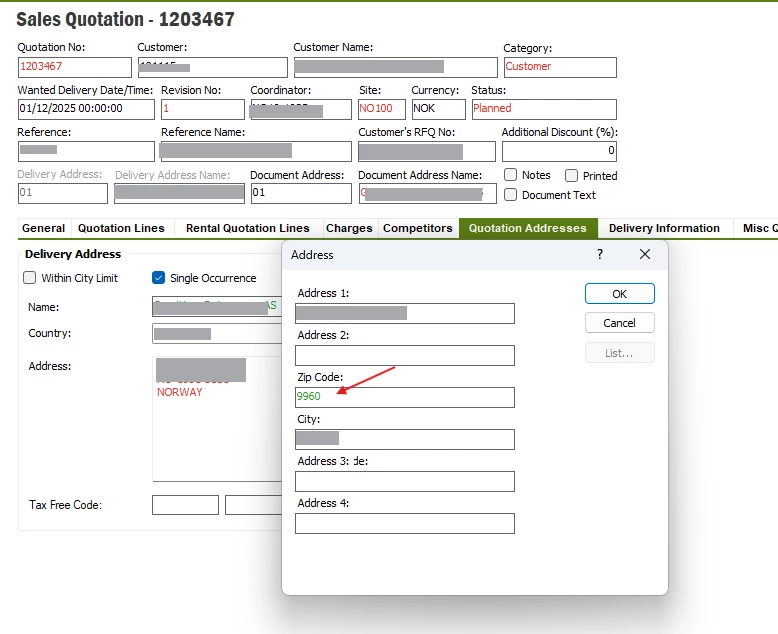
- The address fields (street, ZIP, city, etc.) are updated correctly on:
- the quotation header
- all quotation lines
- The Delivery Information on the header is also updated correctly, including the new Freight Zone based on the ZIP code.
- BUT On the quotation lines, only the address fields are updated.
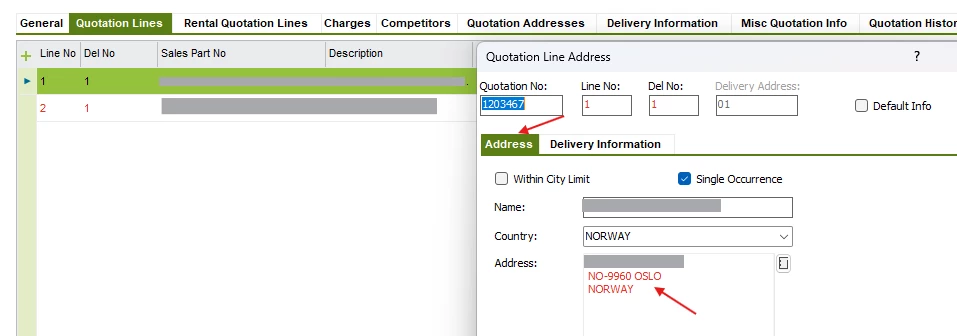
-
The Delivery Information on the lines (Freight Map / Freight Zone) remains unchanged and still reflects the old ZIP / old freight zone. 1081
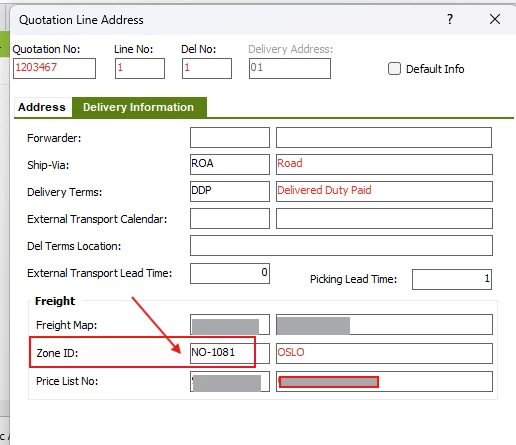
This causes challenges for us, as our charge calculation is based on ZIP‑code–based freight zones.
The exact same scenario works correctly on Customer Orders:
- When changing the address / ZIP code on the order header,
- and confirming the update of lines,
- both address fields and Delivery Information are updated consistently on:
- header
- all order lines.
I also tested changing the ZIP code directly on the quotation line level (by overriding it):
- In that case, the system does recalculate Delivery Information,
- the Freight Zone is updated,
- and charges are recalculated correctly.
-
So the recalculation logic clearly exists, but it seems to be triggered only by explicit line-level changes, not by header-to-line on Sales Quotations.
Has anyone experienced similar behavior in Sales Quotations and found a solution or workaround?