Question

Sales campaign

  • May 20, 2026
  • 2 replies
  • 20 views

Hi, 

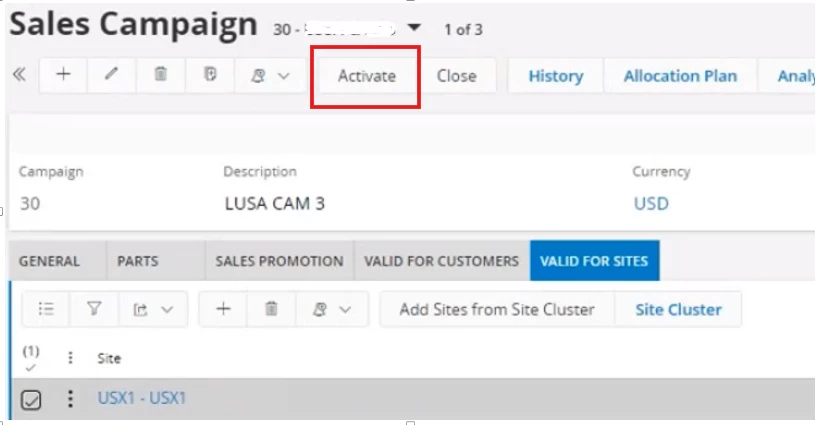
How to activate Sales campaign? The button “activate” is not available. 

Thanks

2 replies

Forum|alt.badge.img+13
  • Hero (Partner)
  • May 20, 2026

@Oksana Bohutska Can you please double check if you’ve added:

  • Valid Customer, Customer Price Group or allowing validity for all customers
  • Valid Site
  • Valid data under the Parts tab or Sales Promotion tab

Forum|alt.badge.img+5
  • Sidekick (Employee)
  • May 22, 2026

Hi ​@Oksana Bohutska,

1.Define the campaign period: Create the sales campaign and ensure it has a valid “Sales Period”.

2.Add the sales parts: Enter the relevant details of the sales part under the Parts tab.

3.Connect your customers: Under the Valid for Customers tab, link the campaign either to a particular “Customer” or to a “Customer Price Group”.

4.Assign the sites: Under the Valid for Sites tab, extend the campaign to the relevant sites. After adding all relevant details here, the Activate button will be enabled automatically.

If this resolves your question, please mark it as the best answer. So that it will be helpful for other peers.

Thanks,

Vihan Weerapura