Solved

Running Inventory Value for any part

  • June 12, 2026
  • 3 replies
  • 18 views

Forum|alt.badge.img+3

Hi all,

I was little surprised  that we dont have any screen in IFS which can tell me to historic inventory transaction and inventory on hand at that time….  I was looking the “ inventory Transaction History ”I am able to see the inventory transaction but it does not have any field which will tell the running total ??? Can any one tell me if such functionality is exist  but i am not just aware of it?


Best answer by Nikila Dis

Hi ​@IFSFAN,

In standard IFS, the Inventory Transaction History page is primarily intended to display the individual inventory transactions (receipts, issues, moves, adjustments, etc.) that have occurred for an inventory part. However, it does not include a field that displays the running on-hand balance after each transaction.

If the requirement is to determine the inventory quantity at a specific point in time, there are a few alternative options available:

Inventory Part Currently On Hand
This can be used to view the current on-hand quantity for a specific inventory part.

Inventory Part On Hand Development
This screen can be used to analyze how inventory quantities have changed over time for a specific part. This is usually the closest standard functionality for reviewing inventory quantity development/history.

Inventory Value per Period
If the requirement is to know the inventory quantity and value for a specific historical period, such as month-end or year-end, this functionality can provide the inventory quantities and values for the selected period.

Regards,

Nikila Dissanayake

3 replies

Nikila Dis
Superhero (Employee)
Forum|alt.badge.img+14
  • Superhero (Employee)
  • Answer
  • June 12, 2026

Hi ​@IFSFAN,

In standard IFS, the Inventory Transaction History page is primarily intended to display the individual inventory transactions (receipts, issues, moves, adjustments, etc.) that have occurred for an inventory part. However, it does not include a field that displays the running on-hand balance after each transaction.

If the requirement is to determine the inventory quantity at a specific point in time, there are a few alternative options available:

Inventory Part Currently On Hand
This can be used to view the current on-hand quantity for a specific inventory part.

Inventory Part On Hand Development
This screen can be used to analyze how inventory quantities have changed over time for a specific part. This is usually the closest standard functionality for reviewing inventory quantity development/history.

Inventory Value per Period
If the requirement is to know the inventory quantity and value for a specific historical period, such as month-end or year-end, this functionality can provide the inventory quantities and values for the selected period.

Regards,

Nikila Dissanayake


PRODQ
Superhero (Customer)
Forum|alt.badge.img+18
  • Superhero (Customer)
  • June 12, 2026

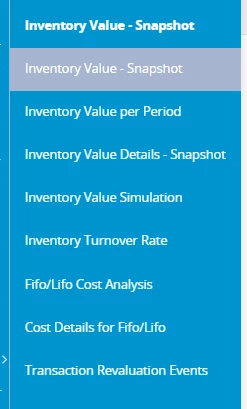
Not sure of the Apps10 equivalent but there are also these in Cloud.


Linda


Forum|alt.badge.img+3
  • Author
  • Do Gooder (Customer)
  • June 12, 2026

@PRODQ ​@Nikila Dis  Thank you very much both for your reply.. ​@Nikila Dis  Thats very helpful as it was exactly I was looking for...