


Question

Return from Service Order

  • Oct 19, 2026 6:55 AM UTC
  • 1 reply
  • 25 views

Forum|alt.badge.img+6

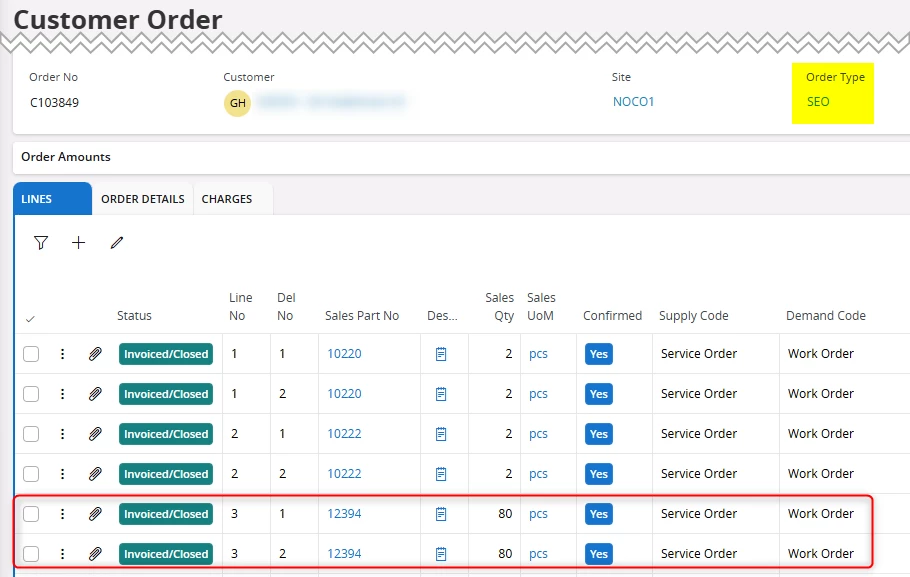
We have sold 80+80pcs of part 12394 via a work order (two work tasks).

We thou have got 20+20pcs in return, and must therefor handle the return.
It seems thou that RMA is not working with Order Type Service Order.

How would you do to handle this return?
 

IFS Cloud

1 reply

richardwoods
Do Gooder (Partner)
Forum|alt.badge.img+6
  • Do Gooder (Partner)
  • Nov 24, 2026 11:09 PM UTC

Short answer: an RMA will not take lines that came from a service order, so the return is done on the work tasks themselves. On each work task you record the 20 pieces as a return, the stock goes back into inventory and the task cost is adjusted. If the 80 + 80 has already gone to the customer on an invoice, the credit for the 20 + 20 is handled on the invoice side.

Why the RMA route is closed

Customer order lines with Supply Code Service Order are excluded from RMA, and returning or scrapping is not allowed on those customer orders either. So the return has to be booked against the work task that consumed the parts.

A setup along these lines

Do this once per work task, so twice in your case.

  • Open the work task (Service > Work Management > Preparation and Planning > Work Task) and go to the Returns tab. The task needs to be somewhere between Released and Work Done.
  • Create a return line for part 12394, quantity 20, with the same ownership as the material line. You can add it as a planned return and execute it afterwards, or return the part directly.
  • Enter the location the parts go back to. Add serial or lot details and condition if the part is tracked.
  • Repeat on the second work task: part 12394, quantity 20.

What happens at each step

  1. The return is executed and the on-hand quantity goes up by 20 in the chosen location, so 40 in total across the two tasks.
  2. The inventory transactions are created and new cost lines appear on each work task, so the task cost reflects 60 consumed rather than 80. In your example each task nets to 60, and the order as a whole to 120 out of the 160 you issued.
  3. If the parts were charged to the customer, you would expect the sales lines to end up at 60 each as well. That is the part to check against what has been invoiced, as below.

The awkward case

If the 80 + 80 has already been invoiced, the quantity on the sold lines cannot just be edited. Sales lines from the task are transferred as customer order lines, so the usual correction is a credit on the invoice: a credit invoice preview with negative amounts against the original (the order should be Invoiced/Closed), and if you need to re-bill 60 on each, a positive line alongside it. If nothing has been invoiced yet, correcting the sales line before transferring is simpler.

Things to know

  • Return rather than unissue where you can. Unissue only works while the task is not yet Reported or Finished, and when the part carries a cost other than standard, a proper return keeps the task cost right.
  • One return line per work task, with the part number and ownership matching the material line.
  • Do the returns before the task is closed out, otherwise you will be working around its status.

Worth a look: the IFS Cloud documentation for Return Material (work task Returns tab), Unissue Part, and Create Credit Lines for a customer order invoice.

Has the 80 + 80 been invoiced to the customer yet, and are the work tasks still open?

Created with the help of Ask Olive.

