


Solved

Purchase Order Cancellation Allowed Even When “No Changes Allowed After Authorization” Rule Is Enforced

  • March 18, 2026
  • 1 reply
  • 15 views

Dee21292
Do Gooder (Customer)


Hi Community,

We are trying to enforce the use of Purchase Order Change Order at the Supplier/Site level.

To achieve this, we have configured the Purchase Order Authorization Rule so that No Changes Are Allowed After Authorization.

However, after a Purchase Order is authorized, its status moves to Released, and the system still allows us to Cancel the Purchase Order without any blocking message or re‑authorization requirement.
Logically, with this configuration, the system should either prevent the cancellation or require re‑authorization.

According to IFS.AI, cancellation should not be allowed with this setup, but in practice this restriction is not working.
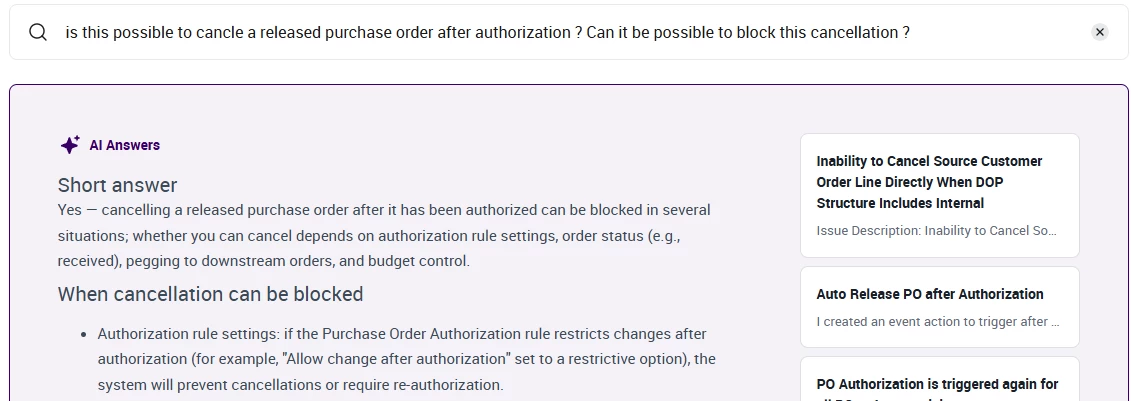
 

Has anyone faced this issue or knows if additional setup is required to enforce cancellation prevention or trigger re‑authorization?

Thanks in advance!

Best answer by jbush0419

@Dee21292 

from my experience with IFS, the "No Changes Allowed After Authorization" setting primarily controls field-level modifications to PO lines (quantities, prices, dates, etc.) rather than status changes like cancellation. The cancellation action is treated differently by the system than line-level changes.

Here are a few things to check and consider:

For blocking cancellation specifically, you might need:

  1. Custom Event Actions - You could create a custom event that triggers on PO cancellation to check authorization status and block the action
  2. Workflow setup - I’ve used workflow rules to control cancellation processes in other entities, you could do the same here. Have you worked with BPA workflows before?
  3. Review the "Valid for Change Order" checkbox - Make sure this is properly configured if you want all changes to go through the change order process

the standard IFS behavior probably will allow cancellation even with strict authorization rules, as cancellation is often considered an administrative action rather than a "change" in the traditional sense. This might be working as designed from IFS's perspective.

i'd suggest opening a case with IFS Support to clarify the expected behavior for cancellation with your specific authorization rule configuration. They can confirm whether this is standard behavior or if there's additional configuration needed.

Have you tried using the Change Order process for cancellations instead? That might be the intended workflow when you have strict authorization rules in place.

hopefully that gave you some additional things to consider. 

-jason

1 reply

jbush0419
Do Gooder (Customer)
Forum|alt.badge.img+3
  • Do Gooder (Customer)
  • Answer
  • March 18, 2026

@Dee21292 

from my experience with IFS, the "No Changes Allowed After Authorization" setting primarily controls field-level modifications to PO lines (quantities, prices, dates, etc.) rather than status changes like cancellation. The cancellation action is treated differently by the system than line-level changes.

Here are a few things to check and consider:

For blocking cancellation specifically, you might need:

  1. Custom Event Actions - You could create a custom event that triggers on PO cancellation to check authorization status and block the action
  2. Workflow setup - I’ve used workflow rules to control cancellation processes in other entities, you could do the same here. Have you worked with BPA workflows before?
  3. Review the "Valid for Change Order" checkbox - Make sure this is properly configured if you want all changes to go through the change order process

the standard IFS behavior probably will allow cancellation even with strict authorization rules, as cancellation is often considered an administrative action rather than a "change" in the traditional sense. This might be working as designed from IFS's perspective.

i'd suggest opening a case with IFS Support to clarify the expected behavior for cancellation with your specific authorization rule configuration. They can confirm whether this is standard behavior or if there's additional configuration needed.

Have you tried using the Change Order process for cancellations instead? That might be the intended workflow when you have strict authorization rules in place.

hopefully that gave you some additional things to consider. 

-jason
