Solved

Page designer purchase part

  • February 10, 2026
  • 5 replies
  • 37 views

Forum|alt.badge.img+2

HI


In Page Designer, there are missing fields that I need to add, which are located in the Purchase_part table and PurchasePart entity. How do I do this?


KR

Best answer by Yathartha Karunananda

Hi ​@pongenae,

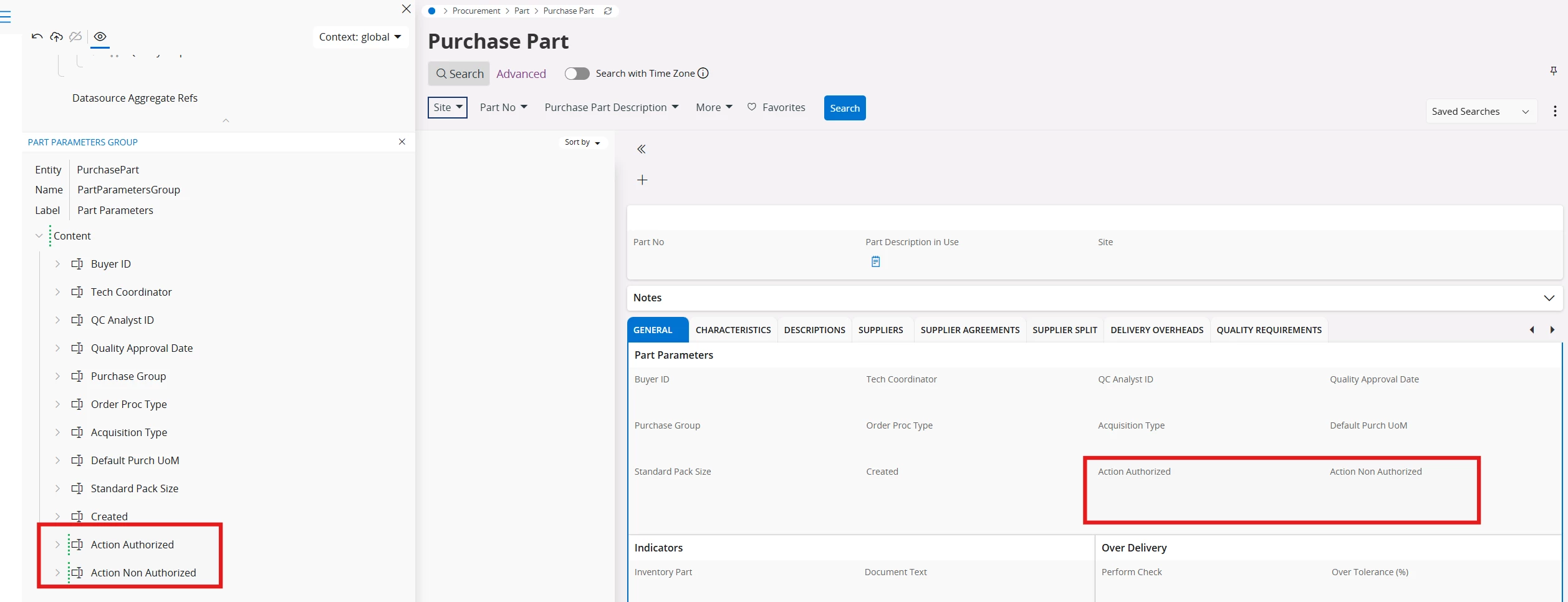
I just checked this in 24R2, and I was able add these without an issue:


5 replies

Yathartha Karunananda
Hero (Employee)
Forum|alt.badge.img+11

Hi ​@pongenae,

You need to add the entity to the relevant projection and publish it. Then, through page designer you should be able to add the field, bound to the projection. 


Forum|alt.badge.img+2
  • Author
  • Do Gooder (Customer)
  • February 10, 2026

@Yathartha Karunananda the fields are in the same entity, I dont understand why I cant see those 2 Fields. And its not customs Fields. Weird. Thank you


Yathartha Karunananda
Hero (Employee)
Forum|alt.badge.img+11

Hi ​@pongenae,

In IFS Page Designer, you cannot directly add any database column you want just because it exists in a table. The UI is entity-driven, not table-driven. So, if that field is not exposed to entity, you cannot add it.

Can you tell me what are the fields that you looking to add? 


Forum|alt.badge.img+2
  • Author
  • Do Gooder (Customer)
  • February 11, 2026

hi ​@Yathartha Karunananda 

hope you are well.


 i need to add to the grid ActionAuthorized and ActionNonAuthorized

thank you


Yathartha Karunananda
Hero (Employee)
Forum|alt.badge.img+11

Hi ​@pongenae,

I just checked this in 24R2, and I was able add these without an issue: