Question

No address in Incoming Dispatch Advice

  • September 21, 2026
  • 1 reply
  • 17 views

Link
Superhero (Customer)
Forum|alt.badge.img+23
  • Superhero (Customer)

Hello everybody,

I scanned a PDF delivery notice using AI, and then created an “Incoming Dispatch Advice”.

However, I have an issue with the delivery address.
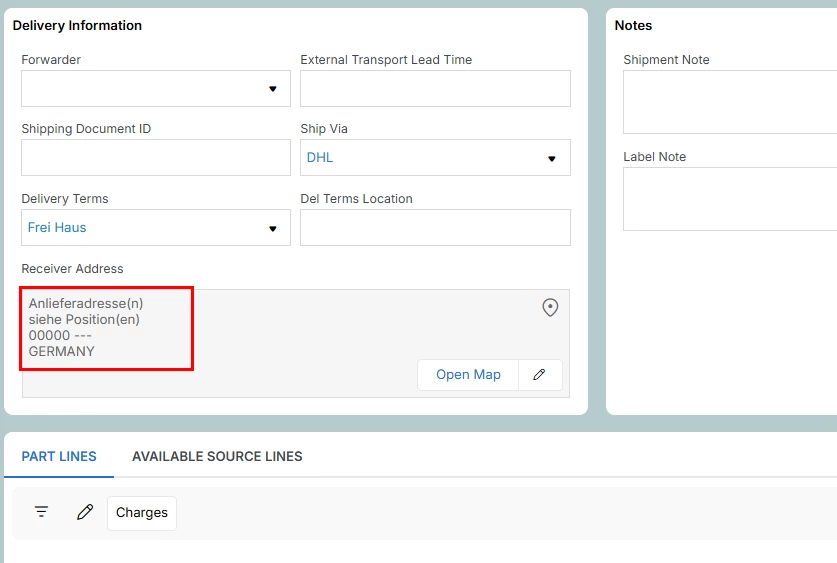
Why doesn't it retrieve the correct delivery address?


1 reply

Forum|alt.badge.img+3
  • Do Gooder (Employee)
  • September 25, 2026

Hi ​@Link,


This is expected. I found a several internal documents about this workflow. The Scan Delivery Note assistant doesn't read the delivery address from the document, so it has nothing to put on the Incoming Dispatch Advice.


The scan actually picks up only these:

*Header: delivery note no, actual ship date, sender (supplier), ship via, delivery terms and terms location, customs declaration no and date
*Lines: part no/description, dispatch qty, lot/batch no and the matched PO line


The address on an Incoming Dispatch Advice is meant for what the supplier sends in an electronic dispatch advice (EDI/MHS). A scanned delivery note doesn't fill it in.

It won't affect receiving. The lines are tied to your PO lines, so receiving works the same as receiving the PO directly.


What you can do:

*To see the address, open the original file from the attachments on the Incoming Dispatch Advice. The assistant attaches the scanned file there if your user has Document Management permissions.
*If you need the address saved as data on the record, that's an enhancement. Post it as an IDEA here on Community: https://community.ifs.com/ideas. IFS R&D Team should take it from there.


If you're seeing an address that's filled in but wrong (not blank), post a screenshot of where it shows up and your IFS Cloud version, and I'll take another look.


Regards,

Gleb



