
Question

MS Level 1 - Create S/P Req

  • Nov 16, 2026 2:15 PM UTC
  • 3 replies
  • 39 views

Forum|alt.badge.img+6

Hi, 

Can anybody explain the details of Create S/P Req setting on the Ms Level 1 planning window?
The perfect would be describing the use and result for each of them.

It is confusing for me, as according to the below help description

  • both Create S/P Req and Create S/P Req Entire Horizon seems like they both generate only MS Proposals and
  • both Do Not Create S/P Req and Create S/P from MRP do not generate any proposals.

What is the idea behind each of them and expected result?
If I get MS Supply object instead of requisition, how am I to convert it into the respective requisition?
What is the planning process to be look like?


  • Create S/P Req: Fixed MS proposals within the planning time fence (PTF) create supplies.
    • Is it supposed to create any proposals only in the PTF? Shouldn’t I get requisitions instead directly?
    • Or the idea of it is to have the fixed proposals inside of PTF?
  • Do Not Create S/P Req: MS proposals do not create supplies. The supplies are based on the customer order or parent shop order, or must be entered manually. This means that the planner intends to manually control supply inside the planning time fence.
    • I generated calculation and I am still getting MS Supply objects
  • Create S/P Req Entire Horizon: MS proposals create supplies for the entire horizon, inside and outside the PTF. Only proposals inside the PTF will be fixed.
    • This looks for me exactly the same as the Create S/P Req
  • Create S/P from MRP: MS proposals do not create supplies. For actual demands of MS-handled parts, supplies will be generated by MRP/PMRP. However, the component demands will not be exploded for these parent MRP/PMRP requisitions. Instead, the component demands are generated from the parent MS proposals.

     

3 replies

majose
Hero (Employee)
Forum|alt.badge.img+15
  • Hero (Employee)
  • Nov 17, 2026 7:28 AM UTC

Hello ​@KatarzynaPrae 

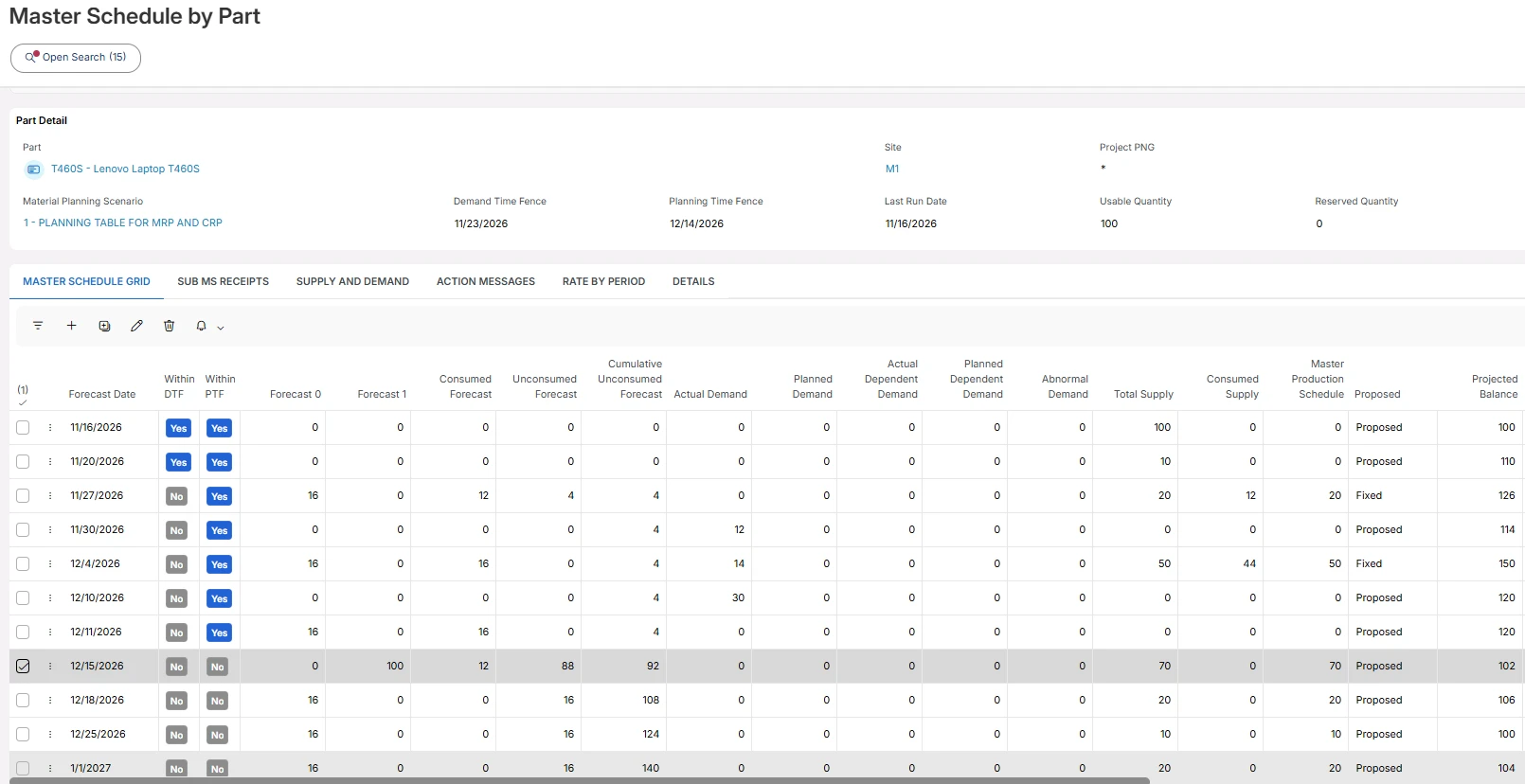
Here below I have manufactures MS planned part where the Create S/P Req flag is set to Create S/P Req. And Generate Fixed MS is also enabled (default) - meaning that as day passes, proposed MS receipts that crosses PTF will get fixed automatically when running the MS Level 1 calculation.

I have this below as starting point - calculation date is the 16th. I increased the level 1 forecast column to a high value just so that I would get a proposed MS receipt outside PTF, for this demonstration.


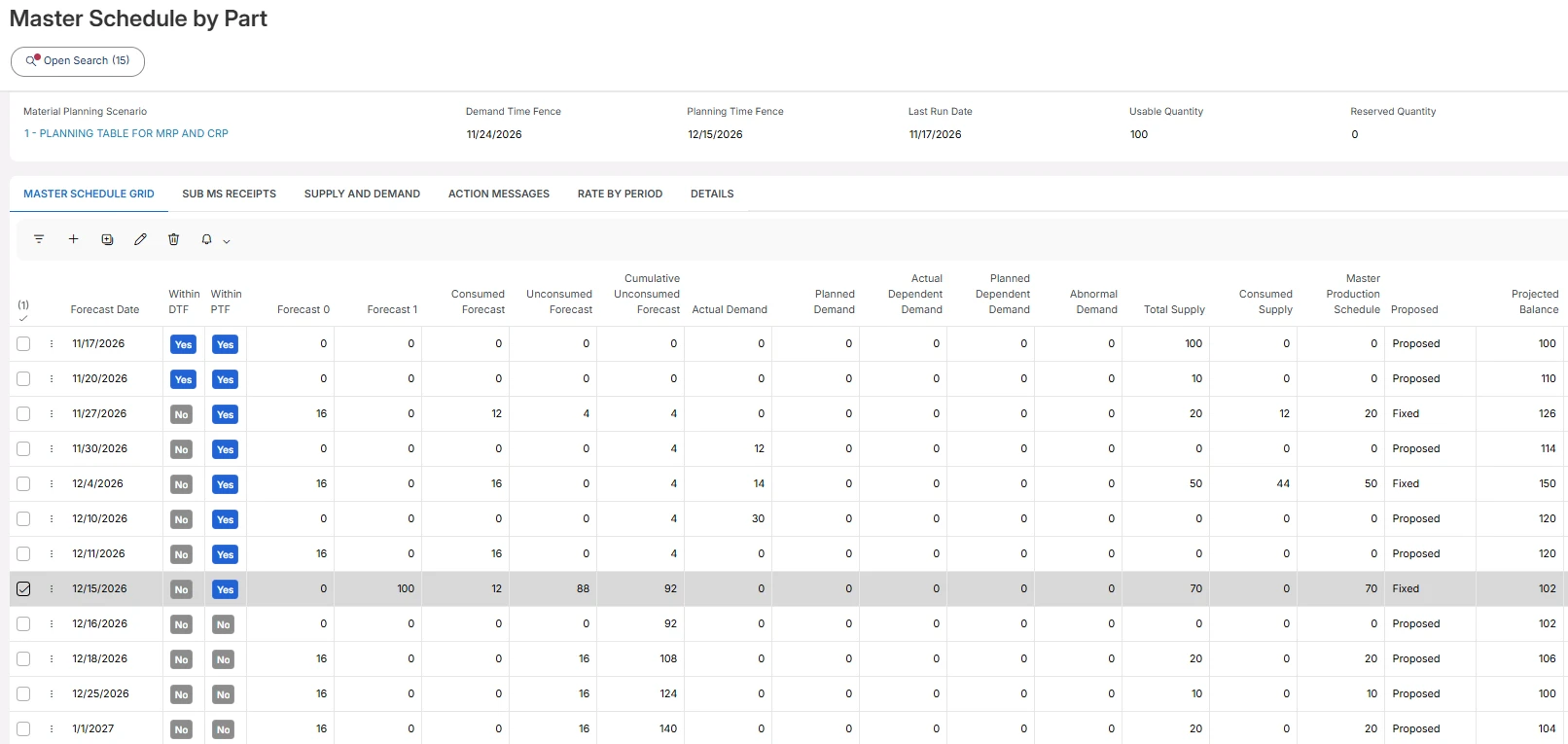
Okay…. then I run MS Level 1 calculation the 17th

The proposed MS receipt has now been converted into a fixed MS receipts, and since I have the flag Create S/P req to its default value. A millisecond later, the MS Level 1 calculation will create a Shop Order Req for this fixed MS Receipt.

Please bear in mind that proposed MS receipts generates CRP load, and are input to MRP demand explosion, you don’t have to turn on Create S/P Reqs for the entire horizon.

However, creating S/P Reqs for the entire horizon is almost a must when you work with Distribution Orders (multi site). And it is also a useful setting for purchased parts when PTF is set to a relatively short value. And/or you would like to share you long time purchasing plan with supplier X.

Since we are talking Master Scheduling - I see the proposed MS receipts almost like a shop order req/Purchase Req Line.

***

Performance:

Having thousands and thousands of master scheduled parts and generating Reqs for the entire horizon….

Removing and creating SO- and PO Reqs consumes more time compared if you compare with just creating proposed MS receipts.

Hope this helps a little bit. I can provide you with more details if you want.

-Mats


Forum|alt.badge.img+6
  • Author
  • Do Gooder (Customer)
  • Nov 17, 2026 12:44 PM UTC

Hello ​@majose 

Thank you so much for your input!

I fully understand your calculation and MS result. This is however working die to flag “generate MS Fixed” and it is mandatory to be used for Create S/P req setting, so it cannot be different.

If both

  • Create S/P req
  • Create S/P Reqs for the entire horizon

generate for entire horizon propositions (which they are according to what you are showing), then what I am confused still about, what is the difference between its results? 

Also, you mentioned:

“The proposed MS receipt has now been converted into a fixed MS receipts, and since I have the flag Create S/P req to its default value. A millisecond later, the MS Level 1 calculation will create a Shop Order Req for this fixed MS Receipt.”

  1. The proposed MS receipt has now been converted into a fixed MS receipts - yes, the result is that after running MS, it simply generates the proposition as fixed, but it is still an MS Supply (which is simply an object with proposition, but not with a real requisiton)
  2. A millisecond later, the MS Level 1 calculation will create a Shop Order Req - what do you mean it will later convert it? It shall automatically create the requisition (fixed) and it does not seems for me to occur as I am getting MS supply object only. (After some testing it seems that the actual requisitions are generated by Create S/P Reqs for the entire horizon, but not sure then why I shall use the other one then??)

Could you kindly elaborate? :)

Thank you so much in advance on this!


Best reagards,

Kasia


majose
Hero (Employee)
Forum|alt.badge.img+15
  • Hero (Employee)
  • Nov 17, 2026 4:18 PM UTC

Will this picture help?

Create S/P Req flag is set to Create S/P Req

Today DTF                                          PTF
|------------|---------------------------------------------|------------------------------------------------------> time

             <----Fixed MS Receipts---------><------------Proposed MS Receipts--->
             SO Reqs are generated here
             <------------------------------------------->
             
             SOs are created from SORs - MANUALLY
             <----------------> 


Create S/P Req flag is set to Create S/P Req Entire Horizon

Today DTF                                          PTF
|------------|---------------------------------------------|-------------------------------------------------------> time

             <----Fixed MS Receipts---------><------------Proposed MS Receipts---->

             SO Reqs are generated here        SO Reqs are generated here
             <-------------------------------------------><------------------------------------------------------>

             SOs are created from SORs  - MANUALLY
             <----------------> 


As day passes and you run MS Level 1 calculation every day, proposed MS receipts that crosses PTF are updated to fixed MS receipts. Fixed MS receipts are controlled by the planner and not by the system. Well, when they cross DTF they become 0 in MS Level 1 calculation.

-Mats