

Question

Inventory Part Availability Planning: Order Proposal Tab

  • July 7, 2026
  • 3 replies
  • 27 views

ArcRolfrH
Do Gooder (Partner)
Forum|alt.badge.img+3

Good afternoon everybody 

where can I find an explanation which lines are visible in Tab Order “Proposal/Order Proposal per day” in Inventory Part Availability Planning page in IFS Cloud. Furthermore which is the criteria to get the two tabs visible?

Thank you very much in advance.

Best regards, 

Rolf

 

3 replies

Abdul
Superhero (Partner)
Forum|alt.badge.img+20
  • Superhero (Partner)
  • July 7, 2026

Hi ​@ArcRolfrH,

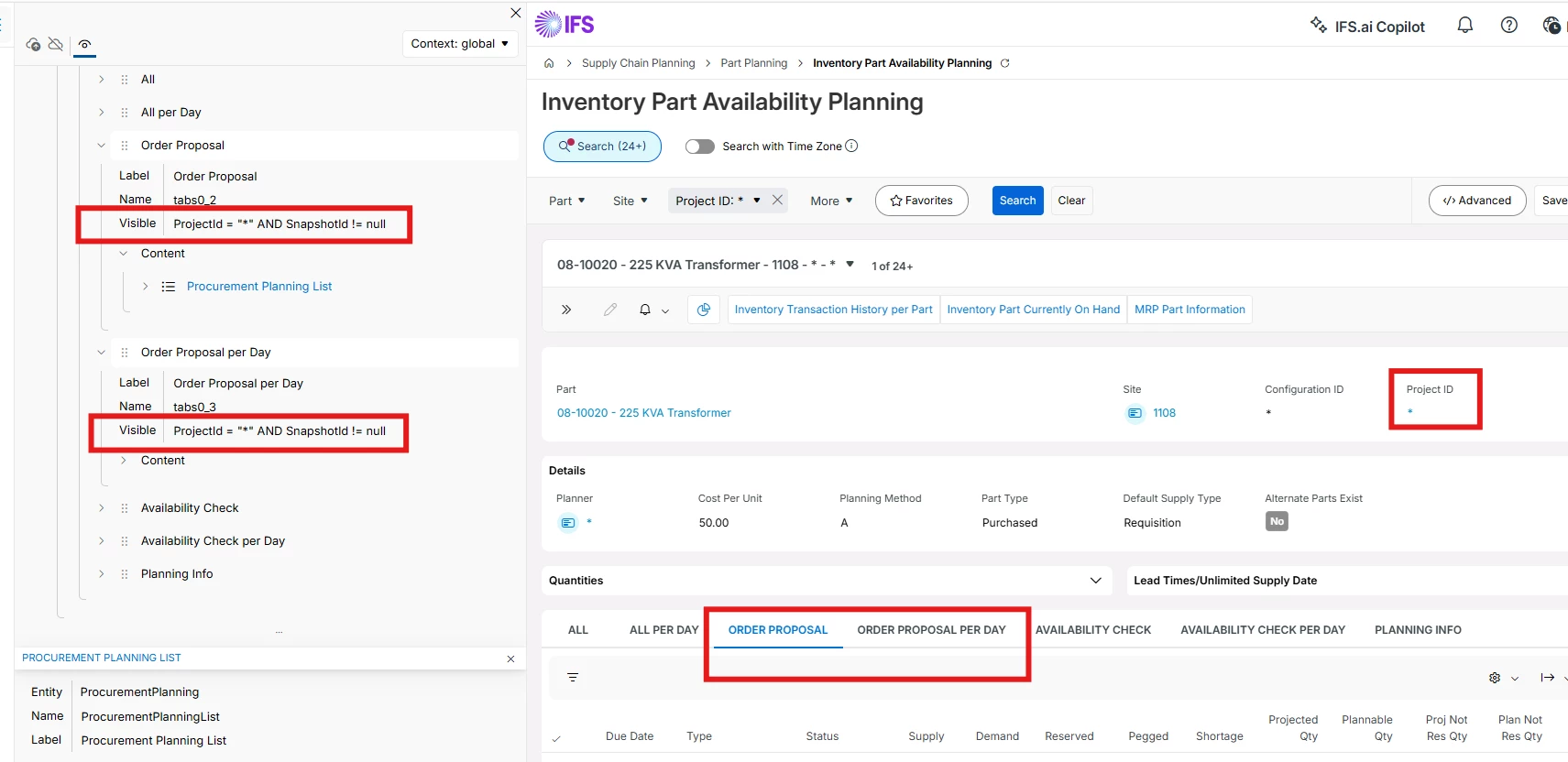
I quickly checked the visibility condition for the tabs in the page designer, and both the tabs will be visible for all records having Project Id ‘*’. 

Please refer to the screenshot below.


matt.watters
Ultimate Hero (Partner)
Forum|alt.badge.img+26
  • Ultimate Hero (Partner)
  • July 7, 2026

@ArcRolfrH some documentation from Apps10 on the content shown in each tab.

  • Order Proposal
    • Use this tab to view the selection of supply and demand information that is used by, e.g., the Order Proposal functionality.
    • Certain supply and demand types and supply and demand details connected to projects are not available here and can be found on the All tab.
  • Order Proposal per Day
    • Use this tab to view the summarized details of the supplies and demands found on the Order Proposal tab.

    • These are summarized per date, and therefore all the orders for a particular part on one particular date, are displayed on one line.

    • References to individual supplies and demands are not available here.


ArcRolfrH
Do Gooder (Partner)
Forum|alt.badge.img+3
  • Author
  • Do Gooder (Partner)
  • July 7, 2026

Hi Matt, 

Thank you very much for your reply. Your explanation is an excerpt from the product documentation. Is there a more detailed list of the criteria for why these lines are displayed in the "Order Proposal" tab?

Thank you. Regards, Rolf