Question

Enhanced ATP Questions - 22R2

  • March 27, 2023
  • 7 replies
  • 500 views

Forum|alt.badge.img+13

Has anyone used the Enhanced ATP functionality released in 22R2?  After playing around with this in a reference environment, I’ve noticed some interesting behavior and it appears I may not be grasping some of the intended value by this enhancement. 

Below are just a few points I’ve seen thus far:

  • Batch Release of Customer Orders
    • It’s only possible to batch Release Customer Order Lines if the Planned Due Date is before or sooner than the Expected Unlimited Supply Date (EUSD) from the Inventory Part.  Why would you not be able to Release Customer Orders after this date?  Isn’t the assumption that all demand could be satisfied in theory after this date?
  • Replanning of Customer Order Line Dates
    • The Replanning feature does modify the Planned Delivery Date at times but only if any incoming Supply is arriving sooner than the EUSD.
      • For example, if the Purchased Lead Time is 6 days (4/3/23) and the EUSD is 14 days (4/11/23).
      • Availability Check will not allow you to enter a Customer Order Line with a Planned Delivery Date sooner than 4/11/23.
      • If I created a Purchase Order (i.e. Supply) to arrive early on 4/8, and Re-Plan Customer Order Lines then the dates are brought in (i.e. available earlier for the Customer Order) but if the Purchase Order is late, (i.e. 4/20), no changes are made – the Planned Due Date remains 4/11/23.
  • Customer Order Availability Exceptions
    • Once the batch job is run to Generate exceptions, it’s not clear what this data is representing nor does it seem to update if data on the Customer Order is updated and the batch job is re-run. 
    • The Past Due Days is comparing the Planned Due Date vs the Site Date which does not provide an accurate representation of how late the order actually is. 

I’ve already reviewed the videos in Academy and the documentation supplied there, but perhaps there is something I am missing?


7 replies

GIISLK
Do Gooder (Employee)
Forum|alt.badge.img+3
  • Do Gooder (Employee)
  • April 4, 2023

Hi @astfarazt,

Please refer following answers.

  • Batch Release of Customer Orders
    • It’s only possible to batch Release Customer Order Lines if the Planned Due Date is before or sooner than the Expected Unlimited Supply Date (EUSD) from the Inventory Part.  Why would you not be able to Release Customer Orders after this date?  Isn’t the assumption that all demand could be satisfied in theory after this date?

Answer: Yes. This is dealing with the option ‘ Release Orders within supply source lead time limit’. 

This is used to control the Release of the Customer Order which are within the Supply Source Lead Time Limit. The Value is set to true by default and user has the possibility set it false. Planned Due Date of the Customer Order Line is checked against Expected Unlimited Supply Date of the Availability Check enabled Inventory Part. If the Planned Due Date of all CO lines less than or equal to Expected Unlimited Supply Date, then the customer order is released.

The Expected Unlimited Supply Date (EUSD) is the date when unlimited supply can be found in inventory which means the all demands can be satisfied after this date. That is the reason for restricting the release after this date. 

If the users do not need to check, then then can clear the option ‘ Release Orders within supply source lead time limit’ and proceed.


  • Replanning of Customer Order Line Dates
    • The Replanning feature does modify the Planned Delivery Date at times but only if any incoming Supply is arriving sooner than the EUSD.
      • For example, if the Purchased Lead Time is 6 days (4/3/23) and the EUSD is 14 days (4/11/23).
      • Availability Check will not allow you to enter a Customer Order Line with a Planned Delivery Date sooner than 4/11/23.
      • If I created a Purchase Order (i.e. Supply) to arrive early on 4/8, and Re-Plan Customer Order Lines then the dates are brought in (i.e. available earlier for the Customer Order) but if the Purchase Order is late, (i.e. 4/20), no changes are made – the Planned Due Date remains 4/11/23.

Answer: The expected lead time, in days, that it takes to receive the parts into inventory. By default, this is the same as the purchasing or the manufacturing lead time and, can be updated via the Calculate Purchase Lead Time assistant or the Manufacturing Lead Time Calculation assistant. This is used in ATP calculations of customer order lines. It enables calculating ATP, based on an expected lead time that perhaps differ from the ordinary purchasing or the manufacturing lead time. Therefore, this value, if manually updated, should represent the total of the component’s supply lead times that are not in stock and/or any other delays in the actual acquisition process as perceived by the user. Basically you should use this field to ensure that a part is delivered on time by giving more realistic planned delivery, dates in ATP calculation. 

In the example mentioned, the purchase lead time is 6 days ( 4/3/23) and EUSD is 14 days ( 4/11/23) which means EUSD is the most realistic lead time considering all above mentioned factirs ( component supply, delays in the actual acqustion process). Therefore when there is not any planned supplies in the system, Availaibility check will not allow you to enter a customer order line with a planned delivery date sooner than 4/11/23.

If there is a planned supply is available in 4/8, then the planned delivery date is recalculated via replan customer order lines and the dates are brought in earlier than 4/11. However if the supply delays ( 4/20), then there may be some possibilities to raise another PO and fulfill the requirement on or before EUSD. If the purchases are always delayed, then the user’s responsibility to enter more realistic expected lead time ( via manual or recalculation).


  • Customer Order Availability Exceptions
    • Once the batch job is run to Generate exceptions, it’s not clear what this data is representing nor does it seem to update if data on the Customer Order is updated and the batch job is re-run. 
    • The Past Due Days is comparing the Planned Due Date vs the Site Date which does not provide an accurate representation of how late the order actually is. 

Answer: This refers to generate exception records on the customer order lines connected which are not possible to deliver on the planned due date.This is an overview page which shows the details of each customer order lines to show whether the demands can meet the planned due date or not depends on the supply changes, demand changes, prioritisation changes etc.If there are some changes done in the customer order line or supplies, then the users can rerun the batch job ‘Generate customer order availability exceptions’ and see the new exceptionr records.

For the comparison Planned due date is considered becuase it is the date and time on which the goods needs to be available for reservation in stock. However if that is not the accurate representation, is there any suggestion from your side?


Thanks and Best Regards,

Gimni


Forum|alt.badge.img+13
  • Author
  • Hero (Partner)
  • April 17, 2023

Thank you @GIISLK.  I appreciate the thorough response.  Below is some additional feedback:

  • ​  Replanning of Customer Order Line Dates

If there is a planned supply is available in 4/8, then the planned delivery date is recalculated via replan customer order lines and the dates are brought in earlier than 4/11. However if the supply delays ( 4/20), then there may be some possibilities to raise another PO and fulfill the requirement on or before EUSD. If the purchases are always delayed, then the user’s responsibility to enter more realistic expected lead time ( via manual or recalculation).

Feedback: Is it safe to assume then the logic does not consider late supply orders past the EUSD?  The replanning only replans if the supply order is earlier, else, it assume the EUSD is correct regardless of the supply order is confirmed for?

  • Customer Order Availability Exceptions

For the comparison Planned due date is considered becuase it is the date and time on which the goods needs to be available for reservation in stock. However if that is not the accurate representation, is there any suggestion from your side?

Feedback: I understand this can be tricky as each IFS customer may look at things differently, although I would think this should compare Promised Delivery Date to the Planned Due Date.      

For example, if the customer originally requested a Wanted Delivery Date of 4/28/23.

  • Let’s assume an External Transport Lead-time of 3 days and Picking Lead-time of 2 days

The Planned Due Date would be 4/23.  The Promised Delivery Date to the Customer would be 4/28.

If due to unexpected delays, you updated the Planned Delivery Date to 5/12/23 then the Planned Due Date will be updated to 5/7/23.

Past Due days should be calculated between 4/28/23 and 5/7/23.    


GIISLK
Do Gooder (Employee)
Forum|alt.badge.img+3
  • Do Gooder (Employee)
  • April 24, 2023

Hi @astfarazt ,

  • ​  Replanning of Customer Order Line Dates

If there is a planned supply is available in 4/8, then the planned delivery date is recalculated via replan customer order lines and the dates are brought in earlier than 4/11. However if the supply delays ( 4/20), then there may be some possibilities to raise another PO and fulfill the requirement on or before EUSD. If the purchases are always delayed, then the user’s responsibility to enter more realistic expected lead time ( via manual or recalculation).

Feedback: Is it safe to assume then the logic does not consider late supply orders past the EUSD?  The replanning only replans if the supply order is earlier, else, it assume the EUSD is correct regardless of the supply order is confirmed for?

Answer: As I mentioned ealier, it is the idea of EUSD is  to ensure that a part is delivered on time by giving more realistic planned delivery, dates in ATP calculation.


  • Customer Order Availability Exceptions

For the comparison Planned due date is considered becuase it is the date and time on which the goods needs to be available for reservation in stock. However if that is not the accurate representation, is there any suggestion from your side?

Feedback: I understand this can be tricky as each IFS customer may look at things differently, although I would think this should compare Promised Delivery Date to the Planned Due Date.      

For example, if the customer originally requested a Wanted Delivery Date of 4/28/23.

  • Let’s assume an External Transport Lead-time of 3 days and Picking Lead-time of 2 days

The Planned Due Date would be 4/23.  The Promised Delivery Date to the Customer would be 4/28.

If due to unexpected delays, you updated the Planned Delivery Date to 5/12/23 then the Planned Due Date will be updated to 5/7/23.

Past Due days should be calculated between 4/28/23 and 5/7/23.    

Answer: As per the standard functionality past due days represents the day already passed from today. So the comparison is against the Planned due date and the site date ( which is sys date and time zone off set).

For example if the planned due date is 4/23 and site date is 4/24 , then the particular customer order line is past due with 1 day.

However it does not compare the different planned due date. If it is the purpose , the existinf standard functionality will not consider these as past due days. We have to use different name/ field to indicate that ( may be handled with a custom field)


MCbra
Do Gooder (Employee)
Forum|alt.badge.img+3
  • Do Gooder (Employee)
  • September 21, 2026

@GIISLK

I have a question regarding the replanning functionality. I have noticed that when Purchase Orders reach the Arrived status, the Replan Customer Order Lines process no longer updates the connected customer orders.

However, an Arrived status does not necessarily mean that the parts are actually available for use. Activities such as quality inspections, internal transport, put-away processes, or other warehouse operations can still affect the actual availability date, which is reflected by the receipt date on the PO line.

Are there any plans to address this limitation in the standard functionality, so that replanning can also consider POs in Arrived status and continue to update the corresponding customer order dates accordingly?

Regards

Maycon


GIISLK
Do Gooder (Employee)
Forum|alt.badge.img+3
  • Do Gooder (Employee)
  • September 22, 2026

Hi ​@MCbra ,


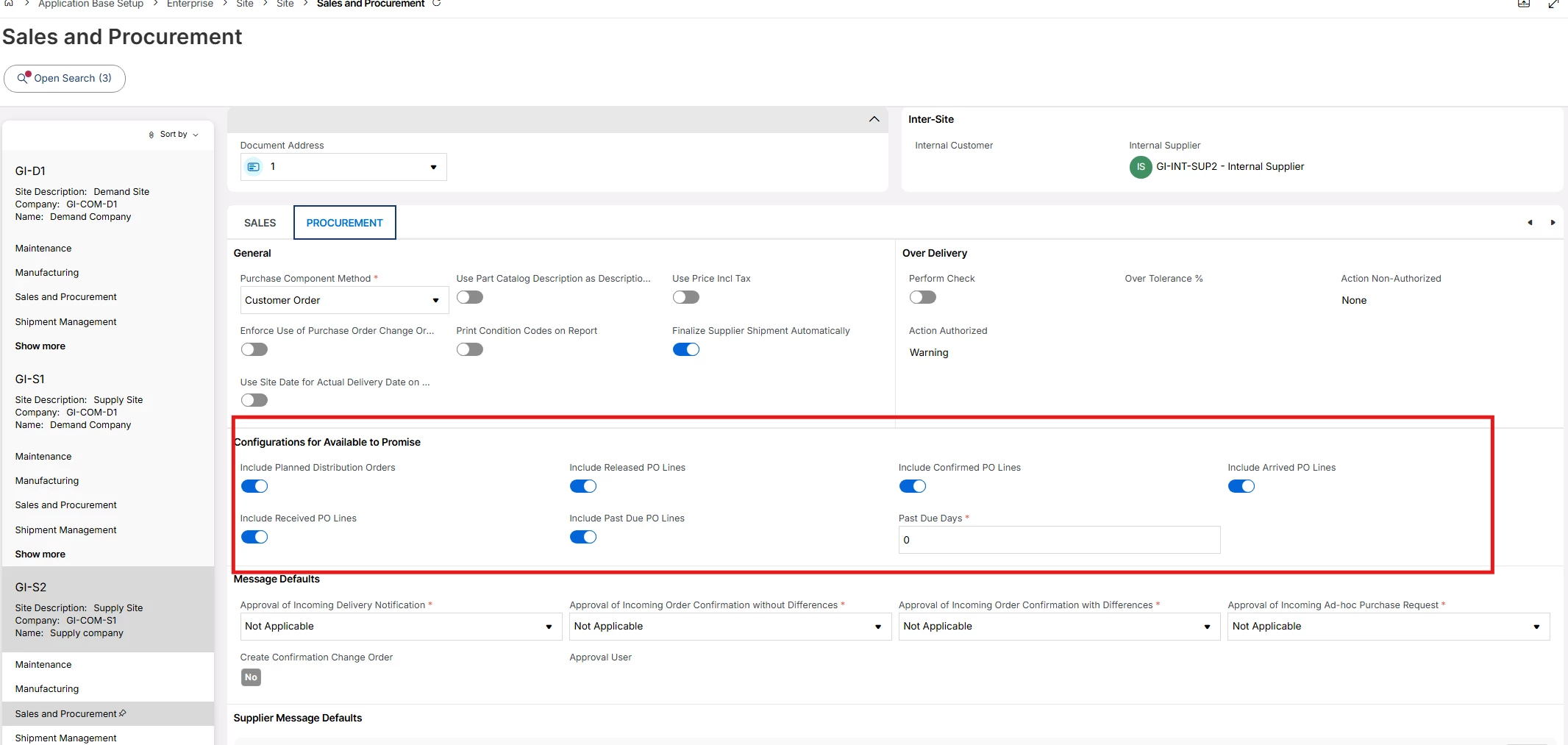
This is already addressed by the feature “ Configurable supply sources” available at site level for Replan Customer Order Lines.

Rather than a fixed rule, you can define which statuses make a supply source eligible for replanning, covering purchase order lines, shop orders, and planned distribution orders.

So you can decide per site whether Arrived purchase order lines are picked up by the replanning job and used to update the connected customer order dates, or keep a stricter set of statuses instead. A site with heavy inspection and put-away steps can be configured differently from one where arrival is effectively availability.

The setup is described in the documentation here:https://ifs26r1bndbntcmb.rnd.ifsdevworld.com/ifsdoc/documentation/en/ which is available from IFS Cloud 22R2 onwards.

Thanks and Best Regards,

Gimni


MCbra
Do Gooder (Employee)
Forum|alt.badge.img+3
  • Do Gooder (Employee)
  • September 22, 2026

Hi ​@GIISLK 

Thanks for the clarification.

I understand that the Configurable Supply Sources feature allows us to decide whether Purchase Order lines in Arrived status should be considered by the Replan Customer Order Lines process.

My concern is slightly different.

From my testing, when an Arrived PO is considered for replanning, the system appears to use the Arrival Date as the supply date for updating the Customer Order.

In many scenarios, however, the Arrival Date does not represent the actual material availability date. Activities such as quality inspection, put-away, internal transport, or other warehouse processes may delay when the material becomes available for demand.

As a result, the Customer Order may receive an overly optimistic delivery date based on the Arrival Date, even though the material is not yet available.

Is there currently any functionality, or are there any plans, to have the replanning logic consider the actual availability date rather than simply the Arrival Date for Arrived Purchase Orders?

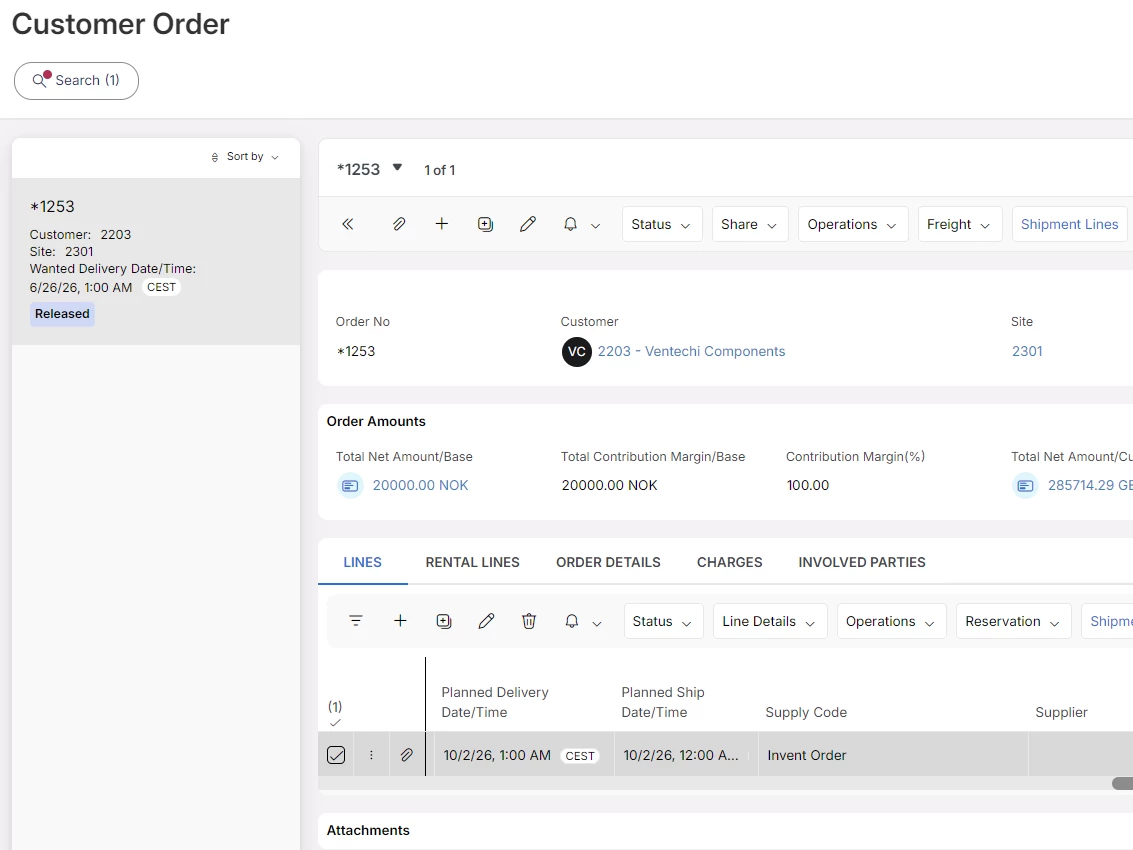
See example below

Thanks and regards

Maycon


GIISLK
Do Gooder (Employee)
Forum|alt.badge.img+3
  • Do Gooder (Employee)
  • September 23, 2026

Hi ​@MCbra 


The system determines the availability date of arrived purchase receipts by adding the Arrival Date, Internal Delivery Lead Time, and Internal Control Time defined for the supplier. This calculation is performed using the site's distribution calendar, and the resulting date is used as the supply date in ATP and supply-demand planning.

Once a purchase receipt reaches the Arrival or QA location, the quantity is considered future supply and is included in the on-hand analysis based on the calculated availability date. The system does not subsequently adjust this date according to the actual progress of quality inspections, warehouse processing, or put-away activities. Therefore, even if the inspection process takes longer than expected, the original calculated availability date remains unchanged.

It is important to note that there is no double counting of inventory. The opening on-hand balance is derived from stock in inventory locations such as Picking, Floor Stock, and Production Line, while the arrived supply calculation considers quantities in Arrival and QA locations separately.

For organizations requiring a delay between physical receipt and ATP availability, the recommended standard approach is to maintain appropriate Internal Delivery Lead Time and Internal Control Time values on the Purchase Part Supplier and Supplier Address records. These values create a planned buffer for inspection and warehouse handling activities and automatically push the availability date forward.

However, standard functionality does not support dynamically adjusting the supply date based on the actual status or completion of a specific QA inspection or put-away task. If availability should depend on the real-time completion of these activities, this would require an enhancement or a custom replanning approach, as such behavior is not considered by the standard Replanning process.


Thanks and Best Regards,

Gimni