Question

Duplication of the demand in the IPAP

  • March 16, 2026
  • 2 replies
  • 38 views

Forum|alt.badge.img+4

Hello, 

Why in the IPAP we find in need both “Customer Schedule Forecast” and “Master Schedule Unconsommed Forecast”.
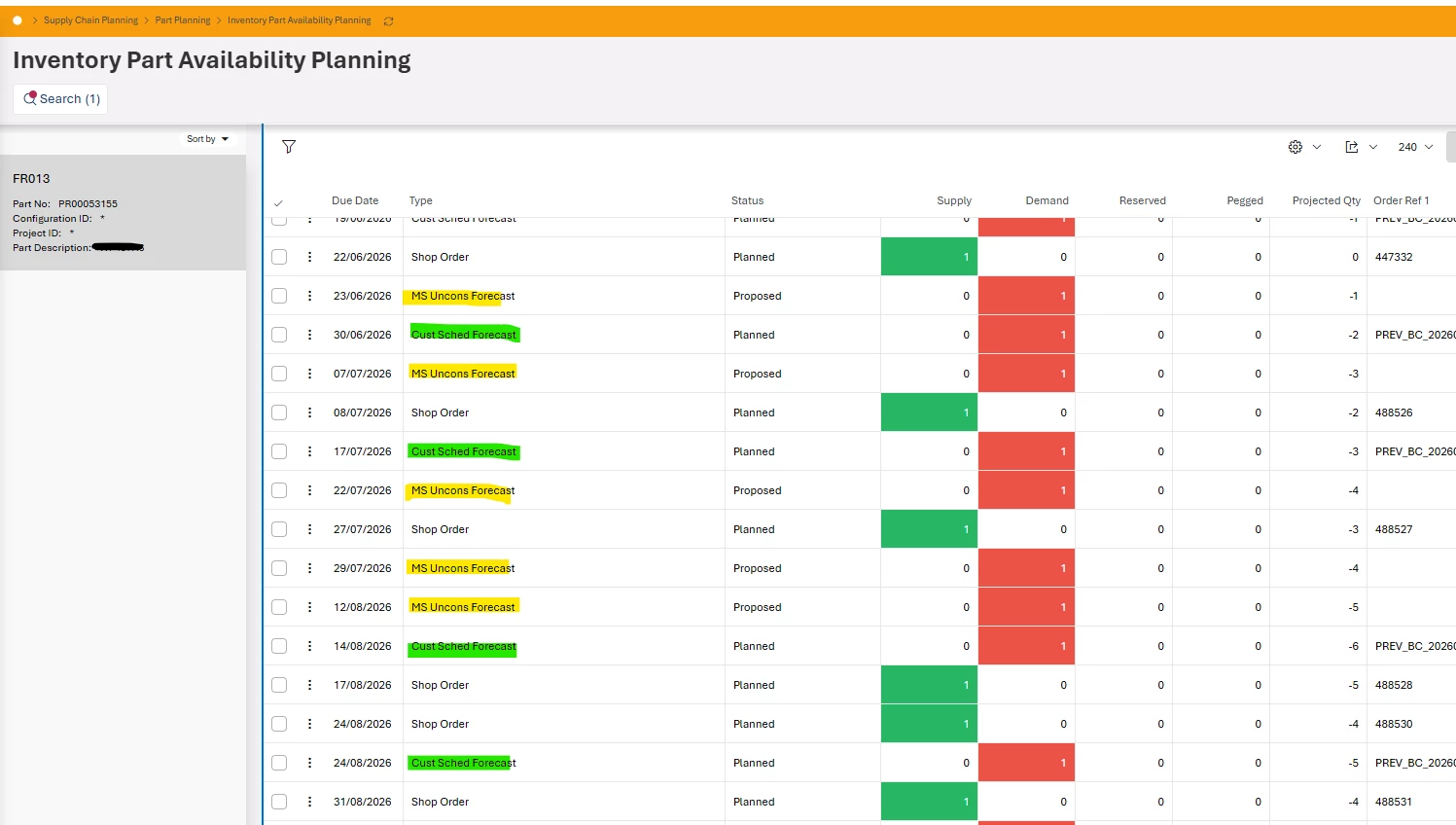


Do you have any explanation ? Because on the IPAP, the projected quantity is completely false.

We work with IFS CLOUD-25R1.

2 replies

jbush0419
Do Gooder (Customer)
Forum|alt.badge.img+3
  • Do Gooder (Customer)
  • March 19, 2026

@B.COLAS - 

The duplication you're seeing between "Customer Schedule Forecast" and "Master Schedule Unconsumed Forecast" typically occurs when both demand sources are feeding into the same planning calculations. Here's what's likely happening:

When Customer Schedule Forecasts are imported into Master Scheduling, they create Master Schedule demand. If the "Show Unconsumed Forecast in IPAP" setting is enabled on the part, you'll see both the original Customer Schedule Forecast AND the Master Schedule Unconsumed Forecast appearing as separate demand lines - even though they represent the same underlying requirement.

How to Fix This:

  1. Navigate to Inventory Part > Planning Data tab for the affected part
  2. Look for the checkbox "Show Unconsumed Forecast in IPAP"
  3. Uncheck this box to prevent the Master Schedule unconsumed forecast from displaying in IPAP

This should eliminate the duplication and give you accurate projected quantities that only show the actual Customer Schedule Forecast demand.

another consideration:

You could also review your Customer Schedule import parameters to ensure you're not inadvertently creating duplicate entries during the import process from Customer Schedules to Master Scheduling.

The key point here is that when Customer Schedule Forecasts are properly imported into Master Scheduling, you should typically only see one representation of that demand in IPAP - not both the original Customer Schedule line and the resulting Master Schedule forecast.

I’ve seen this before, and even though I don’t currently use master scheduling, I remember this from past implementations.. Hope this helps!


-jason


Forum|alt.badge.img+4
  • Author
  • Sidekick (Customer)
  • March 19, 2026

Thank you for your feedback.
We encounter this situation when we update our Customer Schedule Forecasts, while — at the same time — we have not yet updated, or do not intend to update, our Master Schedule based on the new forecast.

Our intention is for the IPAP to reflect only the demand driven by the Master Schedule, so that the various supply chain teams can challenge themselves against the established plan, without being influenced by the customer’s forecast.
And therefore hide the Customer Schedule Forecasts to keep only the Master Schedule unconsumed forecasts.