Solved

Default Receive Case for inventory part in IFS Cloud

  • Sep 21, 2022 3:35 PM UTC
  • 4 replies
  • 480 views

Forum|alt.badge.img+6

Hi All,


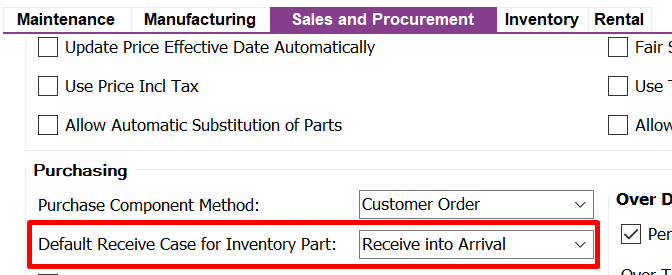
Previously on Apps 10 it was possible to define the Default Receive Case for Inventory Part on Site Windows in Sales and Procurement tab.


I try to find out this field without any success.


If someone knows where this field is hide, it will be a hudge help.


Thanks in advance.

Best answer by ryandu

In IFS cloud please check under Site > Shipment Management tab. Then you will find the option for Inbound shipment with default receiving case option. 

View original

4 replies

Forum|alt.badge.img+5
  • Do Gooder (Employee)
  • Answer
  • Sep 21, 2022 3:49 PM UTC

In IFS cloud please check under Site > Shipment Management tab. Then you will find the option for Inbound shipment with default receiving case option. 


Forum|alt.badge.img+5
  • Do Gooder (Employee)
  • Sep 21, 2022 3:56 PM UTC

If you are looking for this in Apps 10 then you need to navigate to site > sales and procurement tab and under this you will find an option within purchasing section as below 


Forum|alt.badge.img+6
  • Author
  • Sidekick (Partner)
  • Sep 21, 2022 3:57 PM UTC

Was exactly taht, thanks again


Forum|alt.badge.img+2
  • Do Gooder (Partner)
  • Nov 11, 2024 8:24 PM UTC

Why aren’t any receive cases with inspection allowed, with a default Inspection Code?