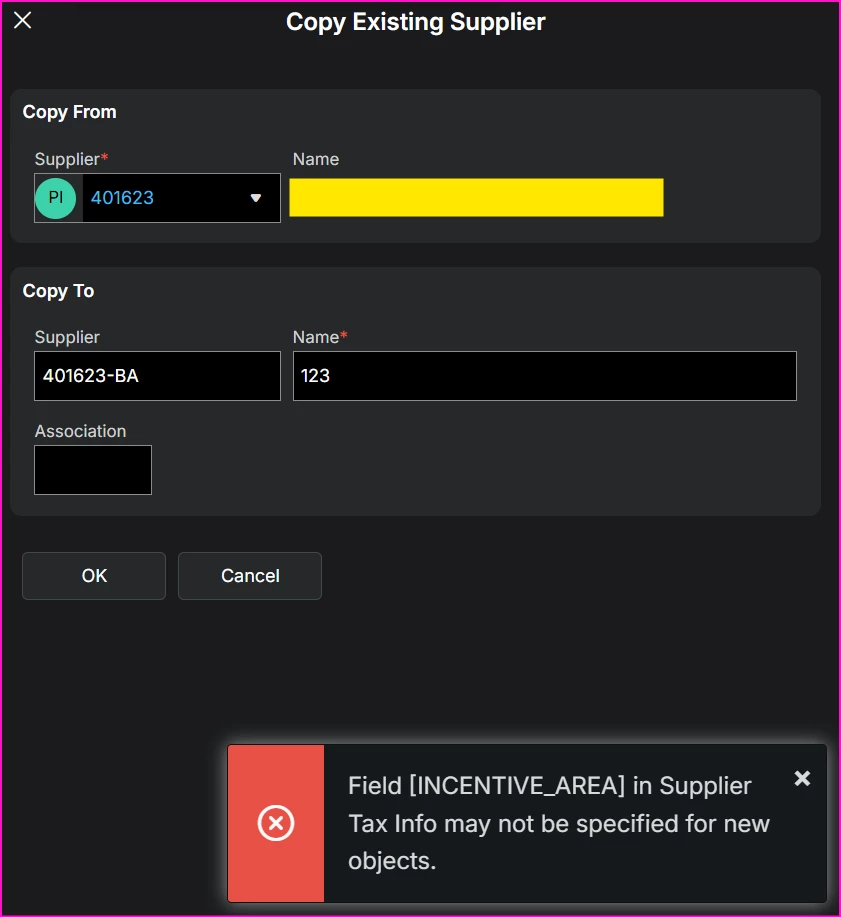
Has anyone encountered the following error when using the Copy Supplier function in the Supplier module?
Field [INCENTIVE_AREA] in Supplier Tax Info may not be specified for new objects.
We are using 25R2 SU2.I would appreciate any advice or guidance on the possible cause and how to resolve this issue. Thank you.
Best answer by Jane Perry
I found this information on this error -
This error occurs during the Copy Supplier process in IFS Cloud due to validation logic on the Incentive Area (INCENTIVE_AREA) field under the Supplier's Delivery Tax Information.
Root Cause
New Localization Field (Brazilian Tax Reform / CBS & IBS):
The Incentive Area field was introduced under Supplier > Address > Delivery Tax Information (entity: SupplierTaxInfo) to support Brazilian fiscal requirements and Avalara integration (e.g., Deposit Regime, Customs Transit Regime, Drawback Regime, Repetro, etc.).
Copy Method Validation Failure:
When the company has Brazilian Specific Attributes or CBS/IBS Tax enabled, Incentive Area becomes a required/validated enumeration attribute.
During the Copy Supplier workflow (which copies address, financial, and tax records from the source supplier to the new supplier), the system attempts to create the new SupplierTaxInfo record.
If the source supplier's address has a null or missing Incentive Area, or if the copy framework fails to pass/default the IncentiveArea enumeration value, the validation checks block creation and trigger an error (e.g., "Field Incentive Area is required and requires a value").
Recommended Workarounds & Fixes
1. Populate the Source Supplier's Incentive Area
Navigate to the source supplier record you are copying from.
Go to Address > Delivery Tax Information (or Address > Tax Information).
Ensure the Incentive Area field is populated with a valid regime option before running the Copy Supplier action.
2. Manual Supplier Creation (If Copying Fails)
If the Copy Supplier tool continues to fail, manually create the new supplier and enter address/tax details directly on the new record.
3. Check Core Patch / Known Issue Reference
This issue stems from core framework updates introduced in recent IFS Cloud tracks (related to task FIDEV-35968 / FIDEV-37842) where copying methods did not gracefully handle mandatory tax attributes added during the tax reform update.
If you are in a cloud environment, contact your system administrator or IFS Support to verify if a patch/deliverable is required for your specific release track.
This error occurs during the Copy Supplier process in IFS Cloud due to validation logic on the Incentive Area (INCENTIVE_AREA) field under the Supplier's Delivery Tax Information.
Root Cause
New Localization Field (Brazilian Tax Reform / CBS & IBS):
The Incentive Area field was introduced under Supplier > Address > Delivery Tax Information (entity: SupplierTaxInfo) to support Brazilian fiscal requirements and Avalara integration (e.g., Deposit Regime, Customs Transit Regime, Drawback Regime, Repetro, etc.).
Copy Method Validation Failure:
When the company has Brazilian Specific Attributes or CBS/IBS Tax enabled, Incentive Area becomes a required/validated enumeration attribute.
During the Copy Supplier workflow (which copies address, financial, and tax records from the source supplier to the new supplier), the system attempts to create the new SupplierTaxInfo record.
If the source supplier's address has a null or missing Incentive Area, or if the copy framework fails to pass/default the IncentiveArea enumeration value, the validation checks block creation and trigger an error (e.g., "Field Incentive Area is required and requires a value").
Recommended Workarounds & Fixes
1. Populate the Source Supplier's Incentive Area
Navigate to the source supplier record you are copying from.
Go to Address > Delivery Tax Information (or Address > Tax Information).
Ensure the Incentive Area field is populated with a valid regime option before running the Copy Supplier action.
2. Manual Supplier Creation (If Copying Fails)
If the Copy Supplier tool continues to fail, manually create the new supplier and enter address/tax details directly on the new record.
3. Check Core Patch / Known Issue Reference
This issue stems from core framework updates introduced in recent IFS Cloud tracks (related to task FIDEV-35968 / FIDEV-37842) where copying methods did not gracefully handle mandatory tax attributes added during the tax reform update.
If you are in a cloud environment, contact your system administrator or IFS Support to verify if a patch/deliverable is required for your specific release track.