Question

Code Part value error

  • January 12, 2026
  • 1 reply
  • 45 views

Forum|alt.badge.img+6

Hello,

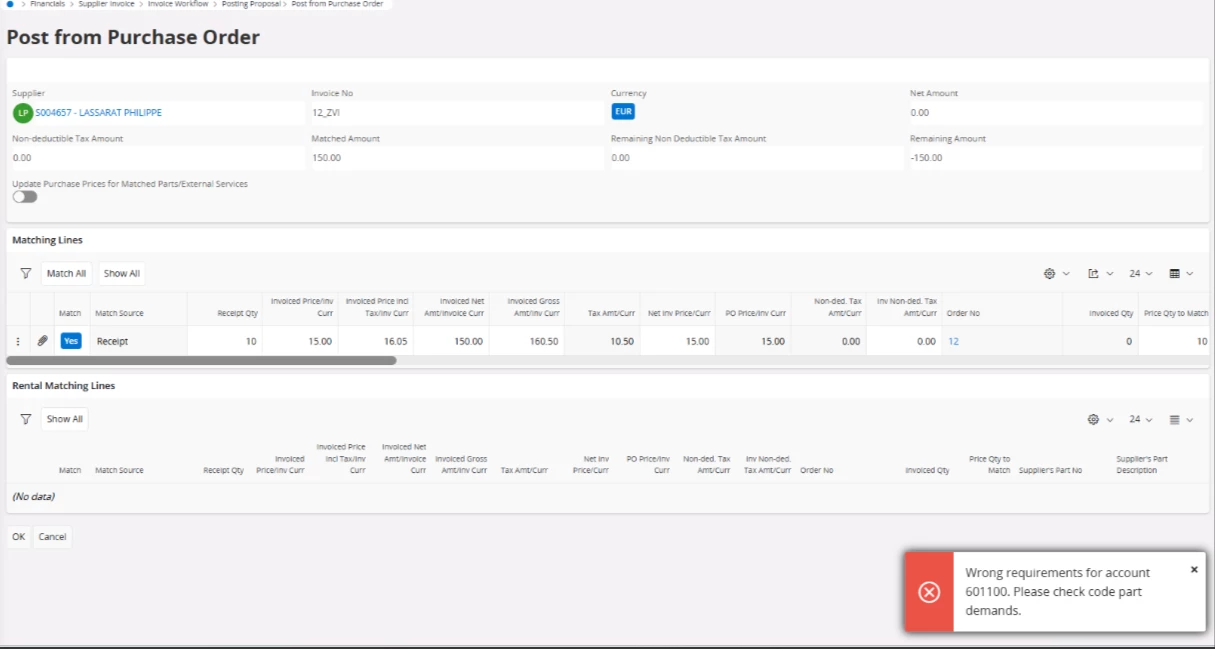
I am facing the below error.

What might the issue or missing setup
 

Regards,

Kruthika

1 reply

Nikila Dis
Superhero (Employee)
Forum|alt.badge.img+14
  • Superhero (Employee)
  • January 12, 2026

Hi ​@kruthika,

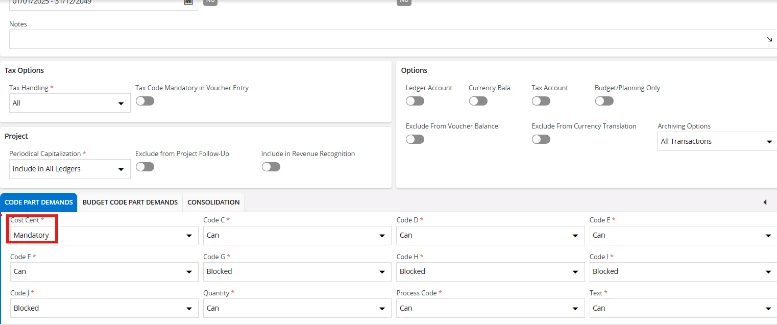
Navigate to the Account Window > 601100

Check whether you have define Code Part Demand as Mandatory for the specific account that is to be used in the Manual Voucher. The reason the code part demand validation message pops up as soon as user select the posting template (which is created without a cost center) is that you may have set the code part demand for the cost center of the particular account to mandatory. In APP 10, users were able to select the posting template and then edit the posting lines accordingly. To elaborate further, APP 10 allows the user to choose a template even if the cost center is not pre- set in the posting template and then to edit the posting lines to add the cost center as needed.

In APP 10, when a user enters a posting template, the validation message pops up only when trying to save the posting lines. The user requires to manually save after adding the template.

However, in cloud the design is different. There is no option to manually save once the posting template is fetched. In other words, once user select the posting template, it gets automatically saved and fetched to the posting information. No additional save option appears like in APP 10.

That is why the validation comes early when using a posting template. Cloud is not designed to have unsaved posting lines when adding a posting template. As a workaround users can manually fetch the cost center to the posting template before it is used in the posting proposal.

Regards,

Nikila Dissanayake