Solved

Bulk change of Customer Order line promise delivery date

  • July 29, 2025
  • 2 replies
  • 45 views

Forum|alt.badge.img+11

Hi guys,


Is there a way of change the promise delivery date for all lines at once? For example, when we update the WANTED DELIVERY DATE on CUSTOMER ORDER, it ask us if we want to change all CUSTOMER ORDER LINE WANTED DELIVERY DATE.

Thanks,


Gianni Neves
Best answer by matt.watters

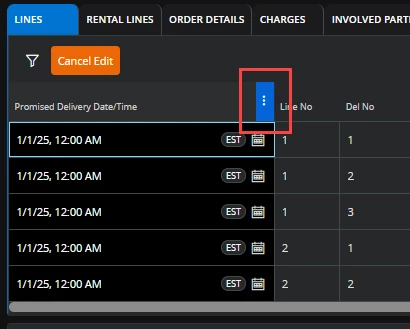
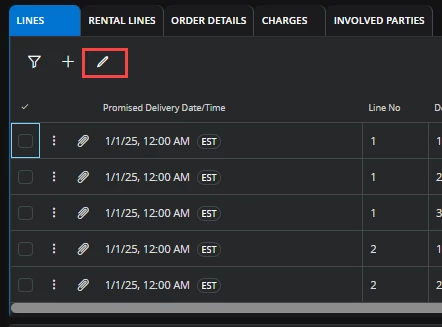
Manual method: Either in the Lines tab of the Customer Order or in the Customer Order Lines page:

  1. Enter edit mode
  2. Select the three dots in the column header
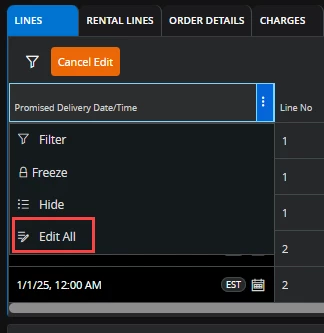
  3. Select ‘Edit All’
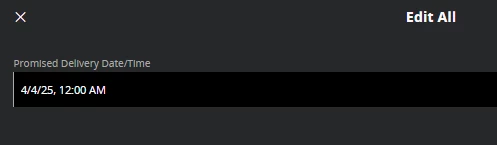
  4. In the Edit All dialog:
    1. Enter the desired date
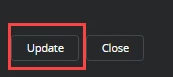
    2. Click ‘Update’
  5. Save the change.

Systematically: Promised Delivery Date will change when the planned delivery date is updated as long as an order confirmation is not printed/sent.


2 replies

matt.watters
Ultimate Hero (Partner)
Forum|alt.badge.img+26
  • Ultimate Hero (Partner)
  • Answer
  • July 29, 2025

Manual method: Either in the Lines tab of the Customer Order or in the Customer Order Lines page:

  1. Enter edit mode
  2. Select the three dots in the column header
  3. Select ‘Edit All’
  4. In the Edit All dialog:
    1. Enter the desired date
    2. Click ‘Update’
  5. Save the change.

Systematically: Promised Delivery Date will change when the planned delivery date is updated as long as an order confirmation is not printed/sent.


Forum|alt.badge.img+11
  • Author
  • Hero (Customer)
  • July 29, 2025

Thanks very much ​@matt.watters, it works.