Question

Adjusting Column Width on Tablet

  • Feb 6, 2025 7:12 AM UTC
  • 5 replies
  • 169 views

Forum|alt.badge.img+1

Hi All,


We are using Aurena on the Tablets but the problem we are facing is adjusting the column width (e.g. Part description is not completely visible) and unable to adjust the width manually on tab. Any Advise to fix this issue?


5 replies

PRODQ
Superhero (Customer)
Forum|alt.badge.img+19
  • Superhero (Customer)
  • Feb 6, 2025 10:34 AM UTC

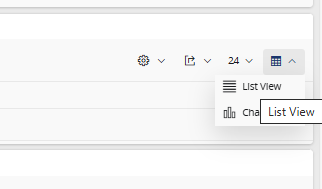
Is your view set to List View or Table View?


matt.watters
Ultimate Hero (Partner)
Forum|alt.badge.img+26
  • Ultimate Hero (Partner)
  • Feb 6, 2025 12:26 PM UTC

As ​@PRODQ hinted at, you can only adjust column widths when using Table View. The intent behind List View was to have only the truly relevant information always visible to the user, but for some reason the framework does not allow you to adjust column widths.


Forum|alt.badge.img+1
  • Author
  • Do Gooder (Partner)
  • Feb 10, 2025 8:34 AM UTC

Is your view set to List View or Table View?


Table view, It does not work on the Tablets


matt.watters
Ultimate Hero (Partner)
Forum|alt.badge.img+26
  • Ultimate Hero (Partner)
  • Feb 10, 2025 11:47 AM UTC

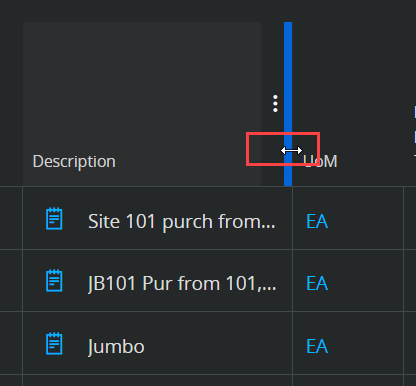
​@NomanShah when you say it does not work in Table View on tablets, do you mean you cannot see a re-sizing handle as below? Maybe this is available only with a mouse?


Abdul
Superhero (Partner)
Forum|alt.badge.img+20
  • Superhero (Partner)
  • Feb 10, 2025 12:31 PM UTC

​@NomanShah when you say it does not work in Table View on tablets, do you mean you cannot see a re-sizing handle as below? Maybe this is available only with a mouse?


Yes matt, it is possible through mouse only :)