Question

Work Task Cost Code Rules

  • Jul 7, 2026 9:58 AM UTC
  • 1 reply
  • 38 views

Forum|alt.badge.img+1

Hi,

I have a question regarding the work task cost code setup and the process.

When the Cost Code selection criteria is the same, is there a way to define which cost code should get picked to the work task depending on the type of work?
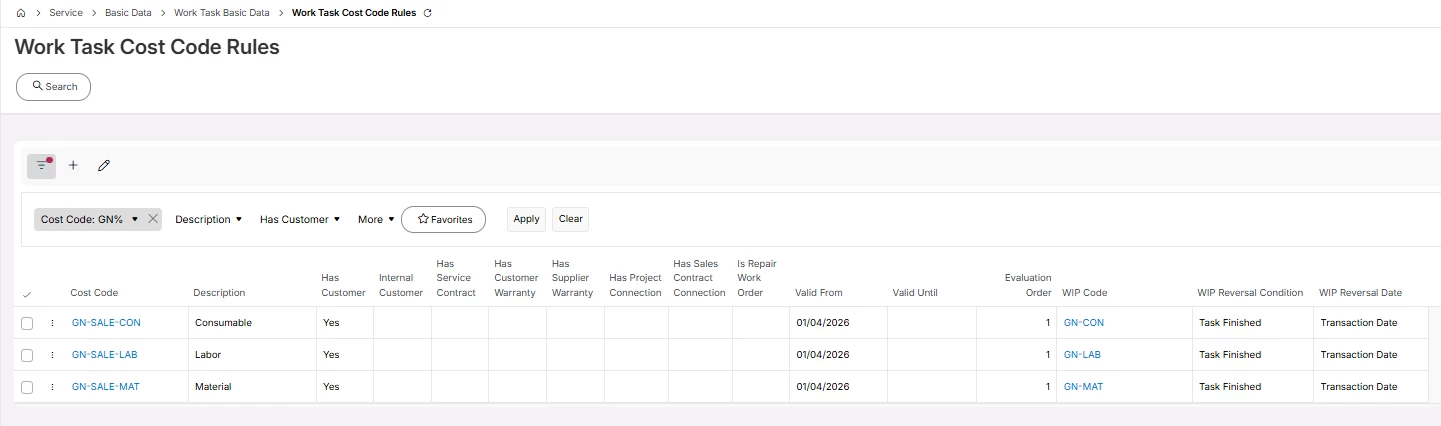

 

1 reply

richardwoods
Do Gooder (Partner)
Forum|alt.badge.img+6
  • Do Gooder (Partner)
  • Nov 24, 2026 10:58 PM UTC

Short answer: when two Work Task Cost Code Rules match on all the criteria, the rule with the lower Evaluation Order wins, where 1 is the highest priority. If you want different cost codes for different kinds of work, the usual approach is to give the rules different criteria, and use Evaluation Order only for the overlap that remains.

A setup along these lines

  • Service > Basic Data > Work Task Basic Data > Work Task Cost Codes: create the codes first, for example CC_STD, CC_WARR, CC_REPAIR.
  • Service > Basic Data > Work Task Basic Data > Work Task Cost Code Rules: one row per rule, each with Valid From (mandatory), an optional Valid Until and a mandatory Evaluation Order.
  • Each Yes/No criterion either restricts the rule (Yes or No) or is ignored if left blank. Criteria available include Has Customer, Internal Customer, Has Service Contract, Has Customer Warranty, Has Supplier Warranty, Has Project Connection and Is Repair Work Order.

An example rule set

  • Rule 1: CC_REPAIR, Is Repair Work Order = Yes, Evaluation Order 1.
  • Rule 2: CC_WARR, Has Customer Warranty = Yes, Evaluation Order 2.
  • Rule 3: CC_STD, no criteria set, Evaluation Order 9, as the catch-all.

A repair work order that is also under customer warranty matches rules 1, 2 and 3, and takes CC_REPAIR because it has the lowest number. Change the numbers if you would rather warranty won.

Things to know

  • Rules for the same criteria can sit side by side over time using the validity dates, but overlapping date ranges give an error, so end one before the next starts.
  • Postings for the cost code need the control type C106 set up in Posting Control for each posting type.
  • A cost code marked Use as Override on the Work Task Cost Codes page is there for overriding the rule result, so it is worth deciding whether you want that as a manual escape route.

Worth a look: the IFS Cloud documentation for Cost Code Selection Criteria, Define Cost Code Rules and Cost Codes and Cost Code Rules.

What do you mean by type of work: preventive versus corrective, repair, warranty, internal versus customer work, or a work type value on the task?

Created with the help of Ask Olive.