Question

Printing Media Graphics on Report Designer Reports

  • October 26, 2020
  • 3 replies
  • 409 views

Forum|alt.badge.img+7

Hello all,


Is it possible to print attached media files on a report designer report? Specifically in this case we are trying to print the media receipts on to the IFS report designer expense report.


Thanks,

Rich

 

3 replies

william.klotz
Superhero (Customer)
Forum|alt.badge.img+21
  • Superhero (Customer)
  • October 26, 2020

Hi @rsczerowski ,


It is possible to print the media files on a report designer report.  You’ll have to write the code in your RDL file (PL/SQL code) to extract the blob data and make it available to the report designer.   Have a look at the Media_Library_API  and Media_Library_Item_API to see the functions and procedures available to you.   If you have access to the built in report sources you can look at CustomerOrderConf.rdf (Customer Order Confirmation Report) you’ll see how they retrieve media images associated with the part catalog and print them on the customer order confirmation.


For example to see if any media files are available at the logical unit ExpenseHeader you’d write something like below.


library_id_   VARCHAR2(200);

library_id_ := Media_Library_Item_API.Media_Library_Item_Exist('ExpenseHeader', expense_id_);
IF (library_id_ IS NOT NULL) THEN
    // Extract media file.
END IF;


Regards,

William Klotz


Forum|alt.badge.img+15
  • March 13, 2026

Hello all,


Is it possible to print attached media files on a report designer report? Specifically in this case we are trying to print the media receipts on to the IFS report designer expense report.


Thanks,

Rich


Hi ​@rsczerowski were you able to achieve this requirement, please? 


Forum|alt.badge.img+4
  • Do Gooder (Customer)
  • March 18, 2026

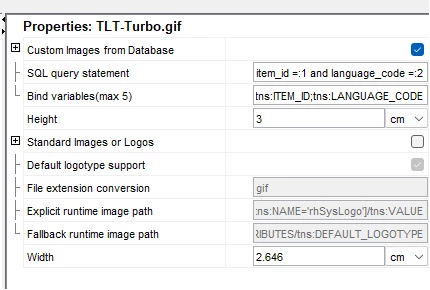
Hi, we have a custom report for the Non Conformance Report. We wanted to print all the media files there. I looked at another report to see how the image is embedded using the ITEM_ID and LANGUAGE_CODE.

select media_object from media_item_lang_image where item_id =:1 and language_code =:2
tns:ITEM_ID;tns:LANGUAGE_CODE


Then I created a query in the .report file to link the NCR to the media files.

SELECT b.ITEM_ID, c.LANGUAGE_CODE
FROM MEDIA_LIBRARY a
LEFT JOIN MEDIA_LIBRARY_ITEM_JOIN b 
ON a.LIBRARY_ID = b.LIBRARY_ID 
LEFT JOIN MEDIA_ITEM_LANG_IMAGE c
ON b.ITEM_ID = c.ITEM_ID 
WHERE a.LU_NAME = 'NonConformanceReport'
AND a.CONNECTED_OBJ_REF1 = ncr_no_


This solution worked very quickly and easily for us.