


Solved

ORA error in Failed Transaction

  • August 13, 2026
  • 2 replies
  • 52 views

Forum|alt.badge.img+7

Hello,


Recently I have seeing the sync issue between mobile application and Cloud, I try to start the Assignment and fill Time Entries from mobile but the status doesn’t updates on cloud.


I checked the failed transactions and found the error - 

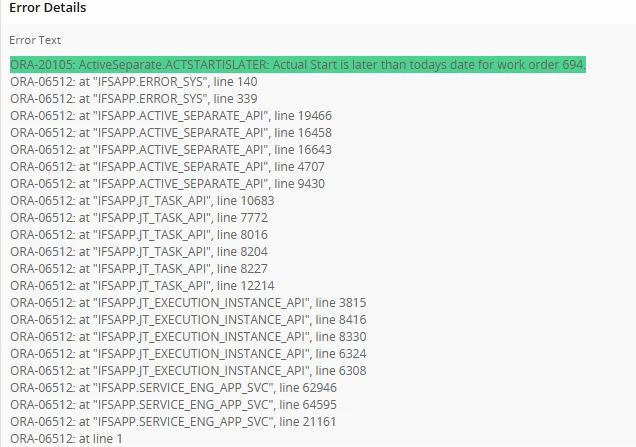
ORA-20105: ActiveSeparate.ACTSTARTISLATER: Actual Start is later than todays date for work order 694.
 

Does anyone know why this is happening with few accounts while others work perfectly and what is the fix


Thanks & Regards,

Mani

Best answer by dirolk

Hi Mani,

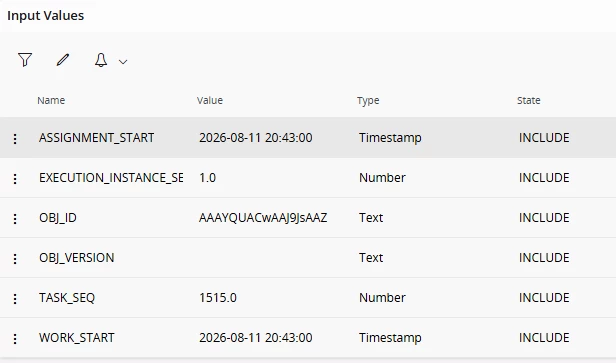
This is almost always a time‑zone mismatch, not a bug. Which is why only some accounts hit it. On Start Work, MWO sends the actual start timestamp (yours: 2026‑08‑11 20:43:00), and the server rejects it with ORA-20105: ACTSTARTISLATER if it's "in the future" versus the server's sysdate.so the status never syncs.

The failing accounts are the ones whose Work Order Site Time Zone Offset (or device time zone) doesn't match the server.

Fix:

  1. Check the affected Site's Time Zone Offset matches the technician's zone and the server.Correct any drift.
  2. Confirm devices' date/time/zone are on automatic and match the server.
  3. Then delete the stuck failed transactions and re‑initialize the device to re‑sync cleanly.

Quick check: compare the Site offset + device zone of a failing vs a working account.

2 replies

dirolk
Do Gooder (Employee)
Forum|alt.badge.img+4
  • Do Gooder (Employee)
  • Answer
  • August 17, 2026

Hi Mani,

This is almost always a time‑zone mismatch, not a bug. Which is why only some accounts hit it. On Start Work, MWO sends the actual start timestamp (yours: 2026‑08‑11 20:43:00), and the server rejects it with ORA-20105: ACTSTARTISLATER if it's "in the future" versus the server's sysdate.so the status never syncs.

The failing accounts are the ones whose Work Order Site Time Zone Offset (or device time zone) doesn't match the server.

Fix:

  1. Check the affected Site's Time Zone Offset matches the technician's zone and the server.Correct any drift.
  2. Confirm devices' date/time/zone are on automatic and match the server.
  3. Then delete the stuck failed transactions and re‑initialize the device to re‑sync cleanly.

Quick check: compare the Site offset + device zone of a failing vs a working account.


Forum|alt.badge.img+7
  • Author
  • Sidekick (Customer)
  • August 26, 2026

Hello ​@dirolk ,


Recently on Technician faced the same issue, I checked his time and he is in houston with current time as 26th Aug 2026, 08:58AM where IFS systime is 8/26/26, 1:56 PM with Offset 0 

Since Technician’s time is behind IFS time he should not be facing this issue! Plus logging out > disconnecting > connecting > login solved the problem.

Can you guide me here please what else I might be missing.


Thanks for your help.


Best Regards,

Mani

