Solved

No checkbox - Show steps for all users

  • September 25, 2020
  • 4 replies
  • 196 views

Forum|alt.badge.img+8

Hello,


I can't find option to disable visibility of all approval steps in Aprroval (Document Management).

In IFS 9 this checkbox was available : 
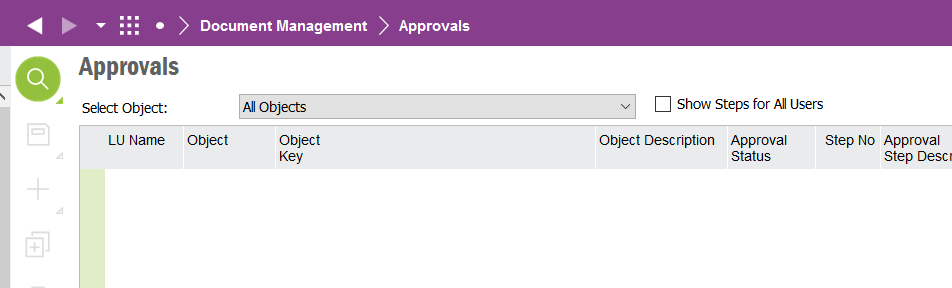
IFS 9

In IFS 10 this option is missing 

IFS10


Best answer by paul harland

You can easily add a saved search that it will execute on startup.  This one will cater for named approver (if you’re using approval groups you would need a slightly more complex query)
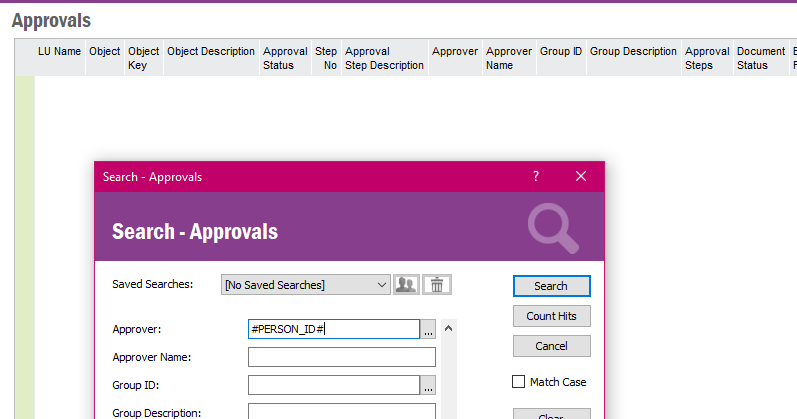
save the query then set navigator item properties
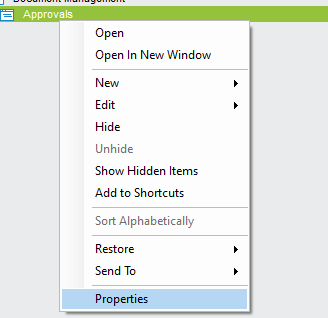
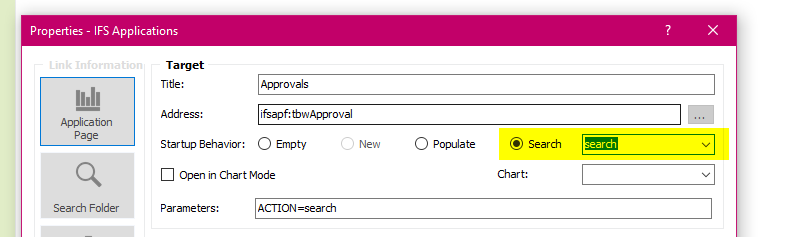
 

To be honest a better solution will be to set up a lobby, but I don’t have one that does this.  Perhaps someone else has created one. You could start a Community topic and ask if anyone has created an Approvals lobby they would share.

4 replies

paul harland
Superhero (Employee)
Forum|alt.badge.img+24

hi @DominikaM 

the behaviour of the screen has indeed been changed between Apps9 and Apps10, to remove that function.

I would guess this was done because of performance concerns.


Forum|alt.badge.img+8
  • Author
  • September 28, 2020
How do I limit this screen view now so that the user only sees their approvals? Now you can see them all.

paul harland
Superhero (Employee)
Forum|alt.badge.img+24

You can easily add a saved search that it will execute on startup.  This one will cater for named approver (if you’re using approval groups you would need a slightly more complex query)

save the query then set navigator item properties


To be honest a better solution will be to set up a lobby, but I don’t have one that does this.  Perhaps someone else has created one. You could start a Community topic and ask if anyone has created an Approvals lobby they would share.


Mathias Dahl
Superhero (Employee)
Forum|alt.badge.img+32
  • Superhero (Employee)
  • September 27, 2021

In Aurena we have a new screen named My Document Approvals that should show only document approvals that are relevant to you.