


Solved

How to transfer MWO Custom Fields across different IFS environments?

  • June 25, 2026
  • 2 replies
  • 19 views

Forum|alt.badge.img+1

Hi all,

When we create a Custom Field for the mobile app (MWO - ServiceEngApp), there are following 3 steps included.

  1. Creating the custom attribute in Entity Configuration. (Solution Manager> Configuration> Entity Configurations> Entity Configuration)
  2. Adding the custom attribute in Mobile App Entity. (Solution Manager> Mobile Apps> Configuration> Entity Details)
  3. Adding the custom attribute in the mobile app’s page. (Solution Manager> Mobile Apps> Configuration> Apps for Page Designer)

Out of these 3, only #1 can be included in an Application Configuration Package (ACP). Therefore, what is the best way to handle migration/ deployment of the other 2 items across different environments, without manually creating them again?


Any insight on how you have managed this is highly appreciated!


Thanks,

Dulshan.
Best answer by Marcel.Ausan

Hi ​@dulshand1 ,


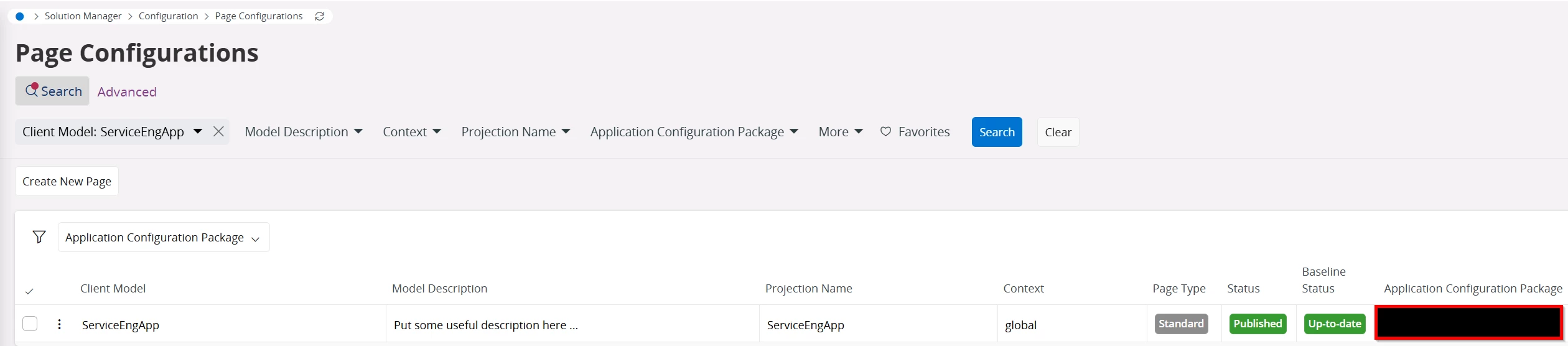
#1 and #3 can be added to the ACP. 

Basically if you’re using MWO Service, the Page Configuration can added to an ACP. 


When I’m adding a new Custom Attribute, I add the attribute and the Page Config to the ACP. Then I always do the Mobile App Entity step manually.

2 replies

Marcel.Ausan
Ultimate Hero (Partner)
Forum|alt.badge.img+22
  • Ultimate Hero (Partner)
  • Answer
  • June 25, 2026

Hi ​@dulshand1 ,


#1 and #3 can be added to the ACP. 

Basically if you’re using MWO Service, the Page Configuration can added to an ACP. 


When I’m adding a new Custom Attribute, I add the attribute and the Page Config to the ACP. Then I always do the Mobile App Entity step manually.


Forum|alt.badge.img+1
  • Author
  • Do Gooder (Customer)
  • June 26, 2026

Thanks ​@Marcel.Ausan  for pointing this out. I overlooked #3 in Page Configurations. Guess we’ll have to manually do the Mobile App Entity changes.


