Solved

How to dispatch WO to mobile?

  • November 30, 2023
  • 4 replies
  • 38 views

Forum|alt.badge.img+16

Community,


We are on APP10/UPD9. We are testing MWO. 

As we remember in APP9, on Prepare Work Order screen, you have the RMB function to dispath the current work order to mobile, but current in our screen, we cannot find this option anywhere.

any idea?

Thank you.
Best answer by James Ashmore

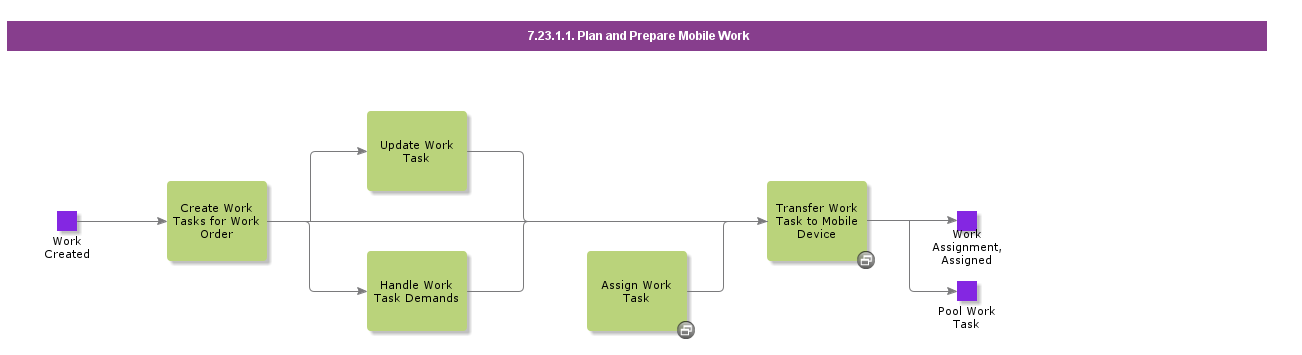
You need to do this from the Work Task in Apps 10. See the business process “Plan and Prepare Mobile Work”:


Cheers

James

4 replies

James Ashmore
Hero (Employee)
Forum|alt.badge.img+16
  • Hero (Employee)
  • Answer
  • November 30, 2023

You need to do this from the Work Task in Apps 10. See the business process “Plan and Prepare Mobile Work”:


Cheers

James


Alexander Heinze
Ultimate Hero (Employee)
Forum|alt.badge.img+23
  • Ultimate Hero (Employee)
  • November 30, 2023


On what page do you miss that button - Work Order or Work Task?


Forum|alt.badge.img+16
  • Author
  • Hero (Customer)
  • November 30, 2023

@James Ashmore Thank you.

@Alexander Heinze Thank you. It’s on window Prepare Work Order.


Alexander Heinze
Ultimate Hero (Employee)
Forum|alt.badge.img+23
  • Ultimate Hero (Employee)
  • December 1, 2023

As James pointed out, check out the individual task. You send a task (assignment) to MWO, not the work order itself.