Question

ACL Designer when using the dark theme

  • April 14, 2026
  • 2 replies
  • 29 views

Forum|alt.badge.img+1

Hello Community,

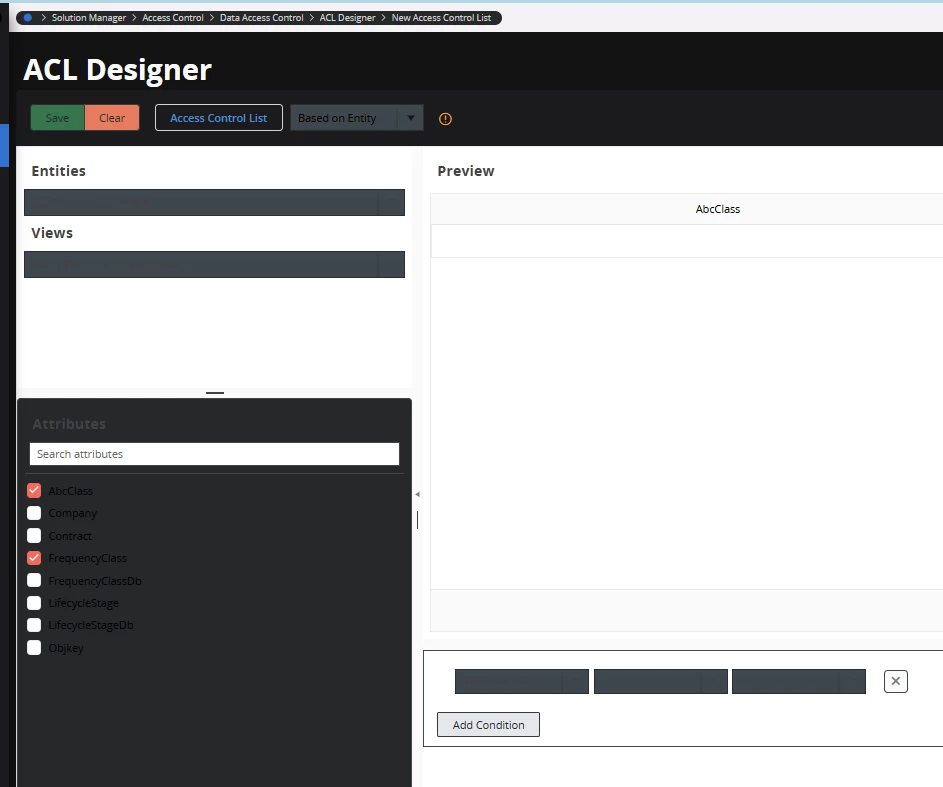
we are experiencing a strange UI behavior in ACL Designer when using the dark theme.
The text on this page is displayed in black, which makes the content very hard (almost impossible) to read. This issue seems to be limited to the ACL Designer page only.

Has anyone encountered a similar issue?
Are there any known workarounds or configuration options, or is switching users to the light theme currently the only solution?

We use Application service update: 25.1.5 and Framework service update: 25.1.10

Thanks in advance for any insights!


2 replies

Forum|alt.badge.img+9
  • Hero (Partner)
  • April 15, 2026

Hello Community,

we are experiencing a strange UI behavior in ACL Designer when using the dark theme.
The text on this page is displayed in black, which makes the content very hard (almost impossible) to read. This issue seems to be limited to the ACL Designer page only.

Has anyone encountered a similar issue?
Are there any known workarounds or configuration options, or is switching users to the light theme currently the only solution?

We use Application service update: 25.1.5 and Framework service update: 25.1.10

Thanks in advance for any insights!



Hi ​@daniela.chavez ,

Yes, this is a known UI theming issue in ACL Designer where certain text elements don't inherit the dark theme styling correctly, causing black text to render on a dark background. You're not alone in seeing this!

A few things to try:

1. **Switch to Light Theme as an immediate workaround** — As you suspected, this is currently the most reliable fix for usability. You can toggle it under your user profile/theme settings. Not ideal, but it unblocks your work right away.

2. **Check for a hotfix or patch** — On version 25.1.5 / Framework 25.1.10, it's worth raising this with IFS Support directly if you haven't already, as UI theming regressions like this are sometimes addressed in point releases. Ask them specifically about ACL Designer dark theme rendering for your update level.

3. **Browser & Cache check** — Just to rule out client-side causes: try a hard refresh (Ctrl+Shift+R), test in a different browser, and clear your browser cache. Occasionally, cached stylesheets can cause theme conflicts.

4. **Custom CSS / Branding overrides** — If your environment has any custom branding or CSS overrides applied, those can sometimes conflict with dark theme rendering on specific pages like ACL Designer. Worth checking with your system admin if any customizations are in place.

The fact that it's isolated to ACL Designer does point to a component-specific styling gap rather than a global theme issue, so it's likely something IFS would need to address in a future update.

Hope this helps — let us know if raising it with IFS Support yields a fix!


IFS Community
Sidekick (Employee)
Forum|alt.badge.img+9
  • Sidekick (Employee)
  • April 15, 2026

Thanks for contributing to the discussion. We’d like to highlight that AI tools can be helpful when drafting or structuring responses, but we expect all content shared in the IFS Community to be reviewed, validated, and reflect the author’s own understanding.

AI‑assisted responses should be treated as a starting point - not a final authority. Please take a moment to verify accuracy, add context from your own experience where possible, and include references if you’re sharing technical guidance.

We also encourage transparency where a response is largely AI‑supported (for example: “This response includes AI‑generated content that I reviewed and validated before posting.”).

This helps maintain trust and ensures discussions remain helpful and reliable for everyone.

- IFS Community Team