Question

can we use the "Demand" instead of the "Adjusted Demand" to calculate the "system forecast"

  • March 16, 2026
  • 4 replies
  • 62 views

Forum|alt.badge.img+2

We are using the IFS demand planning model for quite sometime, currently using the Cloud client,

We noticed that the system  takes the "Adjusted Demand" values to predict the "System Forecast" , want to know if I could use only the "Demand"(actual demand)  to calculate the "System forecast"?

 

4 replies

Richard Owen
Superhero (Employee)
Forum|alt.badge.img+15
  • Superhero (Employee)
  • March 16, 2026

Hi,

You are correct, Demand Planner will use the Adjusted Demand when computing the System Forecast.

By default, the Adjusted Demand is always equal to the Actual Demand.

Typically, the user will only make changes to the Adjusted Demand by exception when required (e.g., to smooth out demand spikes or make other changes to better reflect what the historical demand should have looked like).

Having said that, why is the Adjusted Demand different to Actual Demand in your example, and why can’t the values but set equal if they should not affect the system forecast? 

Thanks


Forum|alt.badge.img+2
  • Author
  • Sidekick (Partner)
  • March 16, 2026

Hi,

You are correct, Demand Planner will use the Adjusted Demand when computing the System Forecast.

By default, the Adjusted Demand is always equal to the Actual Demand.

Typically, the user will only make changes to the Adjusted Demand by exception when required (e.g., to smooth out demand spikes or make other changes to better reflect what the historical demand should have looked like).

Having said that, why is the Adjusted Demand different to Actual Demand in your example, and why can’t the values but set equal if they should not affect the system forecast? 

Thanks

 The Adjusted Demand different to Actual Demand, i feel is due to the taking of the “Qty Lost” , when this is taken i feel it adds to the “Adjusted Demand” so 

(Qty Lost+Demand = Adjusted Demand)


i assume this is the calculation? is there a setting to avoid and take only the “demand” value? 


Forum|alt.badge.img+1
  • Do Gooder (Customer)
  • April 7, 2026

Hello,

I am facing a similar situation as irajsn and would like to follow up on this topic from my perspective.

Last week, I enabled the Sold Out Days functionality, and I can now see that the Adjusted Demand is being increased by Quantity Lost. I believe I understand the underlying logic and the intention behind this design.

However, I have two related questions:

  1. Is it possible to disable the increase of Adjusted Demand by Quantity Lost?
    For example, via Advanced Server Settings or any other Demand Plan Server configuration.

  2. Is there a documented formula or clear logic describing how Adjusted Demand is calculated automatically?
    From my understanding, the primary source is Demand, but the calculation also seems to take into account:

    • Quantity Lost
    • Inherited Demand
    • Events (when Event Cleansing is enabled)
    • Campaigns (when Campaign Auto Cleansing is enabled)

For context, I am working with the following versions:

  • Application Service Update: 25.1.5
  • Demand Plan Server: 25.1.2.0

I would appreciate any clarification or guidance on this.

Thank you in advance.


Richard Owen
Superhero (Employee)
Forum|alt.badge.img+15
  • Superhero (Employee)
  • April 10, 2026

Hello,

I am facing a similar situation as irajsn and would like to follow up on this topic from my perspective.

Last week, I enabled the Sold Out Days functionality, and I can now see that the Adjusted Demand is being increased by Quantity Lost. I believe I understand the underlying logic and the intention behind this design.

However, I have two related questions:

  1. Is it possible to disable the increase of Adjusted Demand by Quantity Lost?
    For example, via Advanced Server Settings or any other Demand Plan Server configuration.

  2. Is there a documented formula or clear logic describing how Adjusted Demand is calculated automatically?
    From my understanding, the primary source is Demand, but the calculation also seems to take into account:

    • Quantity Lost
    • Inherited Demand
    • Events (when Event Cleansing is enabled)
    • Campaigns (when Campaign Auto Cleansing is enabled)

For context, I am working with the following versions:

  • Application Service Update: 25.1.5
  • Demand Plan Server: 25.1.2.0

I would appreciate any clarification or guidance on this.

Thank you in advance.

Hi Daniela,

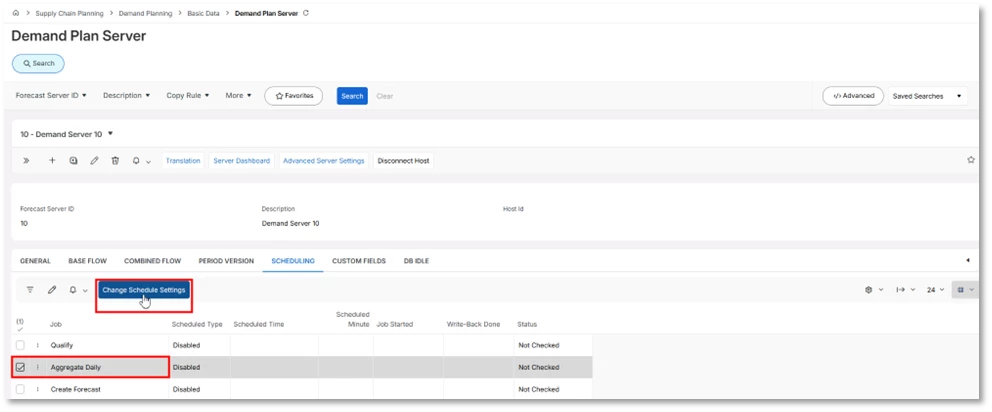
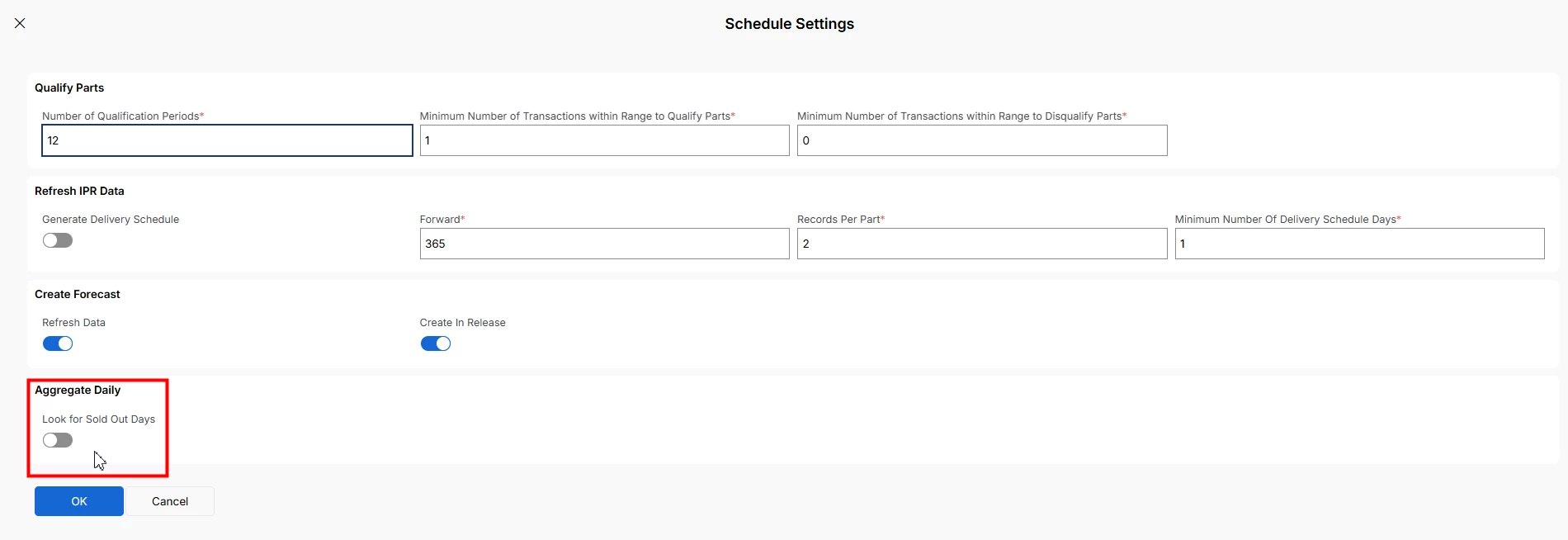
You should be able to disable the Sold Out Days/Qty Lost feature when the Aggregate Daily job is run.

Set this toggle to false


In terms of how Adjusted Demand is calculated, it works like this …

The System Forecast calculations are always based on the Adjusted Demand.

The base rule is that Adjusted Demand is always set equal to Demand (i.e., the Demand which is read based on the Base Flow SQL statement).

 Adjusted Demand can then be adjusted, based on

  1. Qty Lost (which compensates for ‘Sold Out Days’).

A part is treated as Sold Out when the ‘Aggregate Daily’ job is run (and the ‘Look for Sold Out Days’ toggle is true) and there are no sales/transactions for the part on that day and the quantity on hand is 0 at the end of the day. 

If a day is Sold Out there are then two possible options to obtain the compensated values.

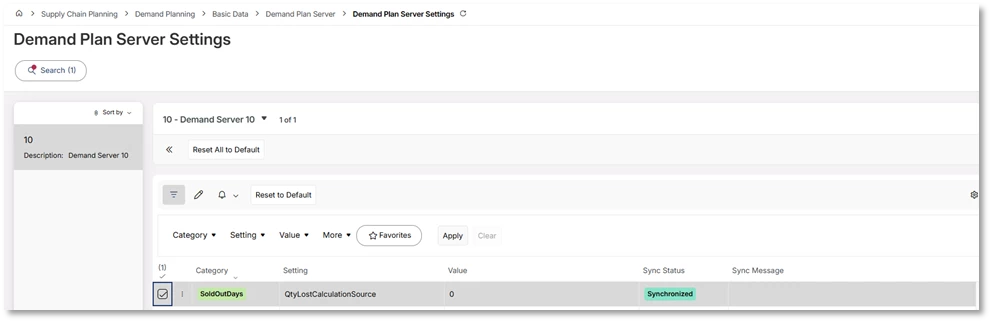
The Adjusted Demand is compensated for with either

  • System Forecast (the default Advanced Setting value = 0)
  • Adjusted Forecast (Advanced Setting value = 1)


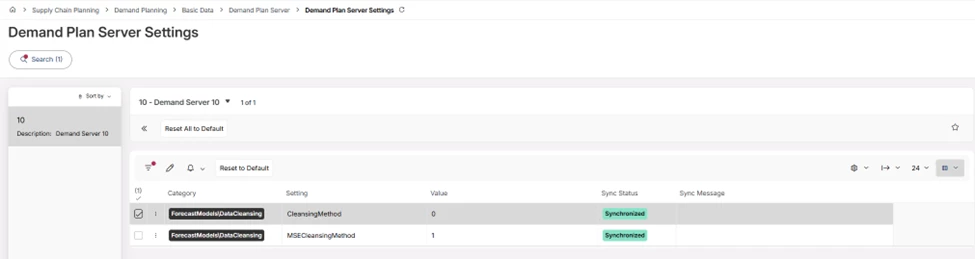
  1. For Event Cleansing, Adjusted Demand is checked to see that it’s within 3 Sigma/Standard Derivations. If not, it's then set equal to 3 Standard Derivations.

The Default Value = 0 (‘On’) but this can be turned off (Value = 1) in Advanced Settings (ForecastModels\DataCleansing\CleansingMethod)


  1. Adjusted Demand can also be changed due to removal of Campaign effects (if the Campaign is set to be removed) or if you do an Event Cleansing that removes the effect of an Event.

I hope this helps!

Regards,

Richard.