Solved

Maintenance of Project Activity Shortcut Names in Time Registration

  • May 5, 2026
  • 2 replies
  • 12 views

Forum|alt.badge.img+1

Hello everybody!


When using the Time Registration window in IFS Cloud, it is possible to create project activity shortcuts and assign a Shortcut Name, which is then displayed on the screen.

We have noticed that the Shortcut Name can be defined when the shortcut is created, but it cannot be changed afterwards. The only available options seem to be deleting and recreating the shortcut.

@IFS RD Product Management 

  • What is the intended or recommended use of the Shortcut Name field?
  • Is it by design that the name cannot be edited after creation?
  • Are there any best practices for managing or updating shortcut names without deleting and recreating them?

Thank you for your clarification.


Best regards

Tatjana
Best answer by desilvasachitha

Hi ​@MWMTAJE,

Please note that you can edit the existing shortcut names via “My shortcuts’ page. 
 

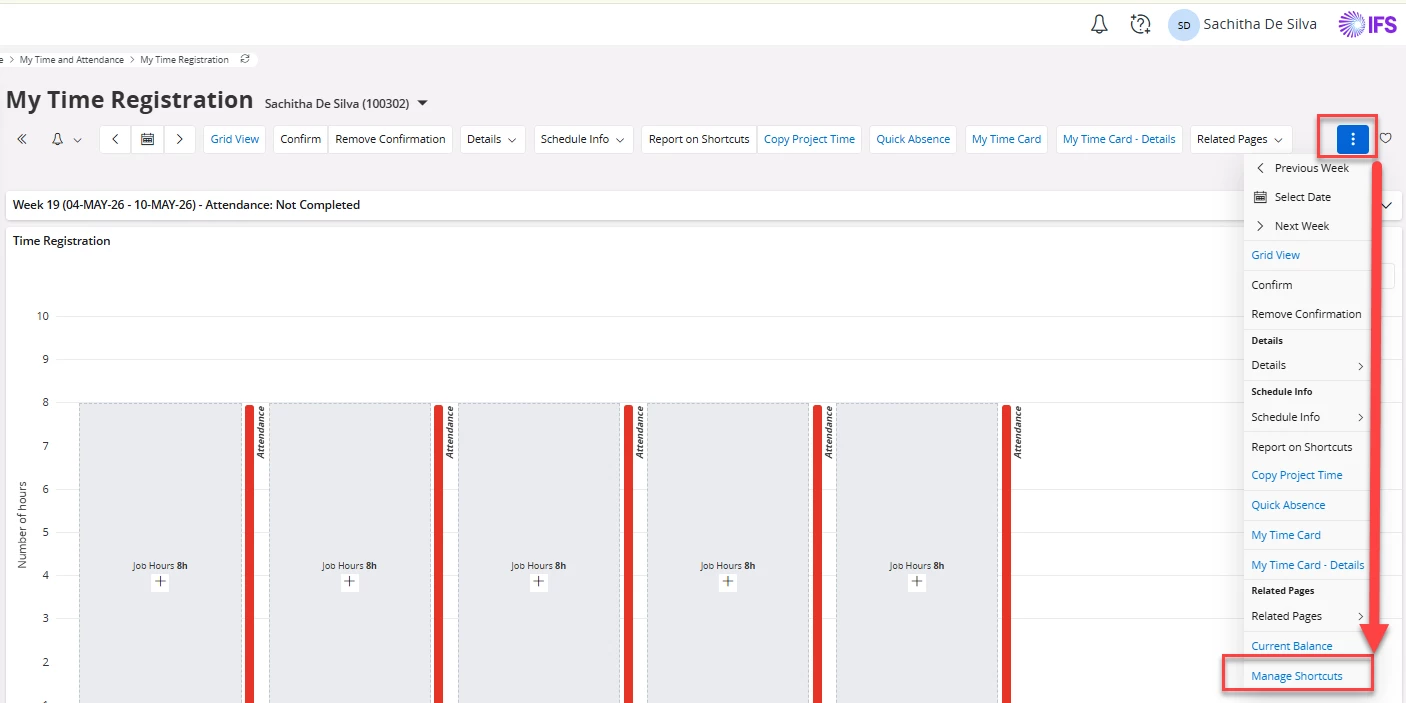
Use the context menu (three dots) towards the right side of your screen in “My Time Registration” page and click on “Manage Shortcuts”.


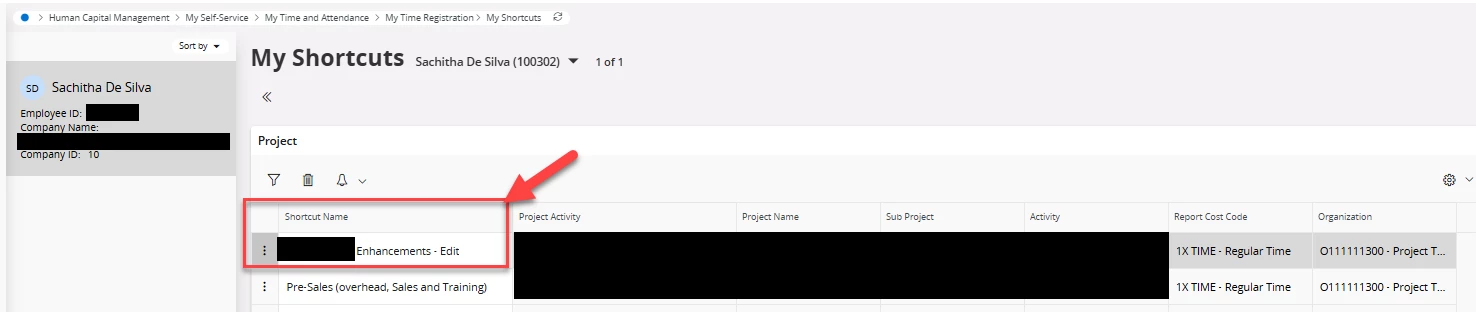
Thereafter, you will be taken to the “My Shortcuts” page where you are free to edit the shortcut names as you see fit.
 

Hope this helps! 

Cheers!
Sachitha 

2 replies

desilvasachitha
Hero (Partner)
Forum|alt.badge.img+12

Hi ​@MWMTAJE,

Please note that you can edit the existing shortcut names via “My shortcuts’ page. 
 

Use the context menu (three dots) towards the right side of your screen in “My Time Registration” page and click on “Manage Shortcuts”.


Thereafter, you will be taken to the “My Shortcuts” page where you are free to edit the shortcut names as you see fit.
 

Hope this helps! 

Cheers!
Sachitha 


Forum|alt.badge.img+1
  • Author
  • Do Gooder (Partner)
  • May 6, 2026

Hi ​@MWMTAJE,

Please note that you can edit the existing shortcut names via “My shortcuts’ page. 
 

Use the context menu (three dots) towards the right side of your screen in “My Time Registration” page and click on “Manage Shortcuts”.


Thereafter, you will be taken to the “My Shortcuts” page where you are free to edit the shortcut names as you see fit.
 

Hope this helps! 

Cheers!
Sachitha 

Hi Sachitha


Wow! Thanks a lot for your quick and comprehensible reply!


BR, Tatjana