Hi,
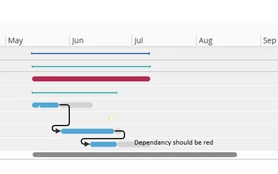
I need to implement the following modification in Project Gantt:
If the dependencies shown on a project are not valid (for example, when the early start date of a successor activity is before the early finish date of a Finish-Start dependency with 0 hours lag), the dependency line should be displayed in red instead of the default black color.
I already made some code changes, but the dependency line color is still not changing on the chart.
ProjectGanttHandling-Cust.Projection
@Override
entity ActivityDependency {

   from = "ACTIVITY_DEPENDENCY_PROJ";

   attribute CDependencyVio Text {

      fetch =
      "
         C_Project_Gantt_Util_API.Is_Dependency_Violated(
            predecessor_activity_seq,
            successor_activity_seq,
            dependency_type_db,
            lag_in_hours
         )";
   }
}
ProjectGantt-Cust.Client
ganttchartitemstyle CDependencyViolationActivityStyle {
   label = "Dependency Violation";
   emphasis = DatavizRed9;
   shape = default;
   toggle = [false];
}


@Override
ganttdependency GanttActivityDependency for ActivityDependency {

   dependencytype StartToStart = [DependencyType = "StartToStart"];
   dependencytype StartToFinish = [DependencyType = "StartToFinish"];
   dependencytype FinishToStart = [DependencyType = "FinishToStart"];
   dependencytype FinishToFinish = [DependencyType = "FinishToFinish"];

   dependencytype DependencyViolationStyle = [CDependencyVio = "TRUE"];


   fromitem = "${PredecessorActivitySeq}";
   toitem = "${SuccessorActivitySeq}";


   tooltip {
      field PredecessorActivity {
         label = "Predecessor";
      }
      field DependencyType {
         label = "Dependency Type";
      }
      field LagInHours {
         label = "Lag (Hours)";
      }
      field SuccessorActivity {
         label = "Successor";
      }
   }

   commandgroup DependencyGroup {
      command EditDependencyCommand;
      command SwapDirectionCommand;
      command DeleteDependencyCommand;
   }
}