

Good afternoon
I would appreciate feedback/assistance wrt the following message I get when doing Resource Allocation on a Project Activity:
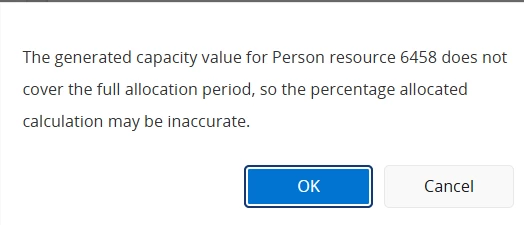
What is required from a setup point of view to ensure the calculation is correct?
Thank you
Anya

Good afternoon
I would appreciate feedback/assistance wrt the following message I get when doing Resource Allocation on a Project Activity:
What is required from a setup point of view to ensure the calculation is correct?
Thank you
Anya
Best answer by Johan Lagerström
Hi
The message indicates that the resource you are allocating does not have capacity defined for the full period of the allocation. As an example, if you generate resource capacity say three months in advance, but your project activity is for a year, the system won’t know the availability of the resource for the final nine months of the activity. If you then try to allocate say 50% of the resource’s capacity, you will get this message.
To address it, open the Resource Availability page of the resource you are trying to allocate. If you look at the Capacity tab, you will likely see that there are not records to cover the full duration of the activity allocation. You can use the Generate Schedules & Capacity button and set the To Offset value to ensure that the To Date is later than the activity end date to generate the ‘missing’ records:
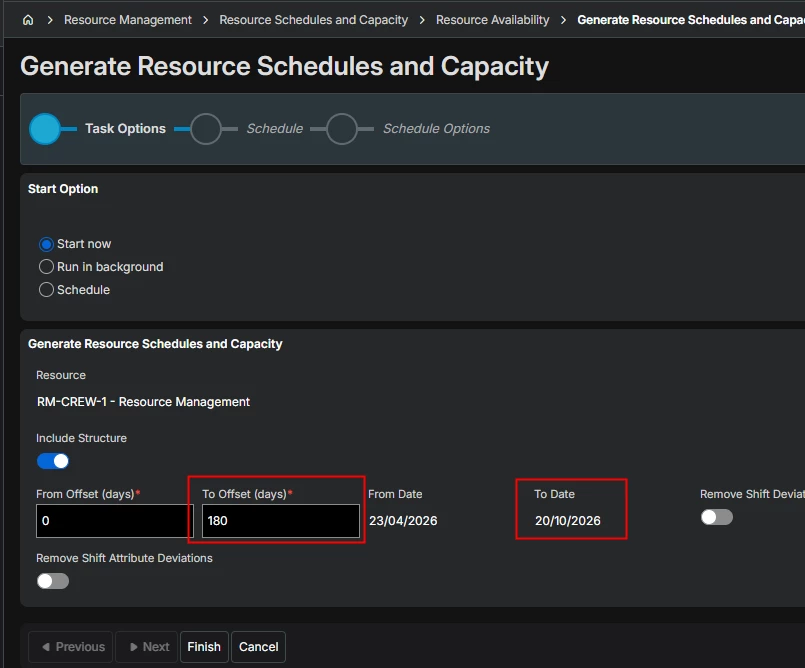
After doing this you should hopefully be able to use the percentage allocation option without getting the message.
Hope this helps.
Kind regards,
Johan
Enter your E-mail address. We'll send you an e-mail with instructions to reset your password.

